


Що можна обрати замість
Вирішують ту саму задачу, але іншим способом або частково.

Visual catalog manager for OpenCart 3.0: 3-panel UI (tree + products + log), drag-and-drop for categories and products, inline editing, bulk operations, cloning, action log with Undo. Restructure your catalog in an evening instead of a week of clicks.
Updated
OcBox AI Category Manager — visual AI category and product manager for OpenCart 3.0 and ocStore: drag-drop, batch, tree, AI descriptions
1,440грн
1,440 грн
14 31
Інші рішення в тій самій області магазину.

The "Attribute Manager" module is a powerful solution for optimizing the management of product attributes in OpenCart 3. It provides tools for easy creation, editing, and management of attributes, groups, and templates, making the administration process faster and more efficient.
Key Features:
Create and Use Attribute Templates:
Prepare pre-configured templates with attribute sets and apply them to products with a single click. This is especially useful for products with similar parameters (e.g., electronics, clothing, or furniture).
Quickly Add Attributes to Templates and Groups:
Add new attributes directly to already created templates and groups. This speeds up attribute updates and simplifies product setup.
Attribute Groups for Bulk Addition:
Organize attributes into groups and add them to products all at once. This is convenient for categories where all items share similar parameters.
Fast Attribute Addition from Templates:
Apply pre-configured templates directly on the product editing page to avoid manual data entry.
View and Manage Attributes in Products:
View all products associated with a specific attribute. Edit attribute values for multiple products simultaneously. Remove unnecessary attributes and add new products to the related list. Seamless Integration and User-Friendly Interface:
The module integrates perfectly with OpenCart's standard functionality while maintaining compatibility with other extensions. Its intuitive interface ensures ease of use, even for beginners.
Advantages of the Module:
✅ Time-Saving: Quickly adding attributes to templates and groups reduces the time spent setting up products.
✅ Convenience: All tools for attribute management are available in one place.
✅ Bulk Management: Edit attributes for multiple products simultaneously, eliminating repetitive tasks.
✅ Flexibility: Add attributes from templates, groups, or individually to adapt the module to your store’s specific needs.
✅ Suitable for All Stores: The universal functionality makes this module valuable for online stores of any size and type, from electronics to fashion and cosmetics.
✅ Error Reduction: Templates and groups minimize the risk of incorrect data entry.
✅ Increased Efficiency: Speeds up the process of adding and updating products, which is particularly important for stores with a large inventory.
Installation:
For the module to work, you need to add additional tables to the database. To do this, run queries from the attribute_manager_query.sql file. The module is easily installed via the standard OpenCart extension loader, no additional settings are required. Two modifiers are available (only one needs to be installed) attribute_manager_oc3.ocmod.zip - install if you purchased only this modifier attribute_manager_oc3_for_attribute_value_editor.ocmod.zip - if you plan to use it with the module
DEMO
Admin Page login/password: demo/demodemo License:
Permitted for use in one online store.
Key Features:
Create and Use Attribute Templates:
Prepare pre-configured templates with attribute sets and apply them to products with a single click. This is especially useful for products with similar parameters (e.g., electronics, clothing, or furniture).
Quickly Add Attributes to Templates and Groups:
Add new attributes directly to already created templates and groups. This speeds up attribute updates and simplifies product setup.
Attribute Groups for Bulk Addition:
Organize attributes into groups and add them to products all at once. This is convenient for categories where all items share similar parameters.
Fast Attribute Addition from Templates:
Apply pre-configured templates directly on the product editing page to avoid manual data entry.
View and Manage Attributes in Products:
View all products associated with a specific attribute. Edit attribute values for multiple products simultaneously. Remove unnecessary attributes and add new products to the related list. Seamless Integration and User-Friendly Interface:
The module integrates perfectly with OpenCart's standard functionality while maintaining compatibility with other extensions. Its intuitive interface ensures ease of use, even for beginners.
Advantages of the Module:
✅ Time-Saving: Quickly adding attributes to templates and groups reduces the time spent setting up products.
✅ Convenience: All tools for attribute management are available in one place.
✅ Bulk Management: Edit attributes for multiple products simultaneously, eliminating repetitive tasks.
✅ Flexibility: Add attributes from templates, groups, or individually to adapt the module to your store’s specific needs.
✅ Suitable for All Stores: The universal functionality makes this module valuable for online stores of any size and type, from electronics to fashion and cosmetics.
✅ Error Reduction: Templates and groups minimize the risk of incorrect data entry.
✅ Increased Efficiency: Speeds up the process of adding and updating products, which is particularly important for stores with a large inventory.
Installation:
For the module to work, you need to add additional tables to the database. To do this, run queries from the attribute_manager_query.sql file. The module is easily installed via the standard OpenCart extension loader, no additional settings are required. Two modifiers are available (only one needs to be installed) attribute_manager_oc3.ocmod.zip - install if you purchased only this modifier attribute_manager_oc3_for_attribute_value_editor.ocmod.zip - if you plan to use it with the module
DEMO
Admin Page login/password: demo/demodemo License:
Permitted for use in one online store.
Updated
Attribute Manager
320 грн
37 147

Edixon — Modify thousands of products in minutes with rollback capability and full control over your catalog
Updated
Edixon — Bulk editing of products in OpenCart without errors and risks
1,276 грн
40 269

the module implements product variations in several display options
Updated
KIT SERIES
1,300 грн
548 1575

Smart Batch Editor Pro is a professional tool for the rapid management of a large product catalog in OpenCart / ocStore.
The module allows you to work not with each product individually, but with an entire selection at once: modify prices and stock levels, categories, manufacturers, attributes, options, specials, discounts, SEO data, and other parameters from a single working interface.
Filter the required products → configure the changes → apply them to the entire selection.
Instead of dozens or hundreds of open product pages, you get a unified workspace for catalog management.
The module allows you to work not with each product individually, but with an entire selection at once: modify prices and stock levels, categories, manufacturers, attributes, options, specials, discounts, SEO data, and other parameters from a single working interface.
Filter the required products → configure the changes → apply them to the entire selection.
Instead of dozens or hundreds of open product pages, you get a unified workspace for catalog management.
Updated
Smart Batch Editor Pro — Mass Product Editing for OpenCart / ocStore
1,299 грн
4 7

- Модуль быстрых редакторов на витрине магазина - Создание SEO шаблонов для каждой категории - Групповое редактирование товара http://editorpro.waterfilter.in.ua/edit_banner/editorpro.png Demo OPENCART 2x login: demo pass: demo Demo OPENCART 15x login: demo pass: demo Модуль написан на основе опыта работы в одном из крупнейших И.М. рунета. Немного лирики. Наверняка каждый, кто следит за актуальностью своего магазина, адекватности и верности заполнения карточек продукта, не один раз в процессе работы замечал небольшие огрехи, «Очепятки» да что греха таить , порой и абсолютно не адекватной инфы о товаре. И вот в процессе продажи думаешь, обязательно чуть позднее вернусь, подкорректирую , и…. в очередной раз …. И еще, в определенный момент тупо ловишь себя на мысли, что в очередной раз откладываешь и злишься на того, кто допустил такой очевидный и досадный ляп, начинаешь вспоминать кто заполнял карточки, злиться, вот так бы взял, да «Головою, да в стенку», темболее что бы исправить это нужно зайти в админку, найти данный продукт, открыть редактор , и вобщем как всегда не сейчас - Поубивал бы J)) И так - с выходом У.Т 6 – Персональный редактор++ Все эти , и многие другие вытекающие проблемы решены. По вопросам допилов до индивидуальных потребностей пишите в личку рассмотрю. Для тех "Кто в теме" полезные ссылки Управление торговлей 7 Управление торговлей 5 Управление торговлей 4 Управление торговлей 3 Управление торговлей 2 Управление торговлей 1 Модуль наличия товара на складе разный цвет..
Updated
Управление торговлей 6 Персональный редактор ++
699 грн
206 678

The module makes it much easier to add attributes when adding a product
Updated
Attribute Category
450 грн
278 424

Часто бывает, что при импорте товаров с разных источников или просто при кривых руках контентщиков, в магазине появляется много одинаковых по сути, но разных в написании названий атрибутов, значений атрибутов и групп атрибутов.. например - Вес, Вес Кг, ВесКГ итп.. тоже самое и с группами атрибутов. вроде бы ничего страшного, но это очень плохо выглядит при использовании фильтров, да и вообще создает бардак в атрибутах и в товарах и в магазине в целом. Данный модуль позволяет решить данную проблему, позволяет объединять нужные атрибуты, значения атрибутов и группы атрибутов. Для объединения необходимо выбрать нужные атрибуты и в правом верхнем углу нажать "Объединить". Модуль позволяет вывести на одной странице все товары и значения атрибутов привязанных в данному товару, удалить или переименовать значения атрибутов, и присвоить нужным товарам одинаковые значения. Внимание! Перед использованием обязательно сделайте бекап базы данных. в архиве осмоды для разных версий опенкарт 2.х-3.x Демо: http://glav.fringe.com.ua/admin/index.php?route=catalog/attributeлогин/пароль demo/demo..
Updated
Объединение групп атрибутов, атрибутов и их значений
675 грн
129 306

The module adds a convenient tool for bulk copying product data directly from the product list in the OpenCart admin panel.
It allows you to quickly transfer data from one product to an unlimited number of other products through a popup window without manually editing each product page.
Main Features
Select a source product for copying Select multiple target products Bulk copy main and additional product images Bulk copy product attributes Copy product description (description) Select copy options using checkboxes Works directly from the product list page Supports multilingual descriptions Automatic page refresh after operation What Can Be Copied
Images
Main product image Additional gallery images Attributes
All product attributes Description
Description field for all store languages Interface and Convenience
Convenient popup windows directly in the product list Instant applying of changes Benefits
Save time when managing product catalog No need to open each product separately Simple and intuitive interface Fast bulk editing in just a few clicks Compatibility
OpenCart 3.x DEMO
Admin Page login/password: demo/demodemo Installation
Install the module through the OpenCart admin panel Refresh modifications License
The license is valid for one domain and its subdomains.
It allows you to quickly transfer data from one product to an unlimited number of other products through a popup window without manually editing each product page.
Main Features
Select a source product for copying Select multiple target products Bulk copy main and additional product images Bulk copy product attributes Copy product description (description) Select copy options using checkboxes Works directly from the product list page Supports multilingual descriptions Automatic page refresh after operation What Can Be Copied
Images
Main product image Additional gallery images Attributes
All product attributes Description
Description field for all store languages Interface and Convenience
Convenient popup windows directly in the product list Instant applying of changes Benefits
Save time when managing product catalog No need to open each product separately Simple and intuitive interface Fast bulk editing in just a few clicks Compatibility
OpenCart 3.x DEMO
Admin Page login/password: demo/demodemo Installation
Install the module through the OpenCart admin panel Refresh modifications License
The license is valid for one domain and its subdomains.
Updated
Mass Copy Product Data
320 грн
1 1
-26%
 Придбати

Updated pro version of the Grapes Web Builder module. The module integrates as a visual editor into most Opencart pages and allows you to create full-fledged landing pages.
The editor includes a block manager, a layer manager, and a style manager. The source code of the editor is as close as possible to professional html/css layout
DEMO
Admin panel
Login/Password: demo/demo
Home
Goods:
Backpack CITY R01
BedroomGlow MH luminaire
Article - Auto accessories
INTEGRATION
An additional tab appears for pages in the admin panel:
Product, category, manufacturer, information (article), blog, HTML content module.
The module is adapted to work with third -party modules:
ocfilter page
blog @octemplates
blog CyberStore
blog @aridius
Different modes of operation: replacing the existing description field, "gluing" before/after the description field, output with a variable in the file
WORK FEATURES
· Ability to enable/disable for a specific page
· Through the HTML Content module, you can create separate modules and add them to layouts like a regular opencart module
· Working with the editor using drag and drop
· Working with blocks on the page (like a professional html layout)
· Saving custom editor blocks to a local library for reuse
· Copy and paste editor content between pages
· History and cancellation of actions in the process of working with the page
· Import and edit source code
· The editor generates the "correct" html and css code (without "inline"), which is convenient to edit and maintain
· The editor stores data in separate tables
· Page responsiveness (separate styling PC/Tablet/Mobile)
· Emoji Support (Service -> Enable Emoji Support)
TYPES OF CONTENT
· Columns with any content
· Forms with sending data to the administrator
· Slider with any content
· Tabs
· Countdown timer
· Tooltips
· Tables with Cell Merge
· Text, headings, images
· Other
Slider in the Grapes Web Builder
Working with forms in the Grapes Web Builder module
INSTALL
https://www.youtube.com/watch?v=E6FQX_sO8iQ
..
Updated
Grapes Web Builder PRO - more than a visual editor
1,550грн
1,150 грн
20 51

The module replaces the standard category list with a convenient workspace featuring a category tree, quick editing, bulk operations, SEO tools, and a full-fledged editor in a popup window.
Updated
Quick Category Edit - quick management and editing of OpenCart categories
450 грн
0 0

The module adds a separate page for category management, where most operations are performed without opening the standard edit form. All core actions are available from a single interface: category tree management, quick edit, bulk operations, and promotions management.
Submitted
Smart Category Pro — OpenCart Category Management
999 грн
0 0

This is a convenient tool for fast bulk editing of products in OpenCart. The module allows you to change categories and manufacturer for multiple products at once directly from the product list in the admin panel.
Main Features
Category Management
Bulk change of categories for selected products Assign multiple categories at once Set main category Convenient category selection via autocomplete Manufacturer Management
Bulk change of product manufacturer Quick manufacturer selection via autocomplete Apply changes to multiple products at once Interface & Usability
Convenient modal windows directly in the product list Instant application of changes Advantages
Time-saving when managing product catalog No need to open each product individually Simple and intuitive interface Fast bulk editing in just a few clicks Compatibility
OpenCart 3.x Installation
Install the module via OpenCart admin panel Refresh modifications DEMO
Admin Page login/password: demo/demodemo License
The license applies to one domain and its subdomains.
Main Features
Category Management
Bulk change of categories for selected products Assign multiple categories at once Set main category Convenient category selection via autocomplete Manufacturer Management
Bulk change of product manufacturer Quick manufacturer selection via autocomplete Apply changes to multiple products at once Interface & Usability
Convenient modal windows directly in the product list Instant application of changes Advantages
Time-saving when managing product catalog No need to open each product individually Simple and intuitive interface Fast bulk editing in just a few clicks Compatibility
OpenCart 3.x Installation
Install the module via OpenCart admin panel Refresh modifications DEMO
Admin Page login/password: demo/demodemo License
The license applies to one domain and its subdomains.
Updated
Mass Editing Categories and Manufacturer
320 грн
0 0
Продаж «Double Categories» призупинено
Ми підібрали схожі модулі інших розробників — їх можна придбати вже зараз.
Інші варіанти

User Feedback
On a wave of inspiration from the unexpected cash “tip” gratitude that has recently appeared!
I wanted to respond with something. I decided to post some of my solutions for free.
Double Categories
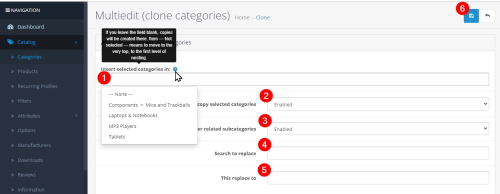
A module for cloning categories with subcategories of unlimited nesting, with renaming names on the fly.
Can
- Clone an OpenCart category
- Duplicate categories with ocStore subcategories
- Find and replace store category name on the fly
- Move the created category along the catalog tree
- Create a copy of top-level subcategories
- Duplicate the main CMS category
Advantages
- Easy to use
- Is open source
- Multilingual
- Free
Supported languages
- Українська
- English
- Polski
- Русский
Have questions? We invite you to the discussion thread, or private messages!
Happy internet marketing everyone!)
And special thanks for the “beer money”!
Характеристики
License typeНа один домен + його піддомен
Activation methodБез активації
Ioncube LoaderНі
В продажеДа
OpenCart3.0
ocStore3.0
OpenCart.Pro, ocShopНе проверялось
Get request to server of developerНі
If the developer server is unavailableДополнение работает
СкидкаYes
Template compatibleall
AdaptationПлатна
LocalisationУкраїнська, Англійська, Російська, інша
Версія1.1.0
File Size19.84 kB
Submitted04/27/2024
-
 1
Previous FileSortMaster — sort order of categories for OpenCart using Drag
Next FileOCDepartment - Categories in Brands, Specials, Search
















-
Recently Browsing 0 members
- No registered users viewing this page.