

Що можна обрати замість

Акции. Массовое управление акциями (OpenCart 1.5.x)

The module allows you to work not with each product individually, but with an entire selection at once: modify prices and stock levels, categories, manufacturers, attributes, options, specials, discounts, SEO data, and other parameters from a single working interface.
Filter the required products → configure the changes → apply them to the entire selection.
Instead of dozens or hundreds of open product pages, you get a unified workspace for catalog management.
Smart Batch Editor Pro — Mass Product Editing for OpenCart / ocStore

Features
Add manufacturers to coupon conditions. Fully compatible with the default OpenCart coupon system. No core file changes — implemented via OCMOD. Easy installation: upload via Extension Installer + refresh modifications. Installation
Run the SQL query from the coupons_by_manufacturer_query.sql file (update table prefix if needed). Go to Admin → Extensions → Extension Installer. Upload the *.ocmod.zip file. Go to Modifications and click "Refresh". How to use
When creating or editing a coupon in the admin panel, a new "Manufacturers" field will appear. You can select one or more brands — the coupon will apply to all products from the selected manufacturers.
DEMO
Admin Page login/password: demo/demodemo License
Allowed for use in one online store.
Coupons by manufacturer

For example, a 10% discount coupon will only apply to those products that do not have a promotion or discount, that is, sold at full price.
Coupon Setup (disabling coupons on special items)
User Feedback
Hello! I am glad to welcome you!
I am a Multi-special long module free version and I will help you:
- Easily extend promotions on many products;
- Quickly increase or decrease the discount price;
- Simply update the end date of a product package discount;
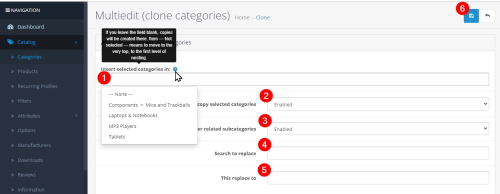
Everything you need for mass editing of products is in the advanced PRO version of the module: MultiEdit
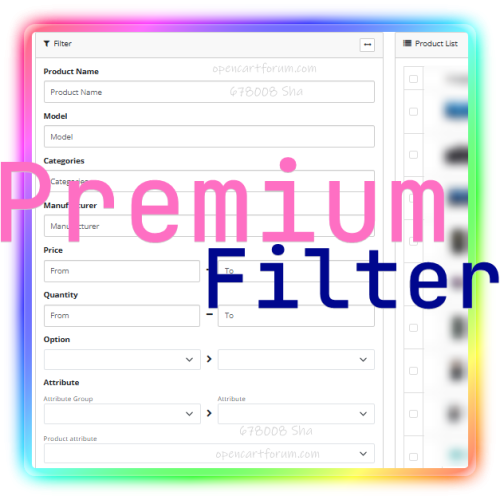
The Special long module is closely integrated with Multi-Edit and Premium filter, so buyers of these modules have new opportunities that add convenience to working with store products.
For those who have previously purchased the PRO module for multiple product editing - new convenient opportunities are available for free!
Localization:
- Ukrainian
- English
Installing and updating the module:
- Back up files and the store database
- Go to the Add-ons->Install add-ons page, select ...ocmod.zip module file
- Update modifiers
The module is installed!
Read more in the FAQ
License:
This module is implemented on the principle: one license per domain.
You cannot distribute, transfer or otherwise grant third parties the right to use this product.
Technical support:
When contacting technical support, please make sure that you purchased the module from the author on a legal resource!
You can also find many answers in the FAQ module!
You can contact us via Private Messages on the forum!
In a private message, you should specify:
Site address;
and when requesting to understand a technical problem or adaptation:
Required accesses for work!
Working hours from 10:00 to 18:00 Kyiv time, except for weekends and holidays.
We wish you good sales!
Характеристики













-
Recently Browsing 0 members
- No registered users viewing this page.