


Що можна обрати замість


Key Features:
Create and Use Attribute Templates:
Prepare pre-configured templates with attribute sets and apply them to products with a single click. This is especially useful for products with similar parameters (e.g., electronics, clothing, or furniture).
Quickly Add Attributes to Templates and Groups:
Add new attributes directly to already created templates and groups. This speeds up attribute updates and simplifies product setup.
Attribute Groups for Bulk Addition:
Organize attributes into groups and add them to products all at once. This is convenient for categories where all items share similar parameters.
Fast Attribute Addition from Templates:
Apply pre-configured templates directly on the product editing page to avoid manual data entry.
View and Manage Attributes in Products:
View all products associated with a specific attribute. Edit attribute values for multiple products simultaneously. Remove unnecessary attributes and add new products to the related list. Seamless Integration and User-Friendly Interface:
The module integrates perfectly with OpenCart's standard functionality while maintaining compatibility with other extensions. Its intuitive interface ensures ease of use, even for beginners.
Advantages of the Module:
✅ Time-Saving: Quickly adding attributes to templates and groups reduces the time spent setting up products.
✅ Convenience: All tools for attribute management are available in one place.
✅ Bulk Management: Edit attributes for multiple products simultaneously, eliminating repetitive tasks.
✅ Flexibility: Add attributes from templates, groups, or individually to adapt the module to your store’s specific needs.
✅ Suitable for All Stores: The universal functionality makes this module valuable for online stores of any size and type, from electronics to fashion and cosmetics.
✅ Error Reduction: Templates and groups minimize the risk of incorrect data entry.
✅ Increased Efficiency: Speeds up the process of adding and updating products, which is particularly important for stores with a large inventory.
Installation:
For the module to work, you need to add additional tables to the database. To do this, run queries from the attribute_manager_query.sql file. The module is easily installed via the standard OpenCart extension loader, no additional settings are required. Two modifiers are available (only one needs to be installed) attribute_manager_oc3.ocmod.zip - install if you purchased only this modifier attribute_manager_oc3_for_attribute_value_editor.ocmod.zip - if you plan to use it with the module
DEMO
Admin Page login/password: demo/demodemo License:
Permitted for use in one online store.
Attribute Manager

Edixon — Bulk editing of products in OpenCart without errors and risks

The module allows you to work not with each product individually, but with an entire selection at once: modify prices and stock levels, categories, manufacturers, attributes, options, specials, discounts, SEO data, and other parameters from a single working interface.
Filter the required products → configure the changes → apply them to the entire selection.
Instead of dozens or hundreds of open product pages, you get a unified workspace for catalog management.
Smart Batch Editor Pro — Mass Product Editing for OpenCart / ocStore

Управление торговлей 6 Персональный редактор ++

OcBox AI Product Mass Editor — AI bulk editor for OpenCart and ocStore: AI descriptions, AI translations, AI Photo Studio, like Excel

The module supports multilingualism, which allows you to create attribute values in several languages, making them available for selection depending on the active language of the storefront. This simplifies attribute management and minimizes errors when filling in data for products.
Main features:
Adding attribute values: Create lists of values for each attribute in a separate section of the admin panel. Selecting attribute values: When editing products, you can select ready-made values from the drop-down list instead of manually entering them. Multilingualism: Support for values in several languages for each attribute. Autofill of text fields: When selecting an attribute value, the data is automatically filled in the text fields for all languages. Intuitive interface: Convenient user interface for working with attributes and their values. Benefits of using the module:
Time saving: Filling in attributes becomes faster and easier. Data consistency: All products use the same attribute values. Multilingual: Full support for several languages. Ease of setup and use: The module is easily integrated into the OpenCart admin panel. System security:
The module does not replace system files. Does not violate the standard logic of attribute operation (including feeds and other integrations). Flexibility in data storage:
All attribute values are written to the database separated by commas. The separator can be easily changed through the modifier settings. Duplicate protection: The verification mechanism prevents adding identical attribute values to a product. Who will benefit from the module:
Online stores with a large number of products and complex characteristics. Owners of sites using OpenCart, for whom convenient management of attributes and their values is important. Stores with a multilingual storefront, where support for several languages is required. Compatibility:
OpenCart 3.x, OcStore 3.x
How the module works:
In the "Attributes" section of the admin panel, you can add and edit lists of values for attributes.
When editing a product, you select the desired attribute and its value from the drop-down list.
The attribute values are automatically filled in in all languages added to the system.
All selected attribute values are saved in the database in the format of a string with a delimiter (by default, a comma).
Use example:
You create an attribute "Color". In the list of values, you add "Red", "Blue", "Green" and translate them into several languages. When editing a product, you select the value "Blue", and it is immediately displayed in all languages. In the database, the attribute values are saved in the format: Red, Blue, Green.
Installation:
For the module to work, you need to add additional tables to the database. To do this, run queries from the attribute_value_editor_query.sql file. The module is easily installed via the standard OpenCart extension loader, no additional settings are required. DEMO
Admin Page login/password: demo/demodemo License:
Permitted for use in one online store.
The "Attribute Value Editor" module will make your work with attributes more convenient and organized!
Attribute Value Editor

Attribute Select

It allows you to quickly transfer data from one product to an unlimited number of other products through a popup window without manually editing each product page.
Main Features
Select a source product for copying Select multiple target products Bulk copy main and additional product images Bulk copy product attributes Copy product description (description) Select copy options using checkboxes Works directly from the product list page Supports multilingual descriptions Automatic page refresh after operation What Can Be Copied
Images
Main product image Additional gallery images Attributes
All product attributes Description
Description field for all store languages Interface and Convenience
Convenient popup windows directly in the product list Instant applying of changes Benefits
Save time when managing product catalog No need to open each product separately Simple and intuitive interface Fast bulk editing in just a few clicks Compatibility
OpenCart 3.x DEMO
Admin Page login/password: demo/demodemo Installation
Install the module through the OpenCart admin panel Refresh modifications License
The license is valid for one domain and its subdomains.
Mass Copy Product Data

Quick Category Edit - quick management and editing of OpenCart categories

Smart Category Pro — OpenCart Category Management

Main Features
Category Management
Bulk change of categories for selected products Assign multiple categories at once Set main category Convenient category selection via autocomplete Manufacturer Management
Bulk change of product manufacturer Quick manufacturer selection via autocomplete Apply changes to multiple products at once Interface & Usability
Convenient modal windows directly in the product list Instant application of changes Advantages
Time-saving when managing product catalog No need to open each product individually Simple and intuitive interface Fast bulk editing in just a few clicks Compatibility
OpenCart 3.x Installation
Install the module via OpenCart admin panel Refresh modifications DEMO
Admin Page login/password: demo/demodemo License
The license applies to one domain and its subdomains.
Mass Editing Categories and Manufacturer
User Feedback
Attribute Category - модуль облегчает добавление атрибутов при добавлении товара
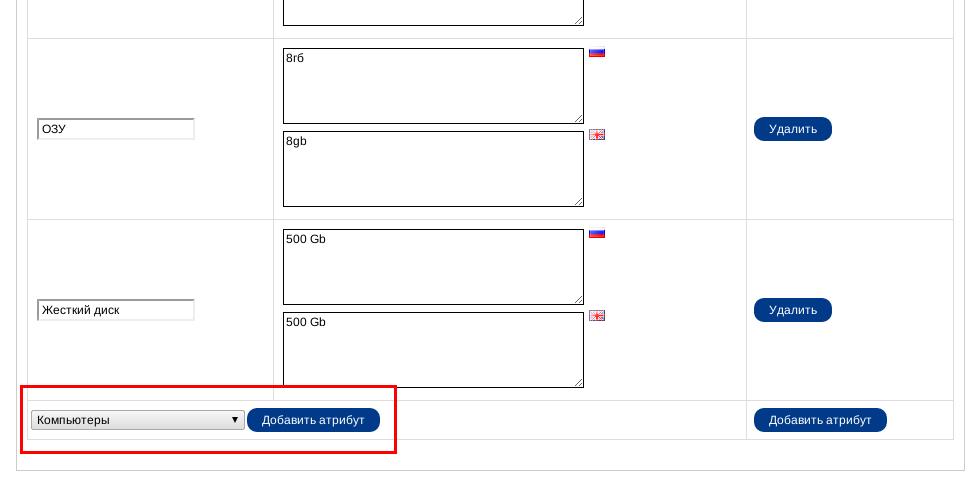
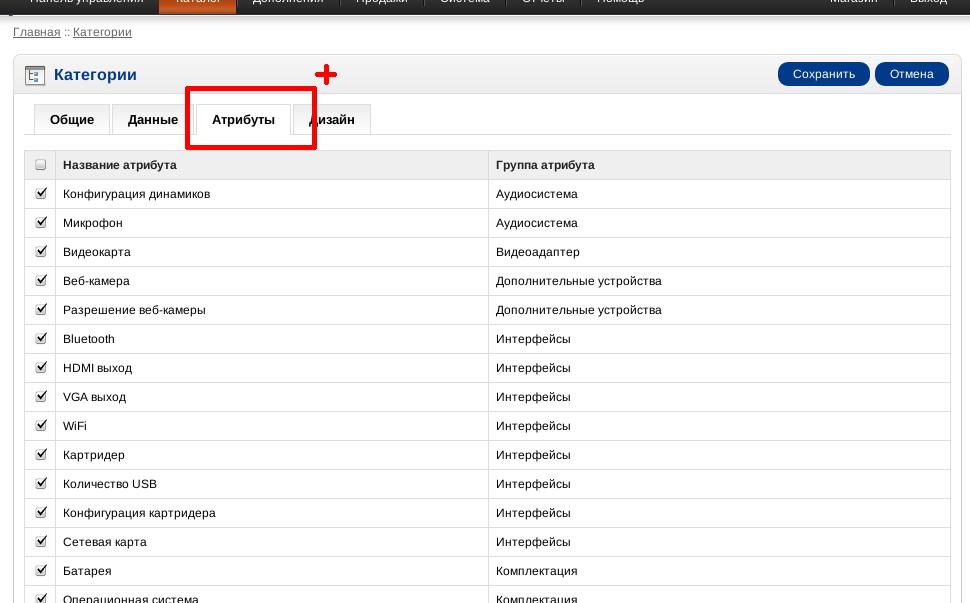
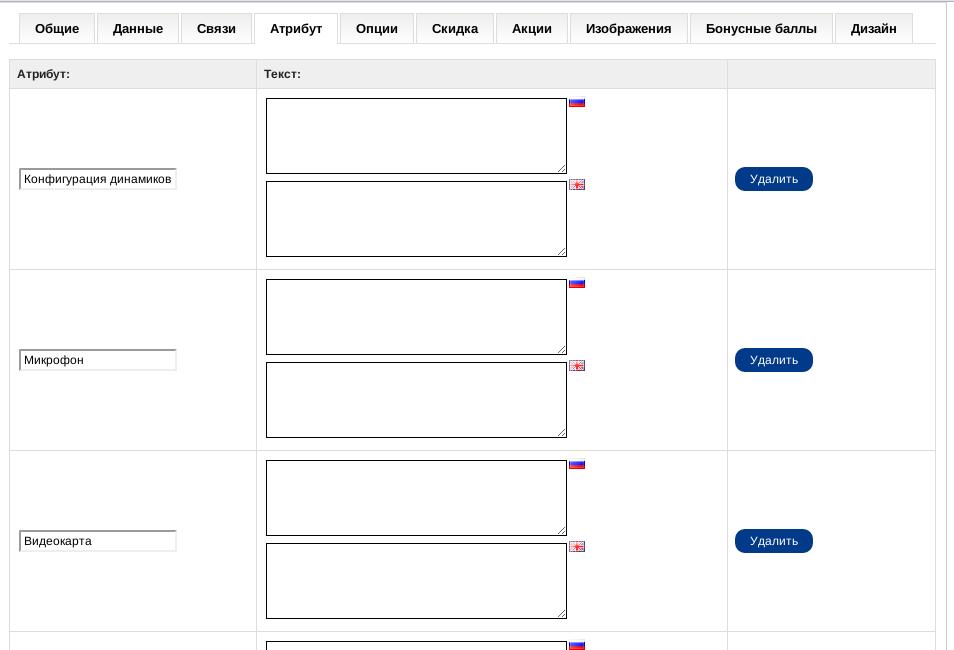
Когда вы добавляете новый товар то во вкладке атрибутов вам придется вручную добавлять каждый атрибут. А если товаров несколько сотен и у каждого по 15-20 атрибутов?.. Что делает модуль? Он позволяет привязать атрибуты к категории товаров. Например можно указать что для товара "Ноутбук" подходят атрибуты "процессор", "ОЗУ", "HDD" итд Теперь когда вы добавляете новый товар-ноутбук во вкладке атрибуты автоматически добавятся присвоенные для ноутбука атрибуты: "процессор", "ОЗУ", "HDD". У вас также остается возможность добавить атрибуты и вручную.
Модуль значительно сэкономить время и количество ошибок при добавлении атрибутов.
Модуль использует vQmod (
Установка:
1. Установить vQmod, если вы этого еще не сделеали
2. Скопировать все с папки upload в корень магазина. Никакие файлы перезаписаны не будут
3. Включить модуль на странице модулей
4. На странице редактирования категории во вкладке "Атрибуты" выбрать атрибуты для каждой категории
Версии на которой тестировался модуль:
Opencart 1.5.6
OCStore 1.5.5.1
OCStore 1.5.4.1
OCStore 1.5.3.1
OCStore 1.5.2.1 (attribute_category_v1.0_oc1.5.2.1.zip)
OCStore 1.5.1.3
Поддержка OpenCart / ocStore 2.x и 3.x есть во второй версии модуля
Новое в версии 1.1:
- упрощено добавление атрибутов у существующим товарам
Удобно использовать вместе с модулем Attribute Select который упрощает добавление значений для атрибутов
Для связи с автором модуля пишите на
© Стасюк Владимир (), 2012
Характеристики

















-
Recently Browsing 0 members
- No registered users viewing this page.