


Що можна обрати замість
Роблять те саме — можна поставити замість.
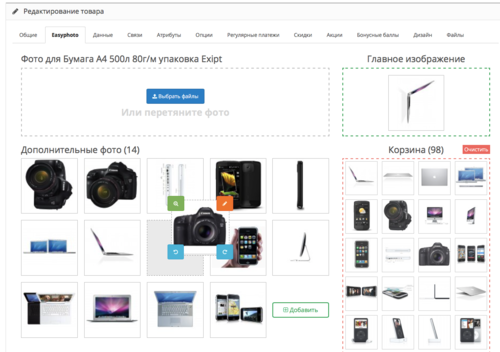
The module allows you to quickly and conveniently upload, sort and flip photos by dragging and dropping them directly into the browser.
There are settings as well as functionality for renaming already uploaded photos and deleting unnecessary ones.
There are settings as well as functionality for renaming already uploaded photos and deleting unnecessary ones.
Updated
Easyphoto — Drag & Drop Photo Upload and Sorting
450 грн
1069 2129

Вирішують ту саму задачу, але іншим способом або частково.

Удобный загрузчик файлов для магазинов с большим числом товаров
К сожалению, родной менеджер файлов в опенкарт очень не удобный и заторможенный.
Работа с ним приводит к одной из двух проблем:
1) - все картинки владелец магазина добавляет в одну директорию,
в результате после того, когда их становится несколько тысяч, сайт начинает серьезно тормозить
и добавить новую картинку становится достаточно трудно, а порой и вообще не возможно
2) - владелец магазина знает, что нужно распределять картинки по папкам и делает это.
В результате, через некоторое время, очень трудно разобраться в какой папке к какому товару лежит картинка.
Данная версия модуля позволяет добавлять и изменять картинки к товарам и категориям не задумываясь о том,
где физически эти картинки на сервере будут размещены. Больше об выборе места их размещения заботиться не нужно!
Картинки загружаются на сервер в директорию image/data, внутри которой автоматически создаются подкатегории вида XX/YY, где XX,YY - числа от 00 до 99
Преимущества
файлы добавляются в 1 клик
можно добавить миллионы картинок и при этом нагрузка на сервер не возрастет
файлы в папках распределяются равномерно. Не более 100 файлов в папке и не более 100 вложенных папок.
можно добавлять файлы с одинаковыми именами, они переименовываются автоматически
нет проблемы в работе с картинками, имеющими русские названия
структуру папок и файлов с изображениями, можно автоматически конвертировать в оптимизированный формат
Модуль не изменяет ни каких файлов движка. VQMOD - обязателен
Протестировано на
OpenCart 1.5.4, 1.5.5, 1.5.6
ocStore 1.5.4, 1.5.5
За основу модуля был взял стандартный filemanager.
Установка.
Работает с vqmod
1. Скопировать файлы из папки upload в корень сайта Если обновляете предыдущую версию согласитесь на замену имеющихся файлов.
2. Установить модуль "Удобный загрузчик файлов".
Пожелания о доработке и дальнейшем улучшении функционала приветствуются в теме поддержки модуля...
Updated
Загрузчик картинок для магазинов с большим числом товаров
Free
1570
Не замінюють, але додають можливостей до цієї задачі або працюють у парі.

AI removes backgrounds, places products on studio backdrops, on people, in lifestyle scenes, improves quality. Bulk processing via CRON. No monthly subscription. OpenCart 3.x, PHP 7.2-8.3.
Updated
OcBox AI Photo Studio — AI product photo editing for OpenCart and ocStore: background removal, lifestyle scenes, bulk on N products
2,400 грн
7 9

The module adds a convenient tool for bulk copying product data directly from the product list in the OpenCart admin panel.
It allows you to quickly transfer data from one product to an unlimited number of other products through a popup window without manually editing each product page.
Main Features
Select a source product for copying Select multiple target products Bulk copy main and additional product images Bulk copy product attributes Copy product description (description) Select copy options using checkboxes Works directly from the product list page Supports multilingual descriptions Automatic page refresh after operation What Can Be Copied
Images
Main product image Additional gallery images Attributes
All product attributes Description
Description field for all store languages Interface and Convenience
Convenient popup windows directly in the product list Instant applying of changes Benefits
Save time when managing product catalog No need to open each product separately Simple and intuitive interface Fast bulk editing in just a few clicks Compatibility
OpenCart 3.x DEMO
Admin Page login/password: demo/demodemo Installation
Install the module through the OpenCart admin panel Refresh modifications License
The license is valid for one domain and its subdomains.
It allows you to quickly transfer data from one product to an unlimited number of other products through a popup window without manually editing each product page.
Main Features
Select a source product for copying Select multiple target products Bulk copy main and additional product images Bulk copy product attributes Copy product description (description) Select copy options using checkboxes Works directly from the product list page Supports multilingual descriptions Automatic page refresh after operation What Can Be Copied
Images
Main product image Additional gallery images Attributes
All product attributes Description
Description field for all store languages Interface and Convenience
Convenient popup windows directly in the product list Instant applying of changes Benefits
Save time when managing product catalog No need to open each product separately Simple and intuitive interface Fast bulk editing in just a few clicks Compatibility
OpenCart 3.x DEMO
Admin Page login/password: demo/demodemo Installation
Install the module through the OpenCart admin panel Refresh modifications License
The license is valid for one domain and its subdomains.
Updated
Mass Copy Product Data
320 грн
1 1
Інші рішення в тій самій області магазину.

Excel-style ocStore 3 product editor: inline edits, filters, bulk operations, SEO, AI and catalog normalization.
Updated
OcBox AI Product Mass Editor — AI bulk editor for OpenCart and ocStore: AI descriptions, AI translations, AI Photo Studio, like Excel
2,400 грн
51 86
 admin product quick edit
SAP- Admin Product Quick Edit
Fast and bulk editing of products without pain, clicks and opening the product editing form
SAP - Admin Product Quick Edit created for stores where the catalog is actually used, not just admired on weekends. If you have dozens, hundreds or thousands of products, the module removes one of the most annoying things in OpenCart: endlessly opening the product card for every small edit.
Here you edit products directly in the table.
Without reloading the page.
Without unnecessary transitions.
Without the classic admin quest of "open, wait, change one field, save, come back, repeat 200 more times."
No more needed:
open a product card for one edit reload the page after each movement update the catalog manually where it should have been done en masse long ago
Now available:
Edit directly in the product list Bulk change data by filter or by selected products Manage prices, promotions, discounts, SEO, categories, images, and related data in one place
In other words: OpenCart won't stop being OpenCart, but at least it will stop punishing you for every catalog edit.
What does this mean in practice?
Faster point edits in the catalog. Mass updates without manual hell. Fewer clicks, fewer errors, less chance of hating the product edit form. Convenient work for a content manager, SEO specialist, marketer, merchandiser, and store owner.
How it works
Catalog -> Products -> Edit the required fields -> AJAX save without reloading
That is, the module does not force you to go into the full product card every time you need to correct the name, SKU, price, category, promotion, or image.
Key features
1. Inline editing in the product list
Editing data without opening the full product card. AJAX saving without page reload. Popover windows for quick editing of more complex fields. Separate quick actions for titles, descriptions, attributes, options, OCFilter, prices, promotions, dates, categories, images. Quick toggles for Status and Noindex if the noindex field is present in the product table. Simple fields such as model, SKU, price, quantity and dates can now be edited inline: click the value in the table, edit it in place, and save without opening a popover. Empty model and SKU values still show the familiar + button, but the edit field opens empty and does not save + as a value.
2. Multilingual titles, descriptions and SEO
Editing the product name in all store languages. Quick editing of product descriptions by language. Product names are now edited in one compact multilingual popover: all store languages are visible at once, with flags, without switching tabs. Description editing now opens in a separate modal window with the product name in the header and more workspace for language and SEO fields. The description editor can be selected in module settings: Summernote by default, CKEditor, or TinyMCE. CKEditor and TinyMCE use local assets and the admin language when available. Support for SEO fields with product_description, if they are in your build: - Description
- HTML H1 / Meta H1 tag
- Meta Title
- Meta Description
3. Prices, promotions and discounts
Quick editing of the base price. Editing special prices directly from the product list. One popover for multiple active special records. Validation of dates and checking the correctness of values. The promotional price cannot be higher than the basic price.
4. Features, options and OCFilter
Quick editing of product characteristics. Create new attributes directly in the characteristics popover without leaving the product list. Inline + button in the attribute search field for creating a new attribute from the typed name when no exact match is found. Saved value suggestions above each language field with instant insertion into the text area. Copy the value to empty languages and see an empty-state indicator for faster multilingual filling. Attribute group display for existing and new characteristics, duplicate validation, and correct saving of the same attribute with different values. Quick editing of product options. Quick edit of OCFilter if the module is installed and active. For OCFilter, product categories are taken into account, and when dragging and copying, the compatibility of filters with the target product categories is checked.
5. Magnet Drag-Copy between products
Copy data between products by simple drag and drop. Drag-copy is supported for: descriptions and SEO fields, characteristics, options, OCFilter. It is especially useful when the products are similar, and duplicating the same connections manually is simply ridiculous.
6. Images without pain and without unnecessary shamanism
Editing the main image and product gallery in a separate window. Drag & Drop to sort images in the gallery. Drag & Drop to assign an additional photo as the main one. Batch upload images to the gallery. Automatic cleaning of temporary files after saving or canceling. Support for jpg, jpeg, png, gif, webp formats.
7. Flexible image storage, naming and display
Image storage mode by category folders. Automatic grouping mode into folders of 100 files. Configurable file naming when saving an image: keep the original file name or generate a name from a template. The template supports {product_name}, {model}, {sku}, {product_id}, plus live preview and quick token insertion in module settings. If a file name is already taken, the module automatically adds a sequential index (-2, -3, -4 ...) and keeps the real extension of the uploaded image. Two image display modes in the product list: gallery or single photo For single photo mode, you can set your own width and height for the preview in the product catalog.
8. Flexible columns and normal list organization in settings
Turning columns on and off in a table. Drag columns to change the order. Select the default sort column. Select ASC/DESC sorting direction. Option to work without default sorting. Controlling the display of quick action buttons: descriptions, characteristics, options, OCFilter
9. Custom columns from the product table
Adding custom fields from the `product` table to the product list. Support for custom column names. Support for various field types: text, number, date, datetime, boolean/tinyint(1) as toggle For relation fields, convenient display via select is supported.
10. Product sales analytics
A dedicated sales statistics window is available directly from the product list without opening the full product card. Periods 7 / 30 / 90 / 365 / all time, comparison with the previous period, average sale price, last sale, and a grouped chart for quantity, revenue, and orders. Additional sections include customers, bought together, reviews, promotions and discounts, product share in category turnover, general metrics, and stock forecast. Settings allow choosing the default period, the order-status calculation base, and enabling or disabling individual analytics sections.
Bulk operations
Mass changes: for all products in the current filter or only for selected ones.
Fields for mass update
Price Promotional price Discount Number Status Noindex if the field exists in the `product` table Model SKUs Producer Categories Attributes Date added Date of change Subtract from the composition Delivery required Out of stock status
Numeric field change modes
Set value Increase by a fixed value Reduce by a fixed value Increase by % Reduce by % Multiply by a factor Divide by the coefficient
Mass work with shares
Support for multiple rules in one bulk operation. Work in groups of buyers. Stock priorities. Start and end dates. Separate "Change only end date" mode: updates only the end date in existing active records, does not create new records and skips products without promotions. Removing a promotional price. Option to clear previous entries before applying. Protection against date conflicts for the same group of buyers.
Bulk work with discounts
Support for multiple rules in one bulk operation. Buyer groups. Quantity for discount. Priority. Start and end dates. Separate "Change only end date" mode: updates only the end date in existing active records, does not create new records and skips products without discounts. Removing a discount. Option to clear previous entries before applying. Protection against date conflicts for the same buyer group and quantity.
Bulk work with attributes
Add/update, append, delete, replace text, migrate/rename attributes and sync values from product fields in one bulk operation. Apply changes to all store languages, only the current language, or selected languages. Copy attributes from a reference product in merge or overwrite mode before applying commands. Cleanup tools normalize case, trim extra spaces, remove duplicate words and remove empty attributes. Preview Before / After changes before applying, with optional sorting by attribute group and sort order.
Filters for quick work
The module adds filters that are really missing when working live with the catalog:
Product ID SKUs Manufacturer with multi-select and live search Category with multi-select and live search Presence / absence of image Special price: quick selection of products with an active special price or without one The standard OpenCart / ocStore filters do not disappear. That is, you do not change the usual catalog page to something else, you simply get an adequate version of it.
Security, validation and change control
Checking the uniqueness of SKUs. Checking the uniqueness of the model. Validation of price, quantity and dates. Checking for `date_modified` conflict to avoid overwriting another user's changes. Correct processing of special / discount rules with conflict checking.
Interface improvements
Button to collapse/expand the left menu. Ability to hide the right filter block for OS3. More workspace for the table. Fixed horizontal navigation buttons for wide tables. More convenient to work on laptops and small screens. Popover arrows for quick-edit windows are aligned to the element that opened them, so the popup visually points to the correct product row. TinyMCE fullscreen mode in the description modal opens across the full screen instead of being limited by the modal window.
What can be edited directly in the product list
Product name by language Description by language HTML H1 / Meta H1 tag Meta Title Meta Description Model SKUs Producer Categories Main category, if supported by SEO Pro / main_category Price Promotional prices Number Status Noindex if the field exists in the product table Date added Date of change Main image Image gallery Characteristics Options OCFilter, if installed Custom fields from the product table
Module for
stores with a large or small catalog. teams that edit titles, prices, promotions, categories, and SEO every day. those who want to work with products quickly, rather than through the traditional OpenCart endurance marathon.
Module languages
Ukrainian English Russian
SAP- Admin Product Quick Edit transforms the product list from a simple view into a full-fledged working tool. The module covers both point-by-point inline edits and serious mass updates on prices, promotions, discounts, quantities, categories, images and related product data.
If your catalog is larger than "a few test items", this module shows its value very quickly. Because when a product is edited in one or two movements instead of a small administrative drama, working simply becomes faster. And, oddly enough, more pleasant.
Installation/Update of the module
Demo
🔗 Product catalog
https://oc34.sapas.pw/admin/index.php?route=catalog/product
🔗 Module settings
https://oc34.sapas.pw/admin/index.php?route=extension/module/sap_quick_edit
Login: demo
Password: demo
Performance tips
Disable unnecessary columns Work through filters Especially effective for large catalogs
By purchasing the SAP - Admin Product Quick Edit module, you are investing in the development of the module, which will return to you in the form of new functionality.
Telegram group - Opencart SAP
Telegram @doc_sap
For those who read to the end - 952402-sap
Fast and bulk editing of products without pain, clicks and opening the product editing form
SAP - Admin Product Quick Edit created for stores where the catalog is actually used, not just admired on weekends. If you have dozens, hundreds or thousands of products, the module removes one of the most annoying things in OpenCart: endlessly opening the product card for every small edit.
Here you edit products directly in the table.
Without reloading the page.
Without unnecessary transitions.
Without the classic admin quest of "open, wait, change one field, save, come back, repeat 200 more times."
No more needed:
open a product card for one edit reload the page after each movement update the catalog manually where it should have been done en masse long ago
Now available:
Edit directly in the product list Bulk change data by filter or by selected products Manage prices, promotions, discounts, SEO, categories, images, and related data in one place
In other words: OpenCart won't stop being OpenCart, but at least it will stop punishing you for every catalog edit.
What does this mean in practice?
Faster point edits in the catalog. Mass updates without manual hell. Fewer clicks, fewer errors, less chance of hating the product edit form. Convenient work for a content manager, SEO specialist, marketer, merchandiser, and store owner.
How it works
Catalog -> Products -> Edit the required fields -> AJAX save without reloading
That is, the module does not force you to go into the full product card every time you need to correct the name, SKU, price, category, promotion, or image.
Key features
1. Inline editing in the product list
Editing data without opening the full product card. AJAX saving without page reload. Popover windows for quick editing of more complex fields. Separate quick actions for titles, descriptions, attributes, options, OCFilter, prices, promotions, dates, categories, images. Quick toggles for Status and Noindex if the noindex field is present in the product table. Simple fields such as model, SKU, price, quantity and dates can now be edited inline: click the value in the table, edit it in place, and save without opening a popover. Empty model and SKU values still show the familiar + button, but the edit field opens empty and does not save + as a value.
2. Multilingual titles, descriptions and SEO
Editing the product name in all store languages. Quick editing of product descriptions by language. Product names are now edited in one compact multilingual popover: all store languages are visible at once, with flags, without switching tabs. Description editing now opens in a separate modal window with the product name in the header and more workspace for language and SEO fields. The description editor can be selected in module settings: Summernote by default, CKEditor, or TinyMCE. CKEditor and TinyMCE use local assets and the admin language when available. Support for SEO fields with product_description, if they are in your build: - Description
- HTML H1 / Meta H1 tag
- Meta Title
- Meta Description
3. Prices, promotions and discounts
Quick editing of the base price. Editing special prices directly from the product list. One popover for multiple active special records. Validation of dates and checking the correctness of values. The promotional price cannot be higher than the basic price.
4. Features, options and OCFilter
Quick editing of product characteristics. Create new attributes directly in the characteristics popover without leaving the product list. Inline + button in the attribute search field for creating a new attribute from the typed name when no exact match is found. Saved value suggestions above each language field with instant insertion into the text area. Copy the value to empty languages and see an empty-state indicator for faster multilingual filling. Attribute group display for existing and new characteristics, duplicate validation, and correct saving of the same attribute with different values. Quick editing of product options. Quick edit of OCFilter if the module is installed and active. For OCFilter, product categories are taken into account, and when dragging and copying, the compatibility of filters with the target product categories is checked.
5. Magnet Drag-Copy between products
Copy data between products by simple drag and drop. Drag-copy is supported for: descriptions and SEO fields, characteristics, options, OCFilter. It is especially useful when the products are similar, and duplicating the same connections manually is simply ridiculous.
6. Images without pain and without unnecessary shamanism
Editing the main image and product gallery in a separate window. Drag & Drop to sort images in the gallery. Drag & Drop to assign an additional photo as the main one. Batch upload images to the gallery. Automatic cleaning of temporary files after saving or canceling. Support for jpg, jpeg, png, gif, webp formats.
7. Flexible image storage, naming and display
Image storage mode by category folders. Automatic grouping mode into folders of 100 files. Configurable file naming when saving an image: keep the original file name or generate a name from a template. The template supports {product_name}, {model}, {sku}, {product_id}, plus live preview and quick token insertion in module settings. If a file name is already taken, the module automatically adds a sequential index (-2, -3, -4 ...) and keeps the real extension of the uploaded image. Two image display modes in the product list: gallery or single photo For single photo mode, you can set your own width and height for the preview in the product catalog.
8. Flexible columns and normal list organization in settings
Turning columns on and off in a table. Drag columns to change the order. Select the default sort column. Select ASC/DESC sorting direction. Option to work without default sorting. Controlling the display of quick action buttons: descriptions, characteristics, options, OCFilter
9. Custom columns from the product table
Adding custom fields from the `product` table to the product list. Support for custom column names. Support for various field types: text, number, date, datetime, boolean/tinyint(1) as toggle For relation fields, convenient display via select is supported.
10. Product sales analytics
A dedicated sales statistics window is available directly from the product list without opening the full product card. Periods 7 / 30 / 90 / 365 / all time, comparison with the previous period, average sale price, last sale, and a grouped chart for quantity, revenue, and orders. Additional sections include customers, bought together, reviews, promotions and discounts, product share in category turnover, general metrics, and stock forecast. Settings allow choosing the default period, the order-status calculation base, and enabling or disabling individual analytics sections.
Bulk operations
Mass changes: for all products in the current filter or only for selected ones.
Fields for mass update
Price Promotional price Discount Number Status Noindex if the field exists in the `product` table Model SKUs Producer Categories Attributes Date added Date of change Subtract from the composition Delivery required Out of stock status
Numeric field change modes
Set value Increase by a fixed value Reduce by a fixed value Increase by % Reduce by % Multiply by a factor Divide by the coefficient
Mass work with shares
Support for multiple rules in one bulk operation. Work in groups of buyers. Stock priorities. Start and end dates. Separate "Change only end date" mode: updates only the end date in existing active records, does not create new records and skips products without promotions. Removing a promotional price. Option to clear previous entries before applying. Protection against date conflicts for the same group of buyers.
Bulk work with discounts
Support for multiple rules in one bulk operation. Buyer groups. Quantity for discount. Priority. Start and end dates. Separate "Change only end date" mode: updates only the end date in existing active records, does not create new records and skips products without discounts. Removing a discount. Option to clear previous entries before applying. Protection against date conflicts for the same buyer group and quantity.
Bulk work with attributes
Add/update, append, delete, replace text, migrate/rename attributes and sync values from product fields in one bulk operation. Apply changes to all store languages, only the current language, or selected languages. Copy attributes from a reference product in merge or overwrite mode before applying commands. Cleanup tools normalize case, trim extra spaces, remove duplicate words and remove empty attributes. Preview Before / After changes before applying, with optional sorting by attribute group and sort order.
Filters for quick work
The module adds filters that are really missing when working live with the catalog:
Product ID SKUs Manufacturer with multi-select and live search Category with multi-select and live search Presence / absence of image Special price: quick selection of products with an active special price or without one The standard OpenCart / ocStore filters do not disappear. That is, you do not change the usual catalog page to something else, you simply get an adequate version of it.
Security, validation and change control
Checking the uniqueness of SKUs. Checking the uniqueness of the model. Validation of price, quantity and dates. Checking for `date_modified` conflict to avoid overwriting another user's changes. Correct processing of special / discount rules with conflict checking.
Interface improvements
Button to collapse/expand the left menu. Ability to hide the right filter block for OS3. More workspace for the table. Fixed horizontal navigation buttons for wide tables. More convenient to work on laptops and small screens. Popover arrows for quick-edit windows are aligned to the element that opened them, so the popup visually points to the correct product row. TinyMCE fullscreen mode in the description modal opens across the full screen instead of being limited by the modal window.
What can be edited directly in the product list
Product name by language Description by language HTML H1 / Meta H1 tag Meta Title Meta Description Model SKUs Producer Categories Main category, if supported by SEO Pro / main_category Price Promotional prices Number Status Noindex if the field exists in the product table Date added Date of change Main image Image gallery Characteristics Options OCFilter, if installed Custom fields from the product table
Module for
stores with a large or small catalog. teams that edit titles, prices, promotions, categories, and SEO every day. those who want to work with products quickly, rather than through the traditional OpenCart endurance marathon.
Module languages
Ukrainian English Russian
SAP- Admin Product Quick Edit transforms the product list from a simple view into a full-fledged working tool. The module covers both point-by-point inline edits and serious mass updates on prices, promotions, discounts, quantities, categories, images and related product data.
If your catalog is larger than "a few test items", this module shows its value very quickly. Because when a product is edited in one or two movements instead of a small administrative drama, working simply becomes faster. And, oddly enough, more pleasant.
Installation/Update of the module
Demo
🔗 Product catalog
https://oc34.sapas.pw/admin/index.php?route=catalog/product
🔗 Module settings
https://oc34.sapas.pw/admin/index.php?route=extension/module/sap_quick_edit
Login: demo
Password: demo
Performance tips
Disable unnecessary columns Work through filters Especially effective for large catalogs
By purchasing the SAP - Admin Product Quick Edit module, you are investing in the development of the module, which will return to you in the form of new functionality.
Telegram group - Opencart SAP
Telegram @doc_sap
For those who read to the end - 952402-sap
Updated
SAP - Admin Product Quick Edit (Quick / Bulk Product Editing) + Product Statistics for OpenCart/ocStore
810 грн
45 111

Visual catalog manager for OpenCart 3.0: 3-panel UI (tree + products + log), drag-and-drop for categories and products, inline editing, bulk operations, cloning, action log with Undo. Restructure your catalog in an evening instead of a week of clicks.
Updated
OcBox AI Category Manager — visual AI category and product manager for OpenCart 3.0 and ocStore: drag-drop, batch, tree, AI descriptions
1,440грн
1,440 грн
14 31

VisualForge AI — content & image generator for OpenCart. Creates SEO descriptions, articles, and AI images (including lifestyle) in one click. Supports block-based editing, multi-language, and bulk generation. Save time and boost sales.
Updated
VisualForge AI — Content & Image Generator for OpenCart V 3.0
2,699 грн
14 55

Image Forge AI is a modern AI media center for OpenCart that combines product image search, photo upload to the store server, gallery management, optimization in WebP, JPEG and PNG, background removal, creation of packshot images and realistic lifestyle scenes using BRIA and OpenAI.
The module helps you fill your catalog with high-quality images faster without constantly switching between third-party services and manually editing files.
The module helps you fill your catalog with high-quality images faster without constantly switching between third-party services and manually editing files.
Updated
Search photo in Google, optimization and AI-creation of backgrounds for product photos V1.4
1,199 грн
5 10

Smart Batch Editor Pro is a professional tool for the rapid management of a large product catalog in OpenCart / ocStore.
The module allows you to work not with each product individually, but with an entire selection at once: modify prices and stock levels, categories, manufacturers, attributes, options, specials, discounts, SEO data, and other parameters from a single working interface.
Filter the required products → configure the changes → apply them to the entire selection.
Instead of dozens or hundreds of open product pages, you get a unified workspace for catalog management.
The module allows you to work not with each product individually, but with an entire selection at once: modify prices and stock levels, categories, manufacturers, attributes, options, specials, discounts, SEO data, and other parameters from a single working interface.
Filter the required products → configure the changes → apply them to the entire selection.
Instead of dozens or hundreds of open product pages, you get a unified workspace for catalog management.
Updated
Smart Batch Editor Pro — Mass Product Editing for OpenCart / ocStore
1,299 грн
4 7

This module will greatly simplify the process of adding images for products. Do you have thousands of products? Do you spend a huge amount of time to find a high-quality picture for each product? Then this module is for you!
Updated
Image search for products PRO
450 грн
483 859

Edixon — Modify thousands of products in minutes with rollback capability and full control over your catalog
Updated
Edixon — Bulk editing of products in OpenCart without errors and risks
1,276 грн
40 268

This module extends the functionality of OcTemplates by adding the ability to bulk assign custom stickers to products using a flexible filter system.
It is fully compatible with the OCTemplates – Product Stickers Settings module and works with the stickers created by the administrator. The module's publication is approved by the OCTemplates template author.
Key Features
Bulk addition of stickers to products based on selected criteria. Filtering supported by the following parameters: categories, manufacturers, price range (min and max), product attributes and their values User-friendly interface in the admin panel. Ability to quickly update or replace stickers without manual editing of each product. Flexible execution options
Manually via admin panel Automatically via CRON job Benefits
Saves time when managing product stickers in bulk. Enhances the visibility of promotions, features, and product statuses. Accurate and flexible product selection for sticker assignment. Automation through CRON support. Compatibility
OpenCart/OcStore 3.x Compatibility tested on the Deals, Ultrastore template. For other templates, please contact us before purchasing. Installation Instructions
Install the module through the OpenCart admin panel. Refresh modifications. Go to System → Users → User Groups, and grant edit permissions to the required admin groups. Go to Extensions → Extensions → Modules, activate Oct Stickers Auto, and configure it. How It Works
Start the sticker assignment process. In the OCTemplates – Product Stickers Settings module, run the mass generation. If running via CRON, the sticker assignment should execute before the mass generation (with a 5-minute gap). License
Licensed for use on a single online store.
It is fully compatible with the OCTemplates – Product Stickers Settings module and works with the stickers created by the administrator. The module's publication is approved by the OCTemplates template author.
Key Features
Bulk addition of stickers to products based on selected criteria. Filtering supported by the following parameters: categories, manufacturers, price range (min and max), product attributes and their values User-friendly interface in the admin panel. Ability to quickly update or replace stickers without manual editing of each product. Flexible execution options
Manually via admin panel Automatically via CRON job Benefits
Saves time when managing product stickers in bulk. Enhances the visibility of promotions, features, and product statuses. Accurate and flexible product selection for sticker assignment. Automation through CRON support. Compatibility
OpenCart/OcStore 3.x Compatibility tested on the Deals, Ultrastore template. For other templates, please contact us before purchasing. Installation Instructions
Install the module through the OpenCart admin panel. Refresh modifications. Go to System → Users → User Groups, and grant edit permissions to the required admin groups. Go to Extensions → Extensions → Modules, activate Oct Stickers Auto, and configure it. How It Works
Start the sticker assignment process. In the OCTemplates – Product Stickers Settings module, run the mass generation. If running via CRON, the sticker assignment should execute before the mass generation (with a 5-minute gap). License
Licensed for use on a single online store.
Updated
Bulk adding custom stickers to templates (OcTemplates)
460 грн
8 20

The module replaces the standard category list with a convenient workspace featuring a category tree, quick editing, bulk operations, SEO tools, and a full-fledged editor in a popup window.
Updated
Quick Category Edit - quick management and editing of OpenCart categories
450 грн
0 0

This is a convenient tool for fast bulk editing of products in OpenCart. The module allows you to change categories and manufacturer for multiple products at once directly from the product list in the admin panel.
Main Features
Category Management
Bulk change of categories for selected products Assign multiple categories at once Set main category Convenient category selection via autocomplete Manufacturer Management
Bulk change of product manufacturer Quick manufacturer selection via autocomplete Apply changes to multiple products at once Interface & Usability
Convenient modal windows directly in the product list Instant application of changes Advantages
Time-saving when managing product catalog No need to open each product individually Simple and intuitive interface Fast bulk editing in just a few clicks Compatibility
OpenCart 3.x Installation
Install the module via OpenCart admin panel Refresh modifications DEMO
Admin Page login/password: demo/demodemo License
The license applies to one domain and its subdomains.
Main Features
Category Management
Bulk change of categories for selected products Assign multiple categories at once Set main category Convenient category selection via autocomplete Manufacturer Management
Bulk change of product manufacturer Quick manufacturer selection via autocomplete Apply changes to multiple products at once Interface & Usability
Convenient modal windows directly in the product list Instant application of changes Advantages
Time-saving when managing product catalog No need to open each product individually Simple and intuitive interface Fast bulk editing in just a few clicks Compatibility
OpenCart 3.x Installation
Install the module via OpenCart admin panel Refresh modifications DEMO
Admin Page login/password: demo/demodemo License
The license applies to one domain and its subdomains.
Updated
Mass Editing Categories and Manufacturer
320 грн
0 0
«Noticeup Image Upload» знято з продажу
Ми підібрали схожі модулі інших розробників — їх можна придбати вже зараз.
Інші варіанти

User Feedback
Noticeup Image Upload
Как вы знаете в opencart очень трудно добавлять товары особенно изображения.
Данный модуль ускоряет работу связанную с добавлением изображений. Можно добавить 100 изображений плюс еще 200 дополнительных изображений к товарам за час. Думаю данный модуль хорошая находка для контентщика у которого добавление изображений забирает массу времени.
*Перед применением обязательно прочтите документацию
Документация
Характеристики
Activation method Без активации
Ioncube LoaderНі
В продажеПриостановлено
OpenCart2.3
ocStore2.3
OpenCart.Pro, ocShopOpencart.pro 2.3
Get request to server of developerНі
If the developer server is unavailableДополнение работает
СкидкаNo
Версія1.0.0
File Size6.06 kB
Submitted05/22/2018
Updated03/25/2019
Previous FileБесплатные всплывающие уведомления Free Popup Cart (vqmod)
Next FileOCappLab - Производители




-
Recently Browsing 0 members
- No registered users viewing this page.