
Немає скріншотів
Що можна обрати замість
Вирішують ту саму задачу, але іншим способом або частково.

Описание
Плагин OpenCart позволяет интегрировать сервис приема платежей на страницу оплаты вашего веб-ресурса. Установка и активация модуля даст возможность бизнесу удобно, быстро и безопасно получать деньги за товары/услуги, а клиентам – оплачивать заказы разнообразными способами оплаты.
Модуль оплаты Opencart заменяет команду программистов, позволяя интегрировать сервис интернет-эквайринга в один клик. После подключения платежного шлюза, ваши пользователи смогут оплачивать покупки банковскими картами, через интернет-банкинги и электронные кошельки. Наличие возможности быстро расплатиться удобным способом оплаты повысит лояльность клиентов, увеличит средний чек и оборот бизнеса.
Платежный шлюз FONDY подключили более 8000 предпринимателей по всему миру: от небольших нишевых сайтов до крупнейших интернет-магазинов и международных компаний с миллионными оборотами. Один из наших последних проектов FondyGlobe дал возможность вывести бизнес на международный рынок.
Платежная система работает с мерчантами в 33 странах. Владельцы бизнеса могут организовать прием платежей в 100+ валютах, включая доллар, евро и фунт стерлингов. Мы сотрудничаем с банковскими организациями Украины, России, Восточной Европы и ЕС, гарантируя максимально быструю обработку транзакций.
Почему выбирают сервис интернет-эквайринга FONDY?
поддержка разовых и регулярных платежей;
конверсия успешных транзакций до 98% за счет процессинга карт одновременно через 25 банков-эквайеров и в процессинговых центрах в 30 странах;
прием платежей в 100 валютах через кредитные карты, локальные платежные средства, интернет-банки;
заморозка денег на счету покупателя на срок до 25 дней с возможностью последующего списания или возврата в один клик;
сохранение реквизитов банковской карты с их автоматическим вводом при повторном входе;
высокий уровень безопасности: двухфакторная идентификация, стандарт шифрования COMODO, собственная система обнаружения мошенников Fondy Antifraud;
приложение для мобильных устройств на базе iOS и Android;
оформление и стилизация платежной страницы под дизайн сервиса или интернет-магазина;
возможность изучения каждого платежа и формирования полноценных отчетов в личном кабинете.
Какие платежные методы поддерживает FONDY?
Банковские карты: VISA, Visa Electron, MasterCard, Maestro, Discover Card и другие;
Альтернативные платежные методы: Trustpay, SEPA, Multibanco, Skrill и другие;
Интернет-банки в 26 странах.
Преимущества платформы FONDY
Быстрое и удобное подключение
Модуль оплаты OpenCart – наиболее простой способ подключения сервиса интернет-эквайринга к интернет-магазину. Вам потребуется пройти небольшую регистрацию, заполнить финансовые реквизиты для получения денежных средств от клиентов, загрузить документы в личном кабинете, дождаться окончания экспресс-аудита веб-ресурса.
На подключение платежного шлюза потребуется от 1 часа до 2 дней. Обычно прием платежей активируется в течение дня. После чего останется добавить и активировать плагин OpenCart. Если есть группы в социальных сетях или база подписчиков по email, тогда можно использовать онлайн-инвойсинг: заполняете счет, отправляете клиенту ссылку, он переходит, вводит платежные данные и оплачивает заказ.
Высокий уровень безопасности
Платежная платформа размещена в облачном сервисе, который соответствует стандартам безопасности. Система защищена от DDoS атак, вмешательства в данные и оборудование третьими лицами и организациями. Поддерживает сертификацию PCI DSS Level 1.
Компания разработала собственную антифрод-систему, которая использует 300 правил и алгоритмов, позволяя предпринимателям настроить её под любую специфику бизнеса. Она отклоняет транзакции мошенников, сохраняя конверсию успешных платежей. В 95% случаях задержка на прохождение оплаты составляет менее 0,3 секунды.
Удобство для клиентов
После подключения Opencart от платежного шлюза FONDY, вы сможете активировать автоматическое заполнение платежных данных. Клиенту достаточно один раз ввести реквизиты банковской карты, а платформа сохранит их в зашифрованном виде.
В последующем информация введется автоматически, останется подтвердить оплату одним кликом. Это уменьшит количество брошенных корзин, так как покупателю не придется искать банковскую карту или вспоминать CW-код.
Постоянным клиентам вы можете предоставить услугу автоматического списания средств. Используя календарь платежей, нужно указать периодичность списания (один или несколько раз в неделю/месяц/год). Деньги будут списываться с банковской карты (счета) пользователя, что избавит его от рутинных действий.
Полный контроль над приемом платежей
Добавление и активация модуля оплаты Opencart открывает доступ к механизму холдирования – блокировке средств на счету покупателя на некоторое время. Например, человек оплатил заказ, а товара на складе уже нет. Вам достаточно сделать один клик, после чего деньги вернутся клиенту.
Механизм холдирования в модуле Opencart позволяет блокировать средства без технических знаний. Такая возможность будет особенно полезна интернет-магазинам, сервисам проката авто, службам доставки и прочим бизнесам любого масштаба.
Управление платежами с помощью смартфона
У пользователей FONDY есть мобильный личный кабинет, позволяющий мониторить состояние бизнеса на любом устройстве, независимо от времени суток и местонахождения. В нем можно оперативно посмотреть конверсии, данные по конкретным платежам или сразу всю аналитику.
Вам нужно зарегистрироваться, подключить модуль оплаты Opencart, скачать приложение на iOS или Android. Данные обновляются в автоматическом режиме. На мобильное устройство также приходят уведомления о каждой выплате, а для просмотра их истории достаточно открыть приложение.
Для пользователей Android разработчики внедрили возможность приема платежей по NFC. Технология превращает обыкновенный смартфон в полноценный терминал: вводите сумму, назначение платежа, подносите банковскую карту и подтверждаете оплату. Это сэкономит ваши средства на покупке POS-терминала, который стоит недешево.
Аналитика в реальном времени
Подключив модуль оплаты Opencart, вы получите инструменты для изучения клиентов. Система аналитики встроена в плагин, поэтому после активации можно в реальном времени отслеживать статус каждого платежа. Вы будете видеть, на каком этапе клиент, сможете вовремя ему помочь.
Пользователи дополнительно получают сведения о клиентах: используемые устройства, способы оплаты, страны, валюта и прочая информация. Полученные данные можно изучать в личном кабинете или создавать отчеты, сохраняя их на компьютере.
Сколько стоит подключение?
За регистрацию, использование модуля оплаты Opencart или других способов приема платежей платить не нужно. Платформа берет только комиссию с оплаты, которая настраивается либо на продавца, либо на покупателя. То есть без первоначальных инвестиций вы сможете протестировать полный функционал системы, а уже заплатить за него после получения результатов.
Как установить плагин Opencart
Для установки модуля оплаты Opencart следуйте инструкции:
Перенесите содержимое папки upload в корень сайта.
В панели управления зайдите в раздел «Дополнения» -> «Менеджер дополнений». Нажмите кнопку обновить.
Из списка выберите и установите «FONDY».
После нажатия на кнопку «Изменить», заполните поля и сохраните изменения.
С помощью Opencart можно изменить внешний вид страницы, добавить способы оплаты, настроить автоматические платежи и прочее. Результат – удобное управление бизнесом, ускоренный прием платежей, довольные клиенты, увеличение прибыли!..
Updated
Модуль оплаты OpenCart — FONDY
Free
516

Скопируйте файлы из папки upload в корень вашего магазина.
Если вы используете не стандартную тему, переименуйте папку catalog->view->theme->default на название вашей темы
После этого модуль появится в админке
Оплата производится в гривнах
**************************************************************************************
Copy files from upload folder into your site
If you use not a default theme rename the folder catalog->view->theme->default at name of your theme
After that the module will appear in the admin panel..
Submitted
Оплата через portmone.com
Free
149

«Interkassa» – это система приема платежей, позволяющая онлайн-магазинам, сайтам и другим торговым площадкам принимать все возможные формы оплаты в максимально сжатые сроки. Она представляет собой универсальный аппаратно-программный комплекс, который обеспечивает обработку операций, поступающую от основных платежных интернет-систем...
Updated
interkassa oc_1.5.x
Free
48

Scale smarter: automate payments and expand without limits
Unlock the full potential of your business with a powerful payment service! Maximise conversions, drive more sales, and seamlessly accept payments from customers worldwide. Automate your business processes and take control of your payments directly from your OpenCart admin panel. Watch your business thrive in real-time as you scale locally and expand globally. Connect your online store with hutko in just minutes and experience the difference!
☑️ Expand globally with payments in 150+ currencies across 200+ countries
☑️ Sell smarter with a checkout that adapts to you and your customers' preferences
☑️ Accept cards, Apple Pay, Google Pay, and installments with ease
☑️ Simplify repeat purchases with one-click payments powered by advanced tokenization
☑️ Customize your checkout – add logo, change colors, and configure fields
☑️ Save and reuse payment links – convenient for repeat payment attempts
☑️ Make instant refunds with zero stress – all from your OpenCart admin panel
☑️ Access end-to-end payment analytics – get a clear view of your business
Requirements
☑️ OpenCart version 3.0.0.0 or later
☑️ PHP version 7.3 or later
☑️ PHP cURL extension enabled on your server
Updated
hutko
Free
15

Офіційний модуль від monobank для підключення інтернет-еквайрингу.
Updated
plata by mono від monobank Polia -
Free
550
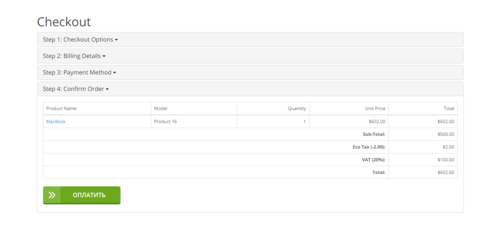
UPD 10.04.19 : API переехал на Liqpay.ua
Приветствую! Этот модуль решает проблему редиректа на страницу index.php?route=checkout/failure
при неудачной транзакции Liqpay (нажатие на кнопку "Отменить оплату", нехватка денег на счету и т.д.)
Тестировалось на ocstore 2.1, 2.3; opencart 2.1, 2.3. Работает с модулем Simple регистрация и заказ.
Модуль "as is". Поддержка по возможности: [email protected]
- Все товары остаются в корзине!
- При неудачной оплате редирект на index.php?route=checkout/failure
- Выбор режима работы: рабочий и тестовый (вводите любую валидную карту, подтверждает оплату без списания)
- Выбор статуса успешной оплаты
- Минимальная сумма для появления этого способа оплаты
- Заменяет кнопку "оформить заказ" на зеленую кнопку "Оплатить" Liqpay. Язык текста на кнопке на русском и английском.
ENG вариант показывается автоматически на английской версии сайта, на остальных - русский.
- При неудачной оплате заказ уходит в "Ошибочные заказы".
Установка:
1. Установить модуль через "Установка дополнений", или распаковать файлы в корневую папку сайта.
Внимание! Заменяет одноименные файлы liqpay, поэтому делайте бекап перед установкой.
UPD: Если ставили любой модуль Liqpay, особенно с их гитхаба, чистим все файлы liqpay во всех папках
2. Обновить кэш модификаторов в "Менеджер дополнений".
3. Способ оплаты "LIQPAY" появится в "Дополнения" -> "Оплата".
4. Заполняете обязательные поля Public Key и Private Key и остальные настройки.
5. ВНИМАНИЕ! В личном кабинете Liqpay -> Настройки компании -> "Checkout" -> "API" -> Поставить галочку на "POST data" !!
6. Поменять Статус модуля на "Включено".
7. Обновить кэш модификаторов в "Менеджер дополнений".
8. По желанию поблагодарить автора, написав "Спасибо" в теме файла, или написать в Telegram @vtasiev .
Особенности: При использовании модуля Simple регистрация и заказ появляется вторая кнопка, в блоке id="simplecheckout_payment_form" (Блок "Модуль оплаты").
Цитата
Блок модуля оплаты обязателен на последнем (или единственном) шаге, так как именно модули оплаты подтверждают заказ. При этом фактически модуль оплаты может быть невидим (зависит от модуля).
Короче говоря, можно скрыть этот блок и дубля кнопки не будет.
..
Updated
Liqpay + Редирект на checkout/failure + Liqpay.UA
Free
1586

«Interkassa» – это система приема платежей, позволяющая онлайн-магазинам, сайтам и другим торговым площадкам принимать все возможные формы оплаты в максимально сжатые сроки. Она представляет собой универсальный аппаратно-программный комплекс, который обеспечивает обработку операций, поступающую от основных платежных интернет-систем...
Updated
Interkassa oc_2.0.x-2.1.x-2.2.x
Free
89

В связи с периодическими вопросами, выкладываю рабочий вариант модуля для платежной системы LIQPAY
ВО ИЗБЕЖАНИИ НЕДОРАЗУМЕНИЙ, ВСЕ ДЕЙСТВИЯ ПРОИЗВОДИТЬ ТОЛЬКО СОЗДАВ РЕЗЕРВНЫЕ КОПИИ ФАЙЛОВ!!
Инструкция по установке:
- отключить штатный модуль LIQPAY
- скопировать содержимое архива с заменой файлов
- обновить кеш
- включить штатный модуль LIQPAY
- внести данные ключей
- профит
Предоставляется "as is", для тех, кому это нужно!
..
Updated
модуль связи с LIQPAY
Free
198
Інші рішення в тій самій області магазину.
This module allows you to connect acquiring from Monobank to an Oppencart website in a few simple steps. The module provides more advanced functionality and a list of options.
Updated
MonoPay оплата для Opencart - модуль для подключения эквайринга Monobank к Opencart - 1.7.3
800 грн
699 1699

Module for Opencart/Ocstore Wayforpay API allows you to connect a full payment to your online store with a wide range of additional functions.
Updated
Wayforpay API оплата для Opencart 2.1, 2.3, 3.x
800 грн
311 505

Модуль для интеграции Вашего магазина с онлайн сервисами Оплата частями и Мгновенная рассрочка от Приватбанка, Покупка частями от Монобанка и Легкая рассрочка от Альфа-банка!
Основные возможности:
- кнопка оформления кредитов на странице товара;
- вывод иконок доступных кредитов в кнопке с указанием максимального платежа;
- всплывающее окно с калькулятором ежемесячных взносов;
- сортировка типов кредитов;
- отключение акций и скидок для каждого типа кредитов;
- отключение возможности покупки в кредитов отсутствующих на складе товаров;
- выбор срока кредита на странице оформления заказа;
- возможность выбора определенных товаров доступных для оформления в кредит;
- ограничение по максимальной и минимальность стоимости товаров доступных для оформления в кредит;
- возможность установки наценки или скидки на оформляемые в кредит товары;
- возможность установки наценки в зависимости от срока кредитования;
- возможность установки максимального срока кредитования на все товары;
- возможность установки максимальных сроков кредитования и наценки на каждый товар индивидуально;
- возможность оформления с холдированием платежа;
- активация доступности товара непосредственно в карточке товара в админке;
- настройка внешнего вида и места вывода кнопки кредита в админке модуля;
- отображение суммы платежа на странице оформления при смене срока кредитования;
- переключение в админке типов кредитов Приватбанка;
- совместимость с модулем Simple - упрощенная регистрация и заказ;
Совместим с версиями 2.x - 3.0.x
Лицензия строго на один домен, и на один тестовый домен(технический домен или поддомены основного домена)
При оформлении покупки обязательно указывать основной домен!
Настройка стикеров под шаблон в бесплатную техподдержку не входит.
Демо для ocStore 3.0
https://demo.fringe.com.ua
Updated
Loans from Ukrainian banks - payment module for goods on credit for Opencart
1,100 грн
1081 2547

The module implements the connection of the Liqpay payment system for your site on Opencart 3.x and 2.x, Ocstore 3.x and 2.x both in the standard implementation with a transition to Liqpay and as a widget built into the page.
Updated
Liqpay API Opencart - онлайн оплата для Opencart 3 и 2.x, OcStore 3 и 2.х.
800 грн
881 1842
This module allows you to connect NovaPay acquiring to the online store on opencard and get an extended set of functions for working with order payments.
Updated
NovaPay - payment for Opencart 3.x, 2,x + prepayment module
800 грн
79 182

9 Ukrainian payment gateways in a single OpenCart 3 and ocStore module: LiqPay, Monobank, LiqPay Instalments, Monobank Instalments, WayForPay, NovaPay, Rozetka Pay, PrivatBank Instalments, PUMB, plus 4 offline methods. Status mapping, refunds from admin, amount verification, non-UAH currency support, sandbox and live per provider.
Updated
OcBox PaymentHub — payments hub for OpenCart 3 and ocStore: LiqPay, Monobank, WayForPay, NovaPay, Rozetka Pay, PrivatBank, PUMB
3,840 грн
10 14

The module allows online stores to accept payments through popular payment systems PayPal, Stripe, and Authorize.Net using the WesternBid.com service.
Updated
Оплата Western Bid - Paypal, Stripe, Authorize.net
700 грн
66 158
The SP Auto Bank Switcher module automatically selects payment details to send to the customer based on the order amount, customer group, total turnover by details, and more, fully automating the process.
Updated
SP Multi-Bank-Details - Auto Selection of Bank Payment Details, Multi-Bank-Details
800 грн
5 7

BankApp Payment Suite — Full Payment, Prepayment, and Balance Payment by Bank Details with QR for OpenCart
BankApp Payment Suite is a set of payment extensions for OpenCart and ocStore that allows merchants to accept bank transfers using payment details: the full order amount, a fixed or percentage-based prepayment, and the remaining balance after the prepayment.
After placing an order, the customer sees the prepared payment details, amount, and payment purpose. They can copy the information, open the payment in a banking app using a link, or scan a QR code. The extension also generates PDF invoices, adds invoice links to the order, and allows the administrator to email them to the customer.
What Is Included
Full Payment by Bank Details with QR — a separate payment method for the entire order amount Prepayment by Bank Details with QR — a separate payment method for a fixed amount or a percentage of the order total Balance Payment — a separate PDF invoice and email template for final payment after a prepayment mPDF Runtime — a separate library package for generating PDF files. It is installed once and is not duplicated in payment extension updates Main Features
Two independent payment methods with separate settings Full order payment by bank transfer Fixed-amount prepayment Percentage-based prepayment Automatic calculation of the prepayment and remaining balance QR code containing the payment details, amount, and payment purpose Universal link for opening the payment in a banking app Responsive payment block on the order success page Copying individual payment details or all payment information PDF invoice generation using mPDF Separate invoice templates for full payment, prepayment, and balance payment QR code embedded directly in the PDF invoice Invoice links in the administration panel and the customer account Sending PDF invoices to customers from the administration panel Signed PDF links that customers can access without signing in Editable HTML templates for PDF invoices and emails using Summernote Multilingual payment purposes, notes, invoices, and emails Ukrainian, Russian, and English localization Full Order Payment
The Full Payment by Bank Details with QR method requests payment of the entire order amount. After confirming the order, the customer receives:
the payment recipient’s name tax ID or EDRPOU code IBAN account number the amount due the payment purpose containing the order number a QR code and a button for opening the payment a link for downloading the PDF invoice Fixed-Amount or Percentage-Based Prepayment
The prepayment extension allows you to select one of two calculation methods:
Fixed amount — for example, UAH 500 regardless of the total order value Percentage of the order — for example, 10%, 20%, or 50% of the full amount If the fixed prepayment exceeds the order amount, the requested payment will not exceed the full order amount. The order success page and invoice display the full amount, prepayment, and remaining balance.
Balance Payment Invoice
If the customer decides to pay the remaining amount after making a prepayment, the administrator can generate a separate invoice for the outstanding balance.
Separate payment purpose for the remaining balance Separate HTML template for the PDF invoice Separate email subject and HTML email template QR code containing the correct remaining balance Display of the full amount, prepayment, and outstanding balance Payment Block on the Order Success Page
The payment block is displayed only for the payment method selected by the customer during checkout. Payment details and the QR code are not displayed for other payment methods.
The block is responsive for desktop computers and mobile devices and includes:
the amount due all bank details copy buttons a centered QR code a button for opening the payment in a banking app a link to the PDF invoice an additional note for the customer contact phone numbers and email addresses QR Code and Banking Applications
The extension generates a payment QR code containing the recipient’s details, IBAN, amount, and payment purpose. The customer can scan it directly using a banking application on a mobile device or computer.
After opening the payment, the user only needs to verify the completed payment details and confirm the transfer in their bank.
PDF Invoices
PDF files are generated by the mPDF library using an HTML template configured in the extension settings.
Separate templates for full payment, prepayment, and balance payment Editing through the built-in Summernote editor Automatic insertion of store, order, customer, payment, and delivery information Store logo support Contact phone numbers and email addresses QR code containing the relevant payment amount Correct Cyrillic character rendering A ready-to-use PDF for downloading, printing, or sending to the customer Invoices in the Administration Panel
On the order information page, the administrator can see the available invoice types when the corresponding extension is enabled:
full payment invoice prepayment invoice balance payment invoice The links are available regardless of the payment method originally selected for the order. This allows the administrator to generate the required invoice if the customer changes their preferred payment method.
Sending an Invoice to the Customer
The administrator can send the required invoice directly from the order page.
Invoice type selection before sending The customer’s email address is automatically taken from the order The email address can be changed before sending Orders from registered customers and guests are supported The PDF invoice is attached to the email A signed invoice link can also be included in the email Invoices in the Customer Account
A registered customer can open the PDF invoice from their order information page. For orders with a prepayment, an invoice for the remaining balance is also available.
Email Templates
A separate subject and HTML email content can be configured for each store language. The extension supports different templates for:
full payment prepayment balance payment The email can include order, customer, and store information, payment details, the payment amount, contact details, and a button linking to the PDF invoice.
Template Variables
A list of available variables is displayed below the editors in the settings. Clicking a variable copies it to the clipboard.
Multilingual Support
The following items can be configured separately for each installed store language:
payment purpose note displayed on the order success page PDF invoice HTML template email subject email HTML template payment purpose, PDF invoice, and email for balance payment The interface and default extension texts are localized in Ukrainian, Russian, and English.
Extension Settings
The settings are divided into convenient tabs:
General Settings — recipient, tax ID/EDRPOU, IBAN, contact details, payment purpose, status, geo zone, and sort order PDF Invoice — multilingual HTML invoice templates Invoice Email — multilingual email subjects and HTML email templates For prepayments, you can additionally configure the calculation method, fixed amount or percentage, and separate templates for the balance payment.
OCMOD Integration
Integration with the order success page, the order information page in the administration panel, and the customer account is implemented through OCMOD. The extension does not require manual editing of OpenCart system files.
Compatibility
OpenCart 3.x ocStore 3.x PHP 7.3–8.3 Ukrainian, Russian, and English localizations System Requirements
OpenCart or ocStore 3.x installed PHP 7.3–8.3 A separate mPDF Runtime package installed for PDF invoice generation OpenCart email settings configured for sending invoices Server access to the external bank.gov.ua HTTPS link for opening payments Standard PHP extensions required by mPDF Important Limitations
The extension works as a bank transfer payment method and is not an online acquiring or card-processing service The QR code and payment link transfer the payment details, amount, and payment purpose, but do not debit funds without confirmation from the customer in their banking application Automatic bank callbacks and automatic payment verification are not provided The administrator must manually change the order status after the funds are received The ability to open and correctly populate a payment depends on whether the specific banking application supports the relevant standard The store email system must be configured correctly to send messages Installation
Upload the bankapp_mpdf_v_1_0_oc3.ocmod.zip archive through Extensions → Installer Upload the bankapp_payment_v_1_0_oc3.ocmod.zip archive Go to Extensions → Modifications and refresh the modification cache Go to Extensions → Extensions Select Payments as the extension type Install the required methods: full payment and/or prepayment Enter the recipient, tax ID/EDRPOU, IBAN, contact details, and payment purpose For prepayment, select a fixed amount or percentage Configure the PDF and email HTML templates when necessary Select the order status, geo zone, and sort order, and enable the extensions Save the settings and place a test order to verify the configuration DEMO
Admin Page login/password: demo/demodemo Store Page License
One license covers one domain and all of its subdomains.
Updated
BankApp Payment Suite
460 грн
1 3
Продаж «Модуль оплаты WellPay» призупинено
Ми підібрали схожі модулі інших розробників — їх можна придбати вже зараз.
Інші варіанти

-
Recently Browsing 0 members
- No registered users viewing this page.