


Що можна обрати замість

VisualForge AI — Content & Image Generator for OpenCart V 3.0

OcBox AI Batch Editor. AI bulk editor for OpenCart and ocStore: AI descriptions, AI translations, AI Photo Studio, like Excel

The module helps you fill your catalog with high-quality images faster without constantly switching between third-party services and manually editing files.
Search photo in Google, optimization and AI-creation of backgrounds for product photos V1.4

OcBox AI Photo Studio. AI product photo editing for OpenCart and ocStore: background removal, lifestyle scenes, bulk on N products

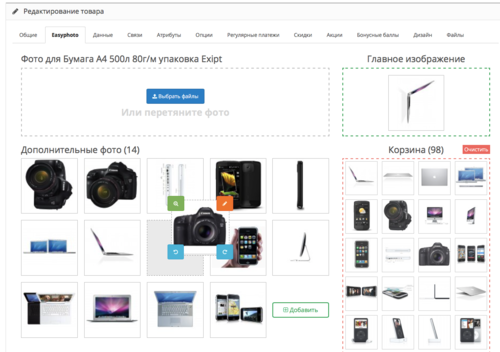
There are settings as well as functionality for renaming already uploaded photos and deleting unnecessary ones.
Easyphoto — Drag & Drop Photo Upload and Sorting

Key Features:
Create and Use Attribute Templates:
Prepare pre-configured templates with attribute sets and apply them to products with a single click. This is especially useful for products with similar parameters (e.g., electronics, clothing, or furniture).
Quickly Add Attributes to Templates and Groups:
Add new attributes directly to already created templates and groups. This speeds up attribute updates and simplifies product setup.
Attribute Groups for Bulk Addition:
Organize attributes into groups and add them to products all at once. This is convenient for categories where all items share similar parameters.
Fast Attribute Addition from Templates:
Apply pre-configured templates directly on the product editing page to avoid manual data entry.
View and Manage Attributes in Products:
View all products associated with a specific attribute. Edit attribute values for multiple products simultaneously. Remove unnecessary attributes and add new products to the related list. Seamless Integration and User-Friendly Interface:
The module integrates perfectly with OpenCart's standard functionality while maintaining compatibility with other extensions. Its intuitive interface ensures ease of use, even for beginners.
Advantages of the Module:
✅ Time-Saving: Quickly adding attributes to templates and groups reduces the time spent setting up products.
✅ Convenience: All tools for attribute management are available in one place.
✅ Bulk Management: Edit attributes for multiple products simultaneously, eliminating repetitive tasks.
✅ Flexibility: Add attributes from templates, groups, or individually to adapt the module to your store’s specific needs.
✅ Suitable for All Stores: The universal functionality makes this module valuable for online stores of any size and type, from electronics to fashion and cosmetics.
✅ Error Reduction: Templates and groups minimize the risk of incorrect data entry.
✅ Increased Efficiency: Speeds up the process of adding and updating products, which is particularly important for stores with a large inventory.
Installation:
For the module to work, you need to add additional tables to the database. To do this, run queries from the attribute_manager_query.sql file. The module is easily installed via the standard OpenCart extension loader, no additional settings are required. Two modifiers are available (only one needs to be installed) attribute_manager_oc3.ocmod.zip - install if you purchased only this modifier attribute_manager_oc3_for_attribute_value_editor.ocmod.zip - if you plan to use it with the module
DEMO
Admin Page login/password: demo/demodemo License:
Permitted for use in one online store.
Attribute Manager

Edixon — Bulk editing of products in OpenCart without errors and risks

Attribute Select

File Manager Images (bulk photo upload)

The module allows you to work not with each product individually, but with an entire selection at once: modify prices and stock levels, categories, manufacturers, attributes, options, specials, discounts, SEO data, and other parameters from a single working interface.
Filter the required products → configure the changes → apply them to the entire selection.
Instead of dozens or hundreds of open product pages, you get a unified workspace for catalog management.
Smart Batch Editor Pro — Mass Product Editing for OpenCart / ocStore

Управление торговлей 6 Персональный редактор ++




User Feedback
What is this plugin for?
Plugin demo video
An advanced version of this plugin is available — "AI GenProTools for OpenCart":
Minimum requirements:
- PHP >= 7.4.33
- OpenCart versions 2.1.x – 3.xx
- OpenAI API key
The module, using ChatGPT gpt-3.5-turbo, gpt-4, can:
-
generate product data:
- mass generation of all data for products, including images
-
suggest a category
- if there is no such category in the database, it will create it when saving (with data from AI)
- offer real images to choose from (you can choose the main and additional ones)
-
generate:
- descriptions (with translation into languages available on the site)
- SEO
-
comments (randomly in languages available on the site)
- by parameters: quantity, rating, date range ...
-
get:
-
attributes
- if there is no such attribute in the database, it will create it when saving (with data from AI)
-
manufacturer
- if there is no such manufacturer in the database, it will create it when saving
-
attributes
-
generate category data:
-
suggest a chain of parent categories
- if there are no such categories in the database, then when saving it will create them (with data from AI)
- offer real images to choose from
-
generate:
- descriptions (with translation into languages available on the site)
- SEO
-
suggest a chain of parent categories
-
generate site data:
- multilingual functionality to the admin panel in the site settings (may conflict with other modules that also add multilingual functionality to the admin panel in the site settings)
-
generate (with translation into languages available on the site):
- Name of the site
- Meta Title
- Meta Tag Description
- Meta Tag Keywords
Takes into account OpenAI Rate limits
Install
For OC 2.x, OC 3.x
- on “Extension Installer” page – upload install archive
- on “Modifications” page – update modifications
- on modules (extensions) page – click “Install” for this module
- on the configuration page of this module in the "OPEN AI" block, you need to enter the OpenAI API key, select the model and choose the "Rate limit type" suitable for your OpenAI account
Update
For OC 2.x
- on “Extension Installer” page – upload install archive
- on “Modifications” page – update modifications
For OC 3.x
- on “Extension Installer” page – click “Uninstall” for this module
- on “Extension Installer” page – upload install archive
- on “Modifications” page – update modifications
Uninstall
For OC 2.x
- on “Modules” (extensions) page – click “Uninstall” for this module
- on “Modifications” page – remove modification “Age Verification”
- on “Modifications” page – update modifications
For OC 3.x
- on “Modules” (extensions) page – click “Uninstall” for this module
- on “Extension Installer” page – click “Uninstall” for this module
- on “Modifications” page – update modifications
If you need a complete removal of all module files, then for OpenCart below the 3rd version you need:
- On the server (can be searched) find and delete files and folders with the name "ai_gpt_tools"
If you need a complete remove all data set by the module from database:
- You need to go to the admin panel and just open route=extension/module/ai_gpt_tools/uninstall_tables
Plugin support and maintenance
Due to the plugin's long-standing presence, numerous purchases, and positive customer feedback, we believe that the plugin is functional by default and is delivered "AS IS." The plugin is in regular demand among our customers, has been tested on all popular platform versions, operates without errors, and undergoes updates regularly when new versions are released.
If, after installing the plugin, any conflicts arise with other plugins in your store or if the plugin does not work correctly with your store due to any non-standard solutions or pre-existing issues on your site before the plugin's installation, you can request technical support from us for an additional fee. This fee will cover the identification and resolution of issues on your site/store, conflict resolution, and proper configuration of the plugin to work without conflicts, if technically possible.
Alternatively, if you are dissatisfied with the plugin for any reason, you may cancel your purchase by requesting a refund through the support service of the site where you purchased the plugin. In such cases, after the refund is processed, the use of the plugin by you is prohibited.
You are welcome to share your suggestions for improving the plugin. We will review your proposal, but if you require immediate implementation, customizations, or fixes for your store, these will be carried out by our company for an additional cost.
We hope for your understanding and are confident that our plugin will optimize your site’s performance and increase its productivity.
Характеристики


-
Recently Browsing 0 members
- No registered users viewing this page.