

Пов'язані
Інші рішення в тій самій області магазину.
-39%
 Придбати

With the help of this module, you will be able to maximize the potential of reviews on the site and, accordingly, increase your sales, since customers will be able not only to leave reviews, but also to add their photos and videos, and the motivation system in the form of bonus points for reviews will increase and facilitate the receipt of these very reviews.
Updated
Reviews PRO with Photos and Videos
1,800грн
1,100 грн
14 46

Купить в 1 клик PRO - Быстрый заказ Demo Opencart 3x Главная Demo Opencart 3x Категории Demo Opencart 3x Товар Админка login: demo pass: demo 1) Пользователь видит дополнительные кнопки "Быстрого заказа" - кнопки имеют гибкие настройки как по цвету, так и по иконкам(более 400) 2) Быстрый заказ не только с карточки товара но и с категории и модулей 3) Регистрация всех заказов в админке + информер + ссылка на страницу товара, заказ на который был сделан 4) Гибкие настройки цветов, названий ,отправки СМС и отправки на почту 5) Заказ падает в заказ 6) В модуль добавлен выбор опций. 7) При выборе количества и опции автоматический пересчет цены. 8) В админке в графе регистрации быстрых заказов отображается присвоеный порядковый номер заказа + название и картинка заказанного товара ( очень удобно для визуального контроля) 9) Быстрая обработка с переходом в сам заказ 10) купить все что в корзине в 1 клик (Корзина покупок) ..
Updated
Купить в 1 клик PRO - Быстрый заказ oc 3.x 7.3
450 грн
278 481

An empty «Reviews» tab under your product sends shoppers to read reviews on a marketplace, and from then on they come back there, not to you. OcBox Reviews Pro turns the stock review table into a proper sales tool: photos and video from the buyer, separate pros and cons, a shop reply under every complaint, a «bought here» marker on verified purchases, and a dedicated product questions section that works for every future customer. A reminder email a few days after the order collects reviews you never had, reward points for photo reviews bring in real-life shots your supplier will never give you, and a one-switch Schema.org markup puts stars in Google next to your product and lifts your click-through from search. $30, licence covers the shop domain and a test domain, first year of updates included. Message the OcBox profile to get started.
Updated
OcBox Reviews Pro for OpenCart 3 and ocStore: reviews with photos and video, product questions, post-order reminders, reward points and Schema.org
1,440 грн
0 1

Купить в 1 клик PRO - oc 2.x Быстрый заказ Версия для 15 купить все что в корзине в 1 клик заказ падает в заказ демо Opencart 2.x карточка товара демо Страница категорий login: demo pass: demo http://opencart20.waterfilter.in.ua/fastimage/quickorderv7.2_0.jpg http://opencart20.waterfilter.in.ua/fastimage/quickorderv7.2_1.jpg http://opencart20.waterfilter.in.ua/fastimage/quickorderv7.2_2.jpg 1) Пользователь видит дополнительные кнопки "Быстрого заказа" - кнопки имеют гибкие настройки как по цвету, так и по иконкам(более 400) 2) Быстрый заказ не только с карточки товара но и с категории 3) Регистрация всех заказов в админке + информер + ссылка на страницу товара, заказ на который был сделан. 4) Гибкие настройки цветов, названий ,отправки СМС. 5) Заказ падает в заказ 6) В модуль добавлен выбор опций. 7) При выборе количества и опции автоматический пересчет цены. 8) В админке в графе регистрации быстрых заказов отображается присвоеный порядковый номер заказа + название и картинка заказанного товара ( очень удобно для визуального контроля) 9) Быстрая обработка с переходом в сам заказ , присвоение статуса. Модуль использует ionCube с онлайн проверкой ключа после приобретения писать в личку заглавив письмо" КУпил, Скачал, Жду ключа на Купить в 1 клик"..
Updated
Купить в 1 клик PRO - oc 2.x
450 грн
414 1491

The module creates a block of similar products on the product page based on the data of this product using morphology and relevance.
Updated
Similar products with morphology and relevance
450 грн
123 149

This modifier is designed to enhance the product page interface in OpenCart by allowing the addition of icons and tooltips for product attributes and attribute groups. It helps improve how customers perceive product information, making the selection process more convenient and informative. The modifier includes the ability to customize icons for attributes and add text tooltips that appear as pop-up windows, helping users better understand what each attribute means.
Advantages of the modifier:
Simplified perception of product attributes:
Using icons allows quick and clear representation of attribute information such as color, size, material, and more. Tooltips provide the ability to reveal more detailed information without overloading the page. Improved user experience:
Shoppers can get all the necessary information about a product directly on the page without navigating to other tabs or ignoring technical details. Tooltips and icons make the interface more interactive and visually appealing. Flexibility and customization:
Store administrators can set icons and tooltips for each product attribute or attribute group separately. Support for attribute groups allows applying icons and tooltips to all products within a single attribute group. Multi-language support:
The modifier supports multilingual stores, allowing you to customize tooltips for each language version of the store. Increased conversion:
Tooltips and icons help customers quickly navigate product details and make purchasing decisions, which in turn can increase conversion rates and reduce cart abandonment. Compatibility:
OpenCart 3.x Installation:
Run the query from the attribute_info_query.sql file in the website database (don’t forget to change the table prefix).
Install the extension using the built-in OpenCart installer.
Refresh the modifications.
Template Compatibility:
The extension is compatible with the default template. Adaptation is required for other templates (paid adaptation).
DEMO
Admin Page login/password: demo/demodemo Store Page License:
Allowed for use in one online store.
Advantages of the modifier:
Simplified perception of product attributes:
Using icons allows quick and clear representation of attribute information such as color, size, material, and more. Tooltips provide the ability to reveal more detailed information without overloading the page. Improved user experience:
Shoppers can get all the necessary information about a product directly on the page without navigating to other tabs or ignoring technical details. Tooltips and icons make the interface more interactive and visually appealing. Flexibility and customization:
Store administrators can set icons and tooltips for each product attribute or attribute group separately. Support for attribute groups allows applying icons and tooltips to all products within a single attribute group. Multi-language support:
The modifier supports multilingual stores, allowing you to customize tooltips for each language version of the store. Increased conversion:
Tooltips and icons help customers quickly navigate product details and make purchasing decisions, which in turn can increase conversion rates and reduce cart abandonment. Compatibility:
OpenCart 3.x Installation:
Run the query from the attribute_info_query.sql file in the website database (don’t forget to change the table prefix).
Install the extension using the built-in OpenCart installer.
Refresh the modifications.
Template Compatibility:
The extension is compatible with the default template. Adaptation is required for other templates (paid adaptation).
DEMO
Admin Page login/password: demo/demodemo Store Page License:
Allowed for use in one online store.
Updated
Icons and tips for product attributes
320 грн
30 174

This modification is designed to enhance the product page interface in OpenCart by allowing you to add tooltips to product options. It helps improve how customers perceive product information and makes the selection process more convenient and informative. The modification includes settings for text tooltips displayed as pop-up hints, helping users better understand what each option means.
Benefits of the Modification
Simplified understanding of product options: Pop-up tooltips allow you to provide more detailed information without cluttering the page. Improved user experience: Customers can get all the necessary information directly on the product page without switching tabs or dealing with technical details. Tooltips make the interface more interactive and visually appealing. Flexibility and customization: The store administrator can configure tooltips for each product option individually. Multilingual Support
The modification supports multilingual stores, allowing tooltips to be configured separately for each language version of the store. Conversion Boost
Tooltips help customers navigate product options faster and make purchase decisions more confidently, which can increase conversion rates and reduce cart abandonment. Compatibility
OpenCart 3.x Template Compatibility
The extension is compatible with the standard default template. For other templates, adaptation may be required (paid adaptation).
Installation
Run the SQL query from the file tips_for_product_options_query.sql in the database (taking into account the table prefix). Install the module via the OpenCart admin panel. Refresh the modifications. DEMO
Admin Page login/password: demo/demodemo Store Page License
The license applies to one domain and its subdomain.
Benefits of the Modification
Simplified understanding of product options: Pop-up tooltips allow you to provide more detailed information without cluttering the page. Improved user experience: Customers can get all the necessary information directly on the product page without switching tabs or dealing with technical details. Tooltips make the interface more interactive and visually appealing. Flexibility and customization: The store administrator can configure tooltips for each product option individually. Multilingual Support
The modification supports multilingual stores, allowing tooltips to be configured separately for each language version of the store. Conversion Boost
Tooltips help customers navigate product options faster and make purchase decisions more confidently, which can increase conversion rates and reduce cart abandonment. Compatibility
OpenCart 3.x Template Compatibility
The extension is compatible with the standard default template. For other templates, adaptation may be required (paid adaptation).
Installation
Run the SQL query from the file tips_for_product_options_query.sql in the database (taking into account the table prefix). Install the module via the OpenCart admin panel. Refresh the modifications. DEMO
Admin Page login/password: demo/demodemo Store Page License
The license applies to one domain and its subdomain.
Updated
Product Option Tooltips
250 грн
0 0
 multilang
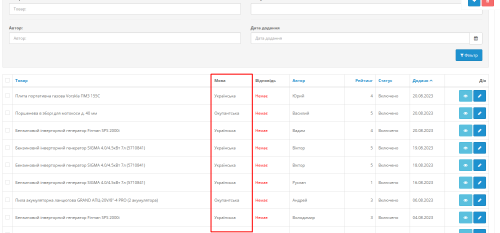
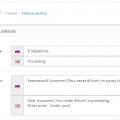
Модуль дозволяє під час модерації відгуків для товарів обрати мову відгуку. Відповідно в картці товару будуть відображатися англомовні відгуки, на англомовній версії сайу, відгуки написані українською мовою, будуть відображатися тільки для цієї мови. Це дозволяє позбутися міксованого контенту коли у вас для сторінки вказаний hreflang="uk", а відгуки є різними мовами.
Updated
Multi language Reviews for goods
350 грн
1 3

Продаж «Like Dislike» призупинено
Ми підібрали схожі модулі інших розробників — їх можна придбати вже зараз.
Інші варіанти
User Feedback
Previous FileНовогодняя гирлянда для Opencart 3
Next FileAdditional photo of the product in the catalog on hover












-
Recently Browsing 0 members
- No registered users viewing this page.