Photo in the list of categories of the administrator


Що можна обрати замість


Кнопка view в списках (товар, категория, производитель, статья)
Порядок сортировки категорий админка VQMOD
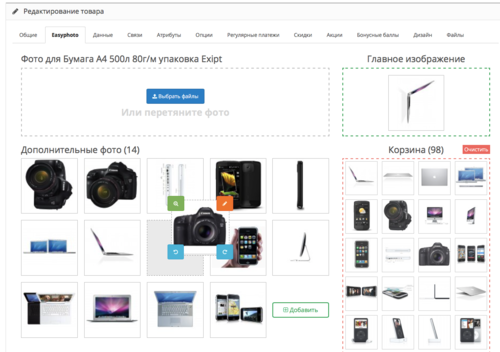
There are settings as well as functionality for renaming already uploaded photos and deleting unnecessary ones.
Easyphoto — Drag & Drop Photo Upload and Sorting

OcBox AI Category Manager. Visual AI category and product manager for OpenCart 3.0 and ocStore: drag-drop, batch, tree, AI descriptions

The module helps you fill your catalog with high-quality images faster without constantly switching between third-party services and manually editing files.
Search photo in Google, optimization and AI-creation of backgrounds for product photos V1.4

File Manager Images (bulk photo upload)

Управление торговлей 6 Персональный редактор ++
Image search for products PRO

Attribute Category

It adds the ability to search using morphology and relevance.
Search Admin - improved product search in the admin panel

Smart Category Pro — OpenCart Category Management

Smart Brand Pro — OpenCart Brand Management

Main Features
Category Management
Bulk change of categories for selected products Assign multiple categories at once Set main category Convenient category selection via autocomplete Manufacturer Management
Bulk change of product manufacturer Quick manufacturer selection via autocomplete Apply changes to multiple products at once Interface & Usability
Convenient modal windows directly in the product list Instant application of changes Advantages
Time-saving when managing product catalog No need to open each product individually Simple and intuitive interface Fast bulk editing in just a few clicks Compatibility
OpenCart 3.x Installation
Install the module via OpenCart admin panel Refresh modifications DEMO
Admin Page login/password: demo/demodemo License
The license applies to one domain and its subdomains.
Mass Editing Categories and Manufacturer


User Feedback
This add-on was created to understand in which categories the image was added. At the same time, there is no need to go to the user part and methodically go through all the categories, of course, such a solution works if there are not many categories, but if there are 100+ of them?
How to install?
Цитата1. Go to the administrative part of the store.
2. Expand the "Modules / Extensions" tab and go to the "Install extensions" item.
3. Select our add-on and click download.
4. After that, you need to go to the "Modifiers" tab.
5. And update the modifiers.
The add-on is not tied to the developer's server, does not require a license key, and the fee for it is purely symbolic in order to stimulate the creation of more popular modules and templates.
/monthly_2022_10/122791029_Screenshot2022-10-10194914.png.5da51b5fe7f8a7a9aaedcd10a741741a.png" rel="">
Характеристики
-
 2
WebCrafters's Other Downloads


-
Recently Browsing 0 members
- No registered users viewing this page.