



Що можна обрати замість

TurboSMS Notify - SMS/Viber Notifications

SMS Fly Order PRO Sending SMS to customers about orders and statuses
SmsFly order

Abandoned Cart - cart recovery for OpenCart/OcStore

Key Features
Automatic submission of new customers to the selected SendPulse address book Adding customer's email, phone number, and name Sending order details (email, phone, first name, last name) Ability to segment customer groups and order statuses into different address books Benefits
Easy installation and configuration through the admin panel No system file modifications (OCMOD) Boosts marketing effectiveness and repeat sales Additional Integrations
Compatible with the subscription system from Octemplates Feel free to contact via PM for integration with other subscription modules Installation Instructions
Install the module through the OpenCart admin panel Refresh the modification cache Go to System → Users → User Groups in the admin panel and assign editing permissions to the appropriate administrator groups Navigate to Extensions → Extensions → Modules, activate the "SendPulse Address Book" module, and configure it DEMO
Admin Page login/password: demo/demodemo Requirements
OpenCart 3.x / OcStore 3.x SendPulse account SendPulse API keys License
Allowed for use in one online store only.
SendPulse Address Book


User Feedback
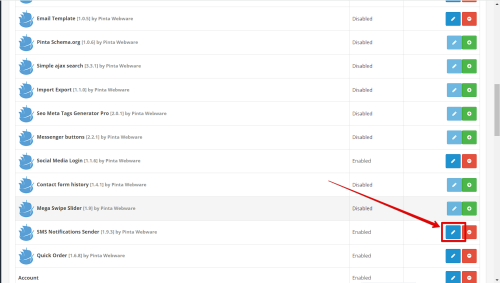
The SMS Notifications Sender extension allows you to inform the client and administrator about various events on your site using SMS notifications. This helps you send up-to-date information in a timely manner.
Greet new customers of the site, confirm the order, or inform customers about a change in the status of their order.
By setting up automatic sending of SMS notifications through the admin panel of your website, you will be able to inform the client about successful registration, orders placed, various stages of order processing and delivery. It is very convenient for the client that he will receive all the information in the form of SMS and there is no need to additionally check the mail.
In addition, this information can also be sent to the site administrator.
The next step after successfully downloading the SMS Notifications Sender extension is to select the service for sending SMS notifications that is right for you. After that, you need to create an account and use the registration data for further work with the extension.
The next step after successfully downloading the SMS Notifications Sender extension is to select the service for sending SMS notifications that is right for you. After that, you need to create an account and use the registration data for further work with the extension.
Services for sending SMS notifications integrated with the extension:
- Clickatell. Detailed information about the service can be found at .
- GatewayAPI. Detailed information about the service can be found at .
- BulkGate. Detailed information about the service can be found at .
- TurboSms. Detailed information about the service can be found at .
- SmsRu. Detailed information about the service can be found at .
- ePochtaSms. Detailed information about the service can be found at .
- RedSms. Detailed information about the service can be found at .
- ByteHand. Detailed information about the service can be found at .
- IntelTelecom. Detailed information about the service can be found at .
- DigitalDirect. Detailed information about the service can be found at .
- Twilio. Detailed information about the service can be found at .
The SMS Notifications Sender extension allows you to:
- send an SMS notification to the client after placing a new order, incl. quick order forms
- send an SMS notification to the client after changing the status of the order,
- send an SMS notification to the client after successful registration on the site,
- send an SMS notification to the administrator after placing a new order, incl. quick order forms
- send an SMS notification to the administrator after successful registration on the site,
- set up message templates for automatic sending of SMS notifications,
- use substitution tags in the message template.
Examples of substitution tags in a message template:
{SiteName} - name of shop
{CustomerName} - customer name
{OrderID} - order ID
{QuickOrderID} - quick order ID
{Email} - client email
{Phone} - customer phone number
{Comment} - customer comment
{CartTotal} - total order value
{StatusFrom} - status changed from
{StatusTo} - status changed to
{ShippingAddress} - delivery address
{ShippingMethod} - delivery method
{PaymentAddress} - billing address
{PaymentMethod} - payment method
Features:
- Inform the customer about the successfully placed order in a timely manner.
- Send SMS confirmation of the order automatically.
- Notify your manager about the new order.
- Set up SMS messages for automatic sending right in the admin panel.
Instructions for use:
- Download and install the extension;
- Create an account on the selected service for sending SMS notifications;
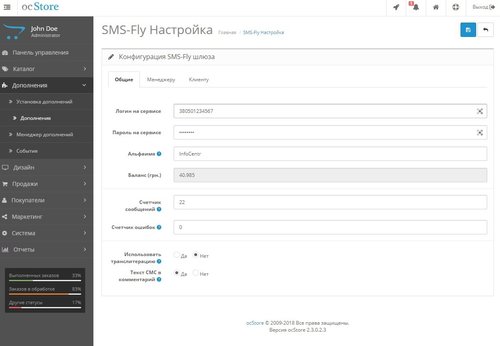
- Enter your registration data on the settings page;
- Select events for sending SMS notifications;
- Customize message templates with substitution tags;
- Save your changes and immediately inform your customers about the events.
Характеристики


-
Recently Browsing 0 members
- No registered users viewing this page.