


Що можна обрати замість

OcBox AI Smart Related. AI related products for OpenCart and ocStore + rule engine + Bought-Together AI + block analytics + 4-in-1


Product Option Link - Опция как ссылка на товар (OC 1.5)

Product Option Link - Опция как ссылка на товар (OC 2.1-3.0)

ASSL Lookbook — Products on Photos

Main Features:
Automatic display of product-related features. Image support for better visualization of features. Easy integration with any templates. Fully responsive design. Usage Examples:
Clothing:
How to wash (hand wash, machine wash, dry cleaning). How to iron (ironing allowed, ironing prohibited, steam iron). Material composition (100% cotton, polyester, wool). Electronics: Key technologies (AMOLED display, water resistance IP68). Compatibility (wireless charging support, works with iOS and Android). Important features (fast charging, NFC, 5G support). Benefits of Using the Module:
Improved visual perception of product features. Convenient and clear presentation of product details. Enhanced user experience and increased conversion rate. Easy setup. Installation:
Run the query from the product_features_query.sql file in the website database (don’t forget to change the table prefix).
Install the extension using the built-in OpenCart installer.
Refresh the modifications.
Grant access permissions to user groups.
Go to store settings: System → Settings → Edit Store → Options tab and configure the width and height of the feature images.
The feature management page is located at: Catalog → Attributes → Features.
Template Compatibility:
The extension is compatible with the default template. Adaptation is required for other templates (paid adaptation).
DEMO
Admin Page login/password: demo/demodemo Store Page License:
Allowed for use in one online store.
Product Features

Быстрый просмотр товара PRO oc 15x / 2.x

It allows you to display additional information in a convenient and visual way — such as size charts, care instructions, delivery and payment terms, warranty details, promotions, and much more.
The module supports bulk assignment by selected categories and manufacturers.
Main Features:
Create popup windows with tabbed content. Unlimited number of content tabs. Bulk add content to product groups by selected categories and manufacturers. Multilingual support. Ability to insert images, tables, text, and HTML content into tabs. Display popup trigger button on the product page. Example Use Cases:
Size chart — add a tab with size tables for different brands or categories. Care instructions — provide helpful product care information. Delivery and payment info — show details without leaving the product page. Promotions, warranty, or certificate information. Benefits:
Improves user experience — customers get all the necessary info without reloading the page. Reduces customer inquiries (especially about sizes and shipping terms). Flexible content assignment — easily update information for many products at once. Theme Compatibility:
default Adaptation for other themes is paid. Please contact before purchase!
Installation:
Upload the module archive via Extensions → Installer. Upload the theme adaptation archive via Extensions → Installer. Refresh modification cache (Extensions → Modifications → Refresh). Go to Extensions → Modules → Content Popup and click Install. Configure the module. After saving settings, always click "Add content to products". Template Compatibility:
The extension is compatible with the default template. Adaptation is required for other templates (paid adaptation).
DEMO
Admin Page login/password: demo/demodemo Store Page License:
Use is allowed in one online store only.
Content Popup


User Feedback
Модуль Сопутствующие товары позволяет Вашим клиентам обратить внимание, а то и прикупить заодно с выбранным товаром, сопутствующий ему.
Например, в вашем магазине имеются в продаже удочки, катушки, леска и прочие снасти. К категории "Удочки" довольно уместно привязать категории "Леска", "Катушки", - в таком случае, пользователь находясь в карточке товара выбранного заветного удилища будет видеть блок сопутствующий товаров(аксессуаров), что непременно повлечет к покупке "крючка и лески" к удочке  . Или же у Вас в продаже Фотокамеры, - обязательно нужно предложить к фотокамере приобрести объектив, сумку-чехол, карту памяти и т.д.
Количество смежных категорий не ограничено.
Настройка модуля в админке:
- Лимит товаров (для каждой сопутсвующей категории);
- Заголовок(мультиязычный, с возможностью вставки переменных - название категории и название текущего товара)
- Размер изображения;
-
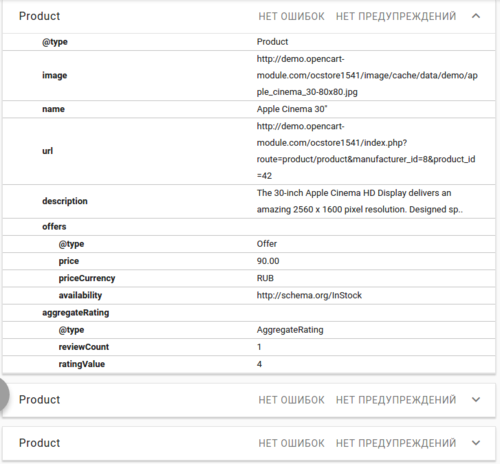
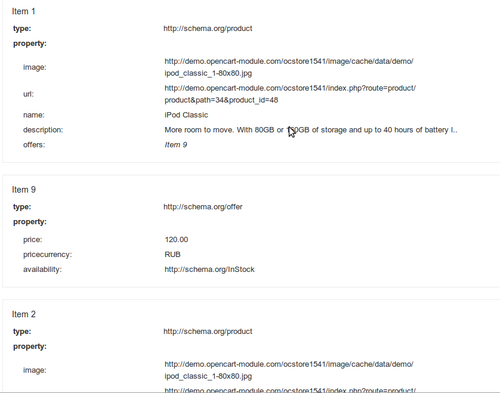
Схема(по умолчанию стоит Product, менять не стоит ибо работает только в этой ) (UPD: + схема категории);
- Расположение(шапка,подвал,слева,справа);
- Статус(вкл/выкл);
- Сортировка
- Возможность вывода ссылки на все товары сопутствующей категории
- Вкл./выкл. счетчика товаров в ссылке перехода
- Вывод товаров в карусели(для расположения товара сверху/снизу используется новая адаптивная карусель OWL Carousel!! что это такое и какие преимущества среди аналогов можете ознакомится на офф. сайте)
- Настройка цвета фона активных вкладок
-
Выбор типа сортировки товаров(new!):
- по наименованию
- по модели
- по количеству
- по цене
- по рейтингу
- по дате добавления
- по кол-ву просмотров
- случайчая выборка
Добавляйте связи категорий и в бой
Расчитан на две локали - русскую и англ.
Инструкция - распаковать содержимое архива в корень сайта.
Вроде всё. Хороших Вам продаж!
Демка модуля
Работает на всех версиях ocStore 1.5.х ! На версии оригинального Opencart 2.х работать не будет!
Быть может Вас могут заинтересовать:
- Модуль "Похожие товары (vqmod)"
- Модуль "Похожие товары"
- Модуль "Рекомендуемые товары"
- Клон модуля "Рекомендуемые товары"
- Клон клона модуля "Рекомендуемые товары"
- Модуль оплаты Z-Payment для версий 1.5.x
- Микроданные Schema.org
- Микроданные Schema.org + Яндекс Острова для категорий
- Микроданные Schema.org + Яндекс Острова для производителей
Характеристики
-
 1



-
Recently Browsing 0 members
- No registered users viewing this page.