



Що можна обрати замість

The micro-markup module allows you to make a good snippet in search engine results. Which significantly increases click-through rates, and as a result, sales.
The module creates structured data for Products, Categories, Articles, Blog, Photos, Videos, markup for social networks, etc.
MicrodataPro - microdata markup for online store


It supports FAQPage schema markup in Microdata or JSON-LD format
SP AUTO SEO FAQ Question-Answer with FAQPage JSON-LD/Microdata markup

SEO Meta Tag Generator

SEO meta tags for system pages

The extension creates llms.txt and llms-full.txt files, as well as separate Markdown files for products, categories, manufacturers, and information pages. Updates are processed through a queue and Cron, allowing the extension to be used in stores with large catalogues.
Important information about llms.txt
llms.txt is a proposed open format for presenting essential website information to language models and AI agents. It helps provide an AI system with a clear website description and structured links to important pages without requiring it to analyse menus, JavaScript, and the entire HTML layout.
The llms.txt protocol is not currently used by every AI system. Its support and practical use are still developing, so publishing these files does not guarantee website crawling, inclusion of its pages in AI answers, or improved search rankings.
The extension does not replace XML or HTML Sitemaps, robots.txt, canonical URLs, Schema.org structured data, conventional SEO, internal linking, or page content available to users. It is an additional technical channel that helps prepare a website for the future development of AI search and AI agents.
The llms-full.txt file in this extension is an extended index containing links to selected sections. The extension intentionally does not combine the entire catalogue into one large text file: complete data is stored in separate Markdown files, making it easier to update and use.
Important information about URL generation
The extension includes its own mechanism for building links to products, categories, manufacturers, and information pages. SEO URLs are generated using the standard seo_url table, the category_path structure, and the extension’s own URL settings.
During generation, the extension does not call OpenCart’s standard URL rewriting mechanism and does not depend on third-party SEO modifications being executed. This reduces the risk of errors caused by conflicts or special behaviour in third-party SEO URL and multilingual extensions.
The link format must be configured to match the website’s actual structure: select language folders or separate domains, a full or short category path, and a URL suffix. Before starting a full generation, we recommend opening the product preview and confirming that the generated links match the storefront URLs.
Extension features
Create the root llms.txt file Create the additional llms-full.txt file Create separate Markdown files for products Create separate Markdown files for categories Create separate Markdown files for manufacturers Create separate Markdown files for information pages Create section indexes and a language index Export all, selected, or no records for each entity type Create a separate set of files for each active store language Add separate titles, descriptions, static text, and Sitemap URLs for each language Add separate HTML and XML Sitemaps to llms.txt and llms-full.txt Automatically add queue jobs when catalogue data changes Process the queue in batches via Cron Content modes
The extension lets you choose how llms.txt and llms-full.txt are generated.
Links only — the extension creates indexes, entity files, and structured links Static text only — llms.txt and llms-full.txt are created from the specified title, short description, manual text, and Sitemap URLs Static text + links — manual text is displayed after the short description, followed by automatically generated links Separate title, short description, text, HTML Sitemap, and XML Sitemap fields are provided for llms.txt and llms-full.txt. Values are configured separately for each active language.
Export settings
One of three modes can be selected for products, categories, manufacturers, and information pages.
Export all records Export selected records only Do not export this entity type When “Selected only” is enabled for categories or manufacturers, these settings are also applied to products. For example, files can be created only for products from selected categories or only for products from specific manufacturers.
Product Markdown file content
Depending on the settings, a product file can contain:
Product name and short description Link to the product page Product ID Model and SKU Manufacturer Main category Regular and special prices Availability status Last update date Product attributes Available options Cleaned description in plain text or Markdown format Main image Additional images with a configurable limit URL settings
The extension allows you to configure the link format to match the structure of a particular website.
Short SEO URLs Full URLs with parent category paths Product URLs with a full category path Category URLs with the complete hierarchy URL endings: no suffix, /, or .html Files for the default language only or for all active languages Language folders such as /ru/ or /en/ Separate domains, subdomains, or base URLs for different languages The internal OpenCart language code, such as uk-ua or en-gb, is used only for file storage and is not added to public URLs.
URL configuration examples
Website without language folders
When only the default language is exported and it does not use a language folder, the public URLs will look like this:
https://example.com/llms.txt https://example.com/llms-full.txt https://example.com/llms/products/145.md Default language without a folder, other languages with folders
If the default language opens without a prefix while other languages use folders, leave the default language field empty and enter the appropriate values for the other languages.
https://example.com/llms.txt https://example.com/ru/llms.txt https://example.com/en/llms.txt https://example.com/en/llms/products/145.md Languages on separate domains or subdomains
If separate domains or subdomains are used for languages, specify the base URL for each language in the extension settings.
https://example.com/llms.txt https://ru.example.com/llms.txt https://en.example.com/llms.txt SEO URLs ending in .html
If the store pages end in .html, specify it in the SEO URL suffix setting.
https://example.com/product-url.html https://example.com/category/product-url.html Automatic file updates
The extension uses standard OpenCart events. When a product, category, or information page is added, edited, deleted, or has its status changed using the quick action, the corresponding entity is added to the queue. Manufacturer changes are also added to the queue.
When a category is changed, the extension also adds related products and child categories to the queue. When a manufacturer is changed, its products are added to the queue. This is required because category names, paths, and manufacturers are used in product files and indexes.
Direct SQL queries do not trigger OpenCart events. If a third-party import changes the database directly, updating date_modified alone will not create a job. After such an import, run Full Reconcile or add the full catalogue to the queue manually.
Cron jobs
The extension provides separate URLs for different scenarios.
Regular Cron without action — processes the existing queue in batches. Add this URL to the scheduler with an interval of approximately 1–5 minutes action=full — adds the entire current catalogue to the queue. Run it manually after installation or when all files need to be generated again action=index — adds only root files and indexes to the queue. Use it after changing titles, descriptions, Sitemap URLs, language URLs, or section placement action=reconcile — removes stale records and adds the current catalogue to the queue. Run it manually after a direct import, bulk deletion, or file synchronisation problem URLs containing action=full, action=index, or action=reconcile should not be added to the regular recurring Cron job. They are intended for separate manual scenarios.
Queue, files, and log
View queued jobs Queue pagination and sorting Process the queue manually Delete an individual job View generated files and their public URLs File list pagination and sorting Delete an individual file Delete all generated files Localised operation, change, and error log Log pagination and sorting Clear the log Protection against simultaneous manual and Cron processing Advantages
Structured catalogue representation for AI systems Preparation for the future development of AI search and AI agents No API keys or paid AI services required Automatic file updates after standard catalogue changes Batch processing for large catalogues through a queue and Cron Flexible selection of products, categories, manufacturers, and information pages Separate content for each language Built-in link generation mechanism Support for language folders, domains, and subdomains Result monitoring through the file list and log Built-in detailed help with configuration examples Compatibility
OpenCart 3.x / ocStore 3.x PHP 7.x–8.x Ukrainian, English, and Russian localisations Access to a Cron scheduler Write permission for the OpenCart storage directory Installation
Upload the extension archive through Extensions / Installer Go to Extensions / Modifications and click Refresh Go to Extensions / Extensions Select the Feeds extension type Find AI LLM Feed and click Install Recommended configuration sequence
Enable the extension Enable llms.txt and, if required, llms-full.txt Select the content mode Enter the title, short description, text, and Sitemap URLs for the required languages Select the entity types and their export modes Configure the product Markdown file content Configure language folders or domains to match the website structure Configure the full category path and SEO URL suffix Check the generated Markdown using the product preview Save the settings Add a full generation to the queue once Configure a regular Cron job to process the queue Check the public llms.txt and llms-full.txt URLs If the server returns a 403 error when opening llms.txt or llms-full.txt, you may need to add an exception for these files to the standard FilesMatch rule in the .htaccess file. An example rule is provided in the extension help section.
DEMO
Admin Page login/password: demo/demodemo llms.txt llms-full.txt Licence
The licence covers one domain and its subdomains.
AI LLM Feed


User Feedback
Данный мод добавляет в разметку карточки товара микроданные используя схемы от Schema.org
Что такое Schema.org?
Schema.org – это стандарт семантической разметки данных в сети, объявленный поисковыми системами Google, Bing и Yahoo! летом 2011 года.
Цель семантической разметки – сделать интернет более понятным, структурированным и облегчить поисковым системам и специальным программам извлечение и обработку информации для удобного её представления в результатах поиска.
Яндекс с осени 2011 года понимает этот формат и поддерживает его в некоторых партнерских программах.
Разметка происходит непосредственно в HTML-коде страниц с помощью специальных атрибутов и не требует создания отдельных экспортных файлов.
Микроданные (HTML microdata) — это международный стандарт семантической разметки HTML-страниц, с помощью атрибутов, описывающих смысл информации, содержащейся в тех или иных HTML-элементах. Такие атрибуты делают контент страниц машиночитаемым, то есть позволяют в автоматическом режиме находить и извлекать нужные данные.
Добавляет следующие типы схем:
- name
- manufacturer
- url
- image
- model
- offers
- description
- aggregaterating
- item
- name
- position
- price
- pricecurrency
- availability
- author
- datepublished
- reviewrating
- reviewbody
- worstrating
- ratingvalue
- bestrating
- reviewcount
- ratingvalue
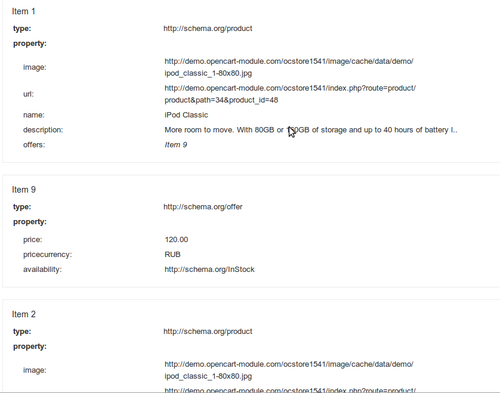
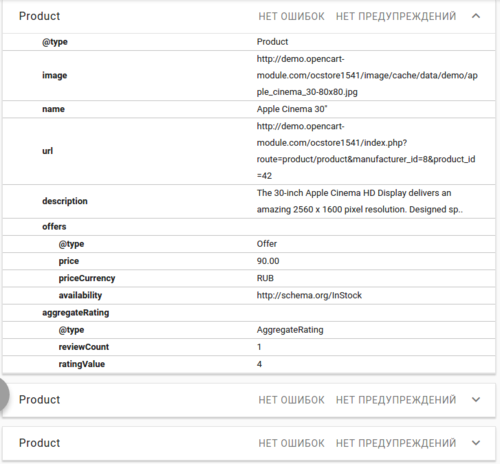
Ссылка - пример того, как видит гугл такую разметку
Работает на всех версиях с дефолтным шаблоном, зависимость может быть только от стороннего шаблона. В случае некоректной работы - допилю под вашу тему. бесплатно, разумеется  (если конечно у Вас один-два домена, не более..
 )
- зависимость от сторонних шаблонов связана с тем, что данный мод, по возможности, добавляет микроданные непосредственно в существующие сущности html, а не скрытыми тегами <meta>, что есть не очень хорошо - в тегах <meta> допускается использовать техническую информацию, для поисковых роботов, которая неуместна в предоставлении пользователю, но никак не весь контент сайта, как это делают многие.. + ко всему вес страниц удваивается
В данном обновлении (3.0) добавлена микроразметка похожих товаров, те что во вкладке выводятся.
Установка:
опенкарт < 2 версии:
- Требуется установленный vqmod
- Распаковать архив(microdata_and_review_no_ajax.zip), скопировать содержимое папки upload в корень магазина (файлы самого движка затронуты не будут);
опенкарт > 2 версии:
- извлечь из архива([ocmod]microdata_and_review_no_ajax.zip) файл с расширением .ocmod.xml и загрузить его штатными средствами движка.
PS: Забыл отметить, что в данный мод добавлено решение от freelancer - Отзывы без аякса (vqmod) ибо без него небыло бы микроданных об отзывах в разметке
PS: Добавлен еще один мод, без Отзывы без аякса (vqmod). Для тех, у кого не используются в магазине отзывы, либо УЖЕ выводятся без аякса. Выбирайте нужный
Внимание: не совместим с шаблонами shoppica и moneymaker а также с другими, имеющими свою разметку микроданными! Поэтому, сначала необходимо убедиться, что в используемом шаблоне нет микроданых.
Быть может Вас могут заинтересовать:
- Модуль "Похожие товары (vqmod)"
- Модуль "Похожие товары"
- Модуль "Рекомендуемые товары"
- Клон модуля "Рекомендуемые товары"
- Клон клона модуля "Рекомендуемые товары"
- Модуль "Сопутствующие товары"
- Модуль Рекомендуемые товары в категории
- Микроданные Schema.org для категорий
- Микроданные Schema.org для производителей
Характеристики
-
 2


-
Recently Browsing 0 members
- No registered users viewing this page.