



Що можна обрати замість
Роблять те саме — можна поставити замість.
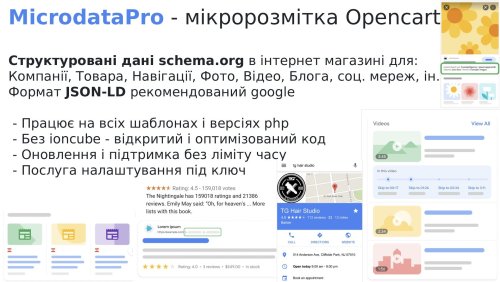
For just $15 you get the friendliness and transparency of an online store for search engines. This will set your site apart from your competitors!
The micro-markup module allows you to make a good snippet in search engine results. Which significantly increases click-through rates, and as a result, sales.
The module creates structured data for Products, Categories, Articles, Blog, Photos, Videos, markup for social networks, etc.
The micro-markup module allows you to make a good snippet in search engine results. Which significantly increases click-through rates, and as a result, sales.
The module creates structured data for Products, Categories, Articles, Blog, Photos, Videos, markup for social networks, etc.
Updated
MicrodataPro - microdata markup for online store
690 грн
3899 10473
Вирішують ту саму задачу, але іншим способом або частково.

Інші рішення в тій самій області магазину.

The module allows you to add a block with frequently asked questions and answers to the homepage, product pages, category pages, ocstore and octemplates blog, ocfilter pages, manufacturer pages, and information pages.
It supports FAQPage schema markup in Microdata or JSON-LD format
It supports FAQPage schema markup in Microdata or JSON-LD format
Updated
SP AUTO SEO FAQ Question-Answer with FAQPage JSON-LD/Microdata markup
550 грн
524 1405
-12%
 Придбати

# SEO Meta Tag Generator for ocStore / OpenCart
The SEO Meta Tag Generator module is designed to automatically generate SEO metadata for online store pages using predefined templates. It simplifies website optimization, reduces the time required to fill in meta tags, and ensures a consistent approach to SEO optimization across your catalog and content.
The generator supports products, categories, manufacturers, and articles, allowing you to configure separate templates for each page type. Thanks to multilingual support, you can create unique templates for every language available on your website.
Key Features
Automatic Meta Title Generation — generate page titles based on predefined templates.
Meta Description Generation — create meta descriptions for search engines.
Meta Keywords Generation — automatically populate keyword meta tags.
H1 Heading Generation — generate page headings according to your configured rules.
Support for Different Page Types — configure templates for products, categories, manufacturers, and articles.
Multilingual Support — define custom templates for each language available on your website.
How Does the Meta Tag Generator Work?
The module uses templates consisting of regular text and special shortcodes. During generation, the shortcodes are replaced with the corresponding values from your website data. As a result, meta tags are generated according to the specific product, category, manufacturer, or article.
For example, instead of manually entering a title for every product page, you can create a single template that automatically generates the Meta Title using the product name and other available data.
Benefits of Using the Module
Save time when optimizing your online store for search engines.
Automate meta tag generation for large numbers of pages.
Flexibly configure templates to match your website structure and requirements.
Maintain a consistent SEO metadata format across different page types.
Adapt meta tags to each language supported by your online store.
Who Is This Module For?
The module is suitable for ocStore / OpenCart store owners, SEO specialists, and developers who want to automate meta tag creation and simplify website SEO optimization.
SEO Meta Tag Generator is a practical tool for automating SEO tasks, simplifying metadata management, and optimizing online store pages...
Submitted
SEO Meta Tag Generator
500грн
440 грн
0 0

SEO Meta Tags for System Pages is a modifier that allows you to add SEO meta data and descriptions to your online store's system pages. This modifier extends the standard functionality, which is often lacking for SEO optimization.
Key features:
Add meta data and descriptions to system pages.
Multilingual support – separate data for each store language.
Easy editing via the admin panel.
Ability to set unique meta tags and descriptions for the following system pages:
Promotions — /index.php?route=product/special
Contacts — /index.php?route=information/contact
Comparison — /index.php?route=product/compare
Manufacturers — /index.php?route=product/manufacturer
Sitemap — /index.php?route=information/sitemap
Cart — /index.php?route=checkout/cart
Checkout — /index.php?route=checkout/checkout
Bookmarks — /index.php?route=account/wishlist
Registration — /index.php?route=account/register
Login — /index.php?route=account/login
Installation and configuration:
Upload the module archive using the standard OpenCart add-on installer.
Update the modifiers.
Go to your store settings and specify meta tags and descriptions for the required pages...
Updated
SEO meta tags for system pages
450 грн
0 3
-30%
Придбати

The AI LLM Feed extension adds a tool to OpenCart 3 and ocStore 3 for creating a structured store description for language models and AI agents in llms.txt and Markdown format.
The extension creates llms.txt and llms-full.txt files, as well as separate Markdown files for products, categories, manufacturers, and information pages. Updates are processed through a queue and Cron, allowing the extension to be used in stores with large catalogues.
Important information about llms.txt
llms.txt is a proposed open format for presenting essential website information to language models and AI agents. It helps provide an AI system with a clear website description and structured links to important pages without requiring it to analyse menus, JavaScript, and the entire HTML layout.
The llms.txt protocol is not currently used by every AI system. Its support and practical use are still developing, so publishing these files does not guarantee website crawling, inclusion of its pages in AI answers, or improved search rankings.
The extension does not replace XML or HTML Sitemaps, robots.txt, canonical URLs, Schema.org structured data, conventional SEO, internal linking, or page content available to users. It is an additional technical channel that helps prepare a website for the future development of AI search and AI agents.
The llms-full.txt file in this extension is an extended index containing links to selected sections. The extension intentionally does not combine the entire catalogue into one large text file: complete data is stored in separate Markdown files, making it easier to update and use.
Important information about URL generation
The extension includes its own mechanism for building links to products, categories, manufacturers, and information pages. SEO URLs are generated using the standard seo_url table, the category_path structure, and the extension’s own URL settings.
During generation, the extension does not call OpenCart’s standard URL rewriting mechanism and does not depend on third-party SEO modifications being executed. This reduces the risk of errors caused by conflicts or special behaviour in third-party SEO URL and multilingual extensions.
The link format must be configured to match the website’s actual structure: select language folders or separate domains, a full or short category path, and a URL suffix. Before starting a full generation, we recommend opening the product preview and confirming that the generated links match the storefront URLs.
Extension features
Create the root llms.txt file Create the additional llms-full.txt file Create separate Markdown files for products Create separate Markdown files for categories Create separate Markdown files for manufacturers Create separate Markdown files for information pages Create section indexes and a language index Export all, selected, or no records for each entity type Create a separate set of files for each active store language Add separate titles, descriptions, static text, and Sitemap URLs for each language Add separate HTML and XML Sitemaps to llms.txt and llms-full.txt Automatically add queue jobs when catalogue data changes Process the queue in batches via Cron Content modes
The extension lets you choose how llms.txt and llms-full.txt are generated.
Links only — the extension creates indexes, entity files, and structured links Static text only — llms.txt and llms-full.txt are created from the specified title, short description, manual text, and Sitemap URLs Static text + links — manual text is displayed after the short description, followed by automatically generated links Separate title, short description, text, HTML Sitemap, and XML Sitemap fields are provided for llms.txt and llms-full.txt. Values are configured separately for each active language.
Export settings
One of three modes can be selected for products, categories, manufacturers, and information pages.
Export all records Export selected records only Do not export this entity type When “Selected only” is enabled for categories or manufacturers, these settings are also applied to products. For example, files can be created only for products from selected categories or only for products from specific manufacturers.
Product Markdown file content
Depending on the settings, a product file can contain:
Product name and short description Link to the product page Product ID Model and SKU Manufacturer Main category Regular and special prices Availability status Last update date Product attributes Available options Cleaned description in plain text or Markdown format Main image Additional images with a configurable limit URL settings
The extension allows you to configure the link format to match the structure of a particular website.
Short SEO URLs Full URLs with parent category paths Product URLs with a full category path Category URLs with the complete hierarchy URL endings: no suffix, /, or .html Files for the default language only or for all active languages Language folders such as /ru/ or /en/ Separate domains, subdomains, or base URLs for different languages The internal OpenCart language code, such as uk-ua or en-gb, is used only for file storage and is not added to public URLs.
URL configuration examples
Website without language folders
When only the default language is exported and it does not use a language folder, the public URLs will look like this:
https://example.com/llms.txt https://example.com/llms-full.txt https://example.com/llms/products/145.md Default language without a folder, other languages with folders
If the default language opens without a prefix while other languages use folders, leave the default language field empty and enter the appropriate values for the other languages.
https://example.com/llms.txt https://example.com/ru/llms.txt https://example.com/en/llms.txt https://example.com/en/llms/products/145.md Languages on separate domains or subdomains
If separate domains or subdomains are used for languages, specify the base URL for each language in the extension settings.
https://example.com/llms.txt https://ru.example.com/llms.txt https://en.example.com/llms.txt SEO URLs ending in .html
If the store pages end in .html, specify it in the SEO URL suffix setting.
https://example.com/product-url.html https://example.com/category/product-url.html Automatic file updates
The extension uses standard OpenCart events. When a product, category, or information page is added, edited, deleted, or has its status changed using the quick action, the corresponding entity is added to the queue. Manufacturer changes are also added to the queue.
When a category is changed, the extension also adds related products and child categories to the queue. When a manufacturer is changed, its products are added to the queue. This is required because category names, paths, and manufacturers are used in product files and indexes.
Direct SQL queries do not trigger OpenCart events. If a third-party import changes the database directly, updating date_modified alone will not create a job. After such an import, run Full Reconcile or add the full catalogue to the queue manually.
Cron jobs
The extension provides separate URLs for different scenarios.
Regular Cron without action — processes the existing queue in batches. Add this URL to the scheduler with an interval of approximately 1–5 minutes action=full — adds the entire current catalogue to the queue. Run it manually after installation or when all files need to be generated again action=index — adds only root files and indexes to the queue. Use it after changing titles, descriptions, Sitemap URLs, language URLs, or section placement action=reconcile — removes stale records and adds the current catalogue to the queue. Run it manually after a direct import, bulk deletion, or file synchronisation problem URLs containing action=full, action=index, or action=reconcile should not be added to the regular recurring Cron job. They are intended for separate manual scenarios.
Queue, files, and log
View queued jobs Queue pagination and sorting Process the queue manually Delete an individual job View generated files and their public URLs File list pagination and sorting Delete an individual file Delete all generated files Localised operation, change, and error log Log pagination and sorting Clear the log Protection against simultaneous manual and Cron processing Advantages
Structured catalogue representation for AI systems Preparation for the future development of AI search and AI agents No API keys or paid AI services required Automatic file updates after standard catalogue changes Batch processing for large catalogues through a queue and Cron Flexible selection of products, categories, manufacturers, and information pages Separate content for each language Built-in link generation mechanism Support for language folders, domains, and subdomains Result monitoring through the file list and log Built-in detailed help with configuration examples Compatibility
OpenCart 3.x / ocStore 3.x PHP 7.x–8.x Ukrainian, English, and Russian localisations Access to a Cron scheduler Write permission for the OpenCart storage directory Installation
Upload the extension archive through Extensions / Installer Go to Extensions / Modifications and click Refresh Go to Extensions / Extensions Select the Feeds extension type Find AI LLM Feed and click Install Recommended configuration sequence
Enable the extension Enable llms.txt and, if required, llms-full.txt Select the content mode Enter the title, short description, text, and Sitemap URLs for the required languages Select the entity types and their export modes Configure the product Markdown file content Configure language folders or domains to match the website structure Configure the full category path and SEO URL suffix Check the generated Markdown using the product preview Save the settings Add a full generation to the queue once Configure a regular Cron job to process the queue Check the public llms.txt and llms-full.txt URLs If the server returns a 403 error when opening llms.txt or llms-full.txt, you may need to add an exception for these files to the standard FilesMatch rule in the .htaccess file. An example rule is provided in the extension help section.
DEMO
Admin Page login/password: demo/demodemo llms.txt llms-full.txt Licence
The licence covers one domain and its subdomains.
Updated
AI LLM Feed
460грн
320 грн
0 1
Продаж «Микроданные Schema.org» призупинено
Ми підібрали схожі модулі інших розробників — їх можна придбати вже зараз.
Інші варіанти
3.2
Ioncube Loader: Ні
Sales paused
Продаж призупинено адміністрацією форуму.
OpenCart2.3, 2.2, 2.1, 2.0, 1.5.6.4, 1.5.6.3, 1.5.6.2, 1.5.6.1, 1.5.6, 1.5.5.1, 1.5.5, 1.5.4.1, 1.5.3.1
ocStore2.3.0.2.4, 2.3, 2.2, 2.1, 1.5.5.1.2, 1.5.5.1.1, 1.5.5.1, 1.5.4.1.2, 1.5.4.1.1, 1.5.4.1, 1.5.3.1, 1.5.2.1, 1.5.1.3
License type
Activation method Без активации
Ioncube LoaderНі
Get request to server of developerНі
Downloads5,895
Submitted07/29/2012
Updated03/27/2022
File Size8.03 kB


User Feedback
There's nothing here yet
-
 2
Previous FileМикроданные Schema.org для производителей
Next FileМикроданные Schema.org для категорий




-
Recently Browsing 0 members
- No registered users viewing this page.