










Що можна обрати замість

MonoPay оплата для Opencart - модуль для подключения эквайринга Monobank к Opencart - 1.7.3

Liqpay API Opencart - онлайн оплата для Opencart 3 и 2.x, OcStore 3 и 2.х.

Wayforpay API оплата для Opencart 2.1, 2.3, 3.x
NovaPay - payment for Opencart 3.x, 2,x + prepayment module

OcBox PaymentHub — every Ukrainian payment method in one module: LiqPay, Monobank, WayForPay, NovaPay, Rozetka Pay, PrivatBank, PUMB

Основные возможности:
- кнопка оформления кредитов на странице товара;
- вывод иконок доступных кредитов в кнопке с указанием максимального платежа;
- всплывающее окно с калькулятором ежемесячных взносов;
- сортировка типов кредитов;
- отключение акций и скидок для каждого типа кредитов;
- отключение возможности покупки в кредитов отсутствующих на складе товаров;
- выбор срока кредита на странице оформления заказа;
- возможность выбора определенных товаров доступных для оформления в кредит;
- ограничение по максимальной и минимальность стоимости товаров доступных для оформления в кредит;
- возможность установки наценки или скидки на оформляемые в кредит товары;
- возможность установки наценки в зависимости от срока кредитования;
- возможность установки максимального срока кредитования на все товары;
- возможность установки максимальных сроков кредитования и наценки на каждый товар индивидуально;
- возможность оформления с холдированием платежа;
- активация доступности товара непосредственно в карточке товара в админке;
- настройка внешнего вида и места вывода кнопки кредита в админке модуля;
- отображение суммы платежа на странице оформления при смене срока кредитования;
- переключение в админке типов кредитов Приватбанка;
- совместимость с модулем Simple - упрощенная регистрация и заказ;
Совместим с версиями 2.x - 3.0.x
Лицензия строго на один домен, и на один тестовый домен(технический домен или поддомены основного домена)
При оформлении покупки обязательно указывать основной домен!
Настройка стикеров под шаблон в бесплатную техподдержку не входит.
Демо для ocStore 3.0
https://demo.fringe.com.ua
Loans from Ukrainian banks - payment module for goods on credit for Opencart

Оплата Western Bid - Paypal, Stripe, Authorize.net
SP Multi-Bank-Details - Auto Selection of Bank Payment Details, Multi-Bank-Details

BankApp Payment Suite is a set of payment extensions for OpenCart and ocStore that allows merchants to accept bank transfers using payment details: the full order amount, a fixed or percentage-based prepayment, and the remaining balance after the prepayment.
After placing an order, the customer sees the prepared payment details, amount, and payment purpose. They can copy the information, open the payment in a banking app using a link, or scan a QR code. The extension also generates PDF invoices, adds invoice links to the order, and allows the administrator to email them to the customer.
What Is Included
Full Payment by Bank Details with QR — a separate payment method for the entire order amount Prepayment by Bank Details with QR — a separate payment method for a fixed amount or a percentage of the order total Balance Payment — a separate PDF invoice and email template for final payment after a prepayment mPDF Runtime — a separate library package for generating PDF files. It is installed once and is not duplicated in payment extension updates Main Features
Two independent payment methods with separate settings Full order payment by bank transfer Fixed-amount prepayment Percentage-based prepayment Automatic calculation of the prepayment and remaining balance QR code containing the payment details, amount, and payment purpose Universal link for opening the payment in a banking app Responsive payment block on the order success page Copying individual payment details or all payment information PDF invoice generation using mPDF Separate invoice templates for full payment, prepayment, and balance payment QR code embedded directly in the PDF invoice Invoice links in the administration panel and the customer account Sending PDF invoices to customers from the administration panel Signed PDF links that customers can access without signing in Editable HTML templates for PDF invoices and emails using Summernote Multilingual payment purposes, notes, invoices, and emails Ukrainian, Russian, and English localization Full Order Payment
The Full Payment by Bank Details with QR method requests payment of the entire order amount. After confirming the order, the customer receives:
the payment recipient’s name tax ID or EDRPOU code IBAN account number the amount due the payment purpose containing the order number a QR code and a button for opening the payment a link for downloading the PDF invoice Fixed-Amount or Percentage-Based Prepayment
The prepayment extension allows you to select one of two calculation methods:
Fixed amount — for example, UAH 500 regardless of the total order value Percentage of the order — for example, 10%, 20%, or 50% of the full amount If the fixed prepayment exceeds the order amount, the requested payment will not exceed the full order amount. The order success page and invoice display the full amount, prepayment, and remaining balance.
Balance Payment Invoice
If the customer decides to pay the remaining amount after making a prepayment, the administrator can generate a separate invoice for the outstanding balance.
Separate payment purpose for the remaining balance Separate HTML template for the PDF invoice Separate email subject and HTML email template QR code containing the correct remaining balance Display of the full amount, prepayment, and outstanding balance Payment Block on the Order Success Page
The payment block is displayed only for the payment method selected by the customer during checkout. Payment details and the QR code are not displayed for other payment methods.
The block is responsive for desktop computers and mobile devices and includes:
the amount due all bank details copy buttons a centered QR code a button for opening the payment in a banking app a link to the PDF invoice an additional note for the customer contact phone numbers and email addresses QR Code and Banking Applications
The extension generates a payment QR code containing the recipient’s details, IBAN, amount, and payment purpose. The customer can scan it directly using a banking application on a mobile device or computer.
After opening the payment, the user only needs to verify the completed payment details and confirm the transfer in their bank.
PDF Invoices
PDF files are generated by the mPDF library using an HTML template configured in the extension settings.
Separate templates for full payment, prepayment, and balance payment Editing through the built-in Summernote editor Automatic insertion of store, order, customer, payment, and delivery information Store logo support Contact phone numbers and email addresses QR code containing the relevant payment amount Correct Cyrillic character rendering A ready-to-use PDF for downloading, printing, or sending to the customer Invoices in the Administration Panel
On the order information page, the administrator can see the available invoice types when the corresponding extension is enabled:
full payment invoice prepayment invoice balance payment invoice The links are available regardless of the payment method originally selected for the order. This allows the administrator to generate the required invoice if the customer changes their preferred payment method.
Sending an Invoice to the Customer
The administrator can send the required invoice directly from the order page.
Invoice type selection before sending The customer’s email address is automatically taken from the order The email address can be changed before sending Orders from registered customers and guests are supported The PDF invoice is attached to the email A signed invoice link can also be included in the email Invoices in the Customer Account
A registered customer can open the PDF invoice from their order information page. For orders with a prepayment, an invoice for the remaining balance is also available.
Email Templates
A separate subject and HTML email content can be configured for each store language. The extension supports different templates for:
full payment prepayment balance payment The email can include order, customer, and store information, payment details, the payment amount, contact details, and a button linking to the PDF invoice.
Template Variables
A list of available variables is displayed below the editors in the settings. Clicking a variable copies it to the clipboard.
Multilingual Support
The following items can be configured separately for each installed store language:
payment purpose note displayed on the order success page PDF invoice HTML template email subject email HTML template payment purpose, PDF invoice, and email for balance payment The interface and default extension texts are localized in Ukrainian, Russian, and English.
Extension Settings
The settings are divided into convenient tabs:
General Settings — recipient, tax ID/EDRPOU, IBAN, contact details, payment purpose, status, geo zone, and sort order PDF Invoice — multilingual HTML invoice templates Invoice Email — multilingual email subjects and HTML email templates For prepayments, you can additionally configure the calculation method, fixed amount or percentage, and separate templates for the balance payment.
OCMOD Integration
Integration with the order success page, the order information page in the administration panel, and the customer account is implemented through OCMOD. The extension does not require manual editing of OpenCart system files.
Compatibility
OpenCart 3.x ocStore 3.x PHP 7.3–8.3 Ukrainian, Russian, and English localizations System Requirements
OpenCart or ocStore 3.x installed PHP 7.3–8.3 A separate mPDF Runtime package installed for PDF invoice generation OpenCart email settings configured for sending invoices Server access to the external bank.gov.ua HTTPS link for opening payments Standard PHP extensions required by mPDF Important Limitations
The extension works as a bank transfer payment method and is not an online acquiring or card-processing service The QR code and payment link transfer the payment details, amount, and payment purpose, but do not debit funds without confirmation from the customer in their banking application Automatic bank callbacks and automatic payment verification are not provided The administrator must manually change the order status after the funds are received The ability to open and correctly populate a payment depends on whether the specific banking application supports the relevant standard The store email system must be configured correctly to send messages Installation
Upload the bankapp_mpdf_v_1_0_oc3.ocmod.zip archive through Extensions → Installer Upload the bankapp_payment_v_1_0_oc3.ocmod.zip archive Go to Extensions → Modifications and refresh the modification cache Go to Extensions → Extensions Select Payments as the extension type Install the required methods: full payment and/or prepayment Enter the recipient, tax ID/EDRPOU, IBAN, contact details, and payment purpose For prepayment, select a fixed amount or percentage Configure the PDF and email HTML templates when necessary Select the order status, geo zone, and sort order, and enable the extensions Save the settings and place a test order to verify the configuration DEMO
Admin Page login/password: demo/demodemo Store Page License
One license covers one domain and all of its subdomains.
BankApp Payment Suite








User Feedback
What's New in Version 5.2
Released
Дата: 26.12.2018 - v5.2:
- Корректировка 54-ФЗ в связи с переходом с 01 января 2019 года на НДС 20%
Дата: 01.11.2018 - v5.1:
- Исправлена ошибка в названии языка в параметре "Язык интерфейса". Вместо грузинского языка был указан казахский язык
- Добавлен новый отключаемый параметр WMI_AUTO_LOCATION "Отображение способов оплаты", позволяющий показывать пользователю способы оплаты, соответствующие его стране нахождения
Дата: 17.10.2018 - v5.0:
- Добавлена мульти-оплата: грамотная система клонирования модуля из админки (одной кнопкой), позволяющая создать на сайте до 1000 копий модуля со своими индивидуальными настройками
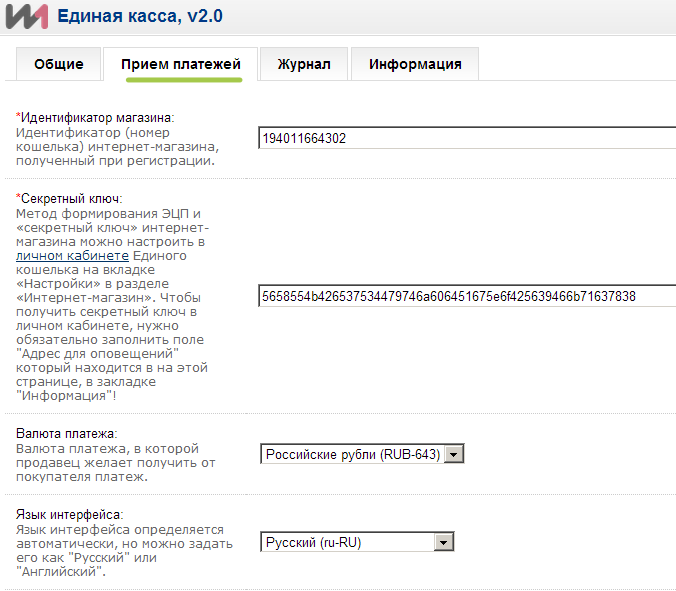
- Актуализированы ссылки на ЛК платежной системы во вкладке "Прием платежей"
- Скорректирована идентификация наличия SSL
- Скорректированы языковые файлы модуля
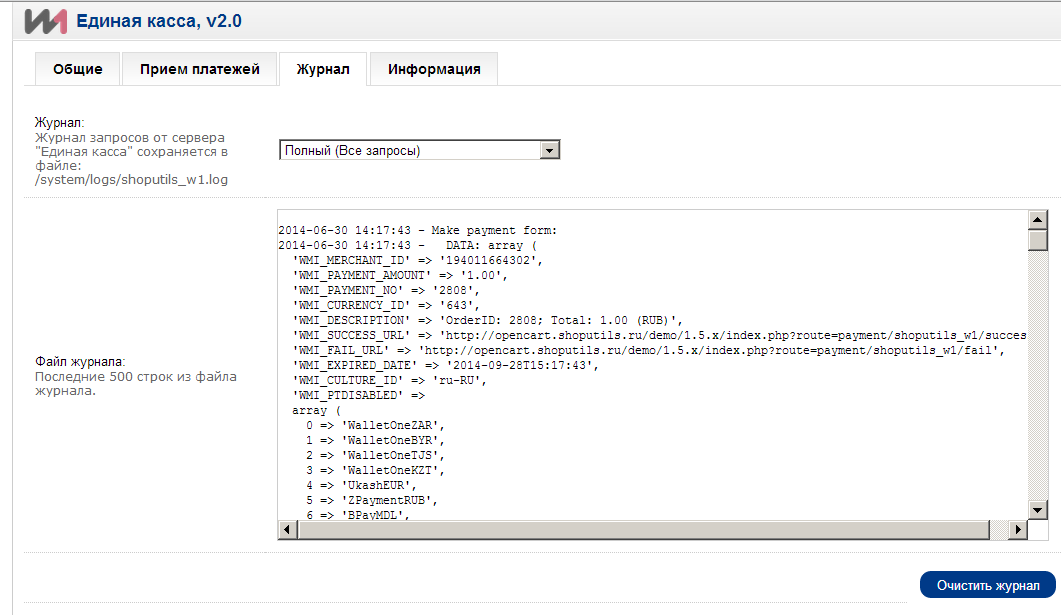
- В метод pay() добавлено логирование GET и POST запросов, если валидация данных не была пройдена
- Добавлена возможность скачивания журнала модуля
- Добавлены в выбор отображения страницы оплаты на сайте платежной системы новые языки: азербайджанский, украинский, казахский, польский
- Валюта AZN больше не поддерживается платежной системой
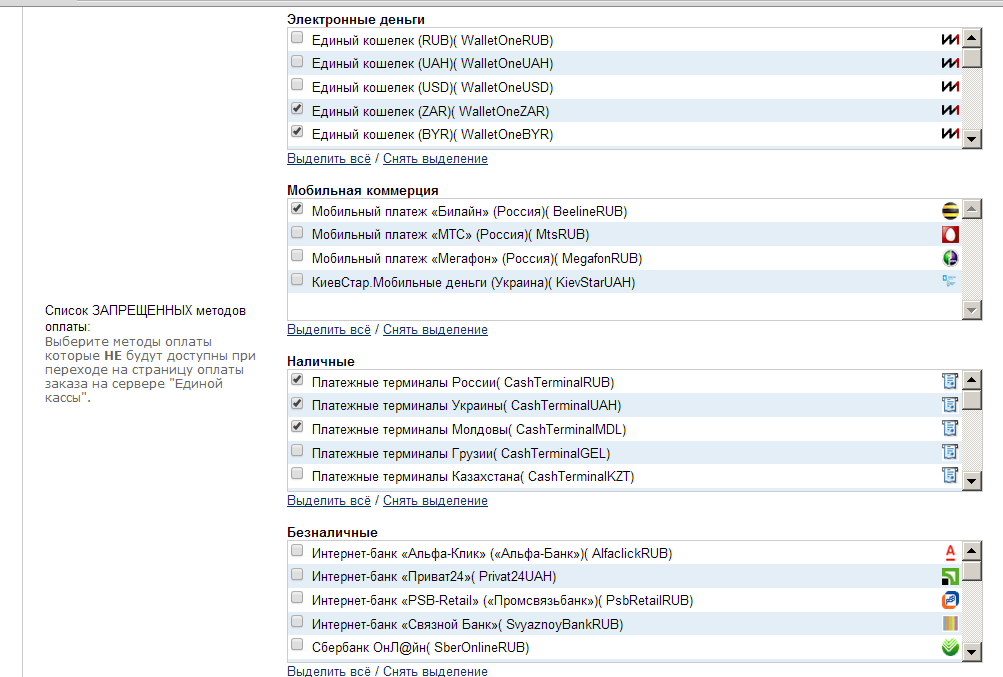
- Добавлены новые запрещенные методы оплаты
- Добавлена привязка к мультимагазинам (теперь можно выбрать в каких магазинах показывать модуль)
- Корректировка окна запроса лицензии
- Корректировка визуализации интерфейса
- Во вкладке "Информация" добавлена возможность копирования в буфер обмена ссылок, которые необходимо "прописывать" на стороне платежной системы
- Исправлены небольшие не критичные ошибки
Дата: 01.04.2018 - v4.2:
- Скорректировано формирование 54-ФЗ по совету технической поддержки Wallet One
- Добавлена поддержка PHP 7.1 - 7.2
Дата: 13.10.2017 - v4.1.1:
- Скорректирована валидация параметров 'WMI_RECIPIENT_LOGIN' и 'WMI_CUSTOMER_EMAIL'.
- Добавлена возможность в фискализации чека по 54-ФЗ брать ставку НДС из налогов товаров (каждому товару можно задать свою ставку НДС).
- Добавлена возможность в фискализации чека по 54-ФЗ указать свою ставку НДС для доставки и подарочного сертификата.
Дата: 02.10.2017 - v4.1:
- Скорректирована логика модуля согласно измененному API.
Дата: 18.08.2017 - v4.0:
- Добавлена фискализация чека по 54ФЗ.
Дата: 26.03.2017 - v3.8:
- В письма добавлена переменная {products}, позволяющая вывести список купленных товаров (только в 1.5.x).
- Добавлена поддержка html в параметр "Название" и проверка на превышение лимита записи в БД (таблица 'order', поле 'payment_method').
- 12.01.2017 - v3.7.1 - Исправлены ссылки на платежные иконки с сайта W1 с http на https.
- 19.12.2016 - v3.7 - Скорректирована логика модуля согласно измененному API.
- 24.11.2016 - v3.6 - В письма добавлена переменная {products}, позволяющая выводить список товаров в заказе (для 2.x); Исправлен неверный callback url во вкладке "Информация" (для 2.3); Добавлены в платежную форму новые поля: WMI_RECIPIENT_LOGIN и WMI_CUSTOMER_EMAIL.
- 08.08.2016 - v3.5 - Релиз для Opencart 2.3; Исправлен конфликт параметров "Отображать иконку "Оплатить заказ" в ЛК покупателя, если оплата заказа прервана" и "Режим отсроченной оплаты"; Изменена иконка перехода на оплату в ЛК покупателя с изображения на символ шрифта fontawesome; Скорректирован текст языкового файла админ-панели.
- 02.07.2016 - v3.4 - Добавлены новые валюты: польский злотый, грузинский лари
- 07.06.2016 - v3.3 - Добавлен запрет на включение модуля, если сумма заказа нулевая; Добавлен параметр "Отображать модуль только залогинненым администраторам"; Добавлена совместимость с Opencart 2.2.x
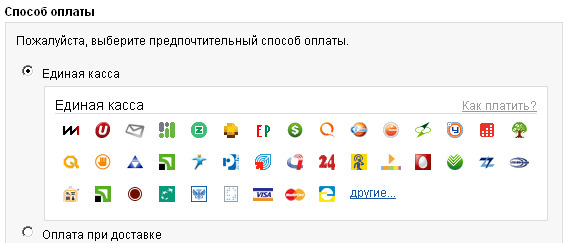
- 09.02.2016 - v3.2 - Удалена доставка RedExpress; Переименование названия модуля на Wallet One; Убран многократный вызов header при оповещение шлюза об ошибке, что приводило к ошибкам; Добавлено вкл/откл отображения платежных иконок на странице оформления заказа; Добавлен параметр "Текст кнопки button_confirm"; Добавлена иконка "Оплатить заказ" в историю заказов ЛК покупателя при прерванной оплате; Улучшение совместимости в ocmod и xml файлах; Исправлена ошибка в параметре "Язык интерфейса"; Исправление мелких ошибок; При отправке email учитывается конфиг 'config_mail_regexp' из ocStore 2.1.0.1+ (для 2.x только); Добавлены в админку иконки в табы + полные надписи в кнопки (для 2.x только); Добавлена совместимость с CKEditor (для 2.x только); Изменение позиции кнопки "Очистить журнал" (для 2.x только); Изменен редирект при не удачной оплате с common/home на checkout/failure (для 2.x только);
- 27.11.2015 - v3.1 - Переход на новый адрес шлюза + Исправление мелких ошибок
- 15.07.2015 - v3.0.1 - Скорректирован параметр WMI_EXPIRED_DATE согласно измененному API
- 11.04.2015 - v3.0 - Добавлена поддержка доставки товаров через Единую Кассу курьерской службой RedExpress
- 16.10.2014 - v2.3 - Убраны ссылки с иконок методов оплаты, ведущие на их описание на сайте Единой Кассы (покупателей ссылки часто сбивали с толку); Устранена ошибка в "хлебных крошках" в административной части модуля
- 16.10.2014 - v2.2 - Выпущена версия модуля для Opencart 2.0.0.0
- 21.07.2014 - v2.2 - Добавлена возможность формирования своего произвольного шаблона письма покупателю при успешной оплате; Добавлена возможность формирования своего произвольного шаблона письма покупателю при неудачной оплате; Добавлено управление письмами администратору с возможностью формирования своего произвольного
- шаблона письма при неудачной оплате клиентом; Управление e-mail уведомлениями вынесено в отдельную вкладку
- 17.07.2014 - v2.1.1 - Добавлено управление письмами администратору с возможностью формирования своего произвольного шаблона письма при успешной оплате клиентом
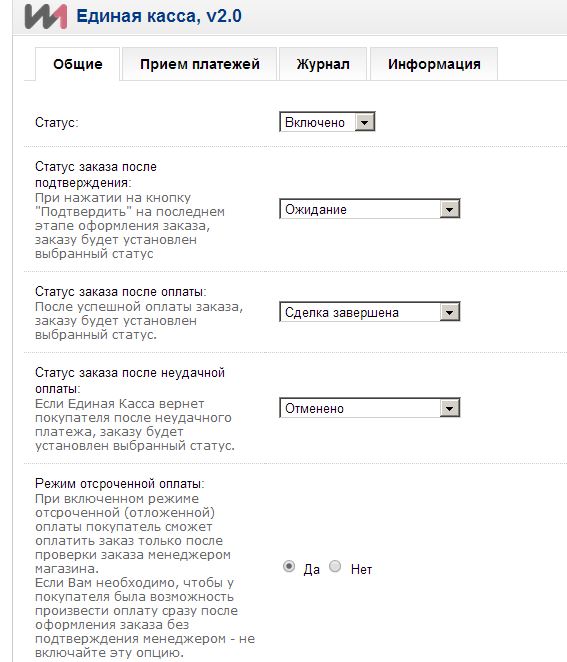
- 16.07.2014 - v2.1 - Стабилизирована работа режима отсроченной оплаты; Актуализированы данные в настройках модуля во вкладке "Информация"; В настройки модуля добавлена возможность выводить при подтверждении заказа инструкцию по оплате произвольным текстом
- 02.07.2014 - v2.0 - Добавлена отсроченная оплата - после того как менеджер убедился в наличии товара (или иных условиях), он меняет статус заказа, а покупателю уходит письмо с просьбой оплатить заказ (вкл. опционально). Оплата становится доступной из личного кабинета / история заказов; В настройки модуля добавлена возможность устанавливать статус заказа после неудачной оплаты; Добавлена возможность задавать в настройках модуля название метода оплаты на странице оформления заказа; Оптимизирована работа кнопки "Очистить журнал"
- 24.05.2014 - v1.2.3 - Добавлены 6 новых запрещенных методов оплаты; Исправлен баг, возникавший в некоторых случаях при использовании модуля "Заказ и регистрация Simple", не позволявший перейти к оплате при нажатии на кнопку "Оформить заказ"
- 16.04.2014 - v1.2.2 - Удален устаревший параметр WMI_AUTO_ACCEPT=0
- 15.03.2014 - v1.2.1 - Рефакторинг кода; Исправлены ошибки в тексте; Исключены валюты, поддерживаемые Единой кассой, которые не установлены в системе (в Opencart).
- 03.10.2013 - v1.1 - Добавлены валюты, поддерживаемые Единой Кассой на октябрь 2013г. (Южноафриканские ранды, Казахстанские тенги, Белорусские рубли, Таджикистанские сомони)
- 09.01.2014 - v1.2 - Добавлены 58 запрещенных методов оплаты
- 2011 г. - v1.0 - RELEASE
-
 1
-
Recently Browsing 0 members
- No registered users viewing this page.