


Що можна обрати замість
Вирішують ту саму задачу, але іншим способом або частково.

Данный модуль больше не поддерживается автором (с 14/12/2020), любые вопросы/ошибки будут проигнорированы.
Данный модуль поможет вам увеличить количество покупателей в вашем иентернет-магазине с помощью психологического воздействия на покупателя.
Когда клиент увидит "Магическое всплывающее окно", который показывает, сколько людей уже купили конкретный продукт, всплывающее окно создаст дополнительное доверие к конкретному продукту. Покупатель будет думать, что просматриваемый продукт популярен и это может располижить покупателя купить просматриваемый товар.
Возможности модуля:
- Настройка фона и прозрачности popup окна
- Настройка содержимого внутри всплывающего окна
- Настройка текста на разных языках
- Настройка окончания текста для окончения текста для покупателей (Пример:1 покупатель, 3 покупателя, 7 покупателей)
- Установить задержку перед/после появления magic popup'а
- Ограничения на количество закрытий magic popup'а как для конретного товара, так и на общее количество закрытий
- Ограничение на отключение отображения magic popup'а после превышения лимитов ограничений
- Использование как реальных данных о количестве покупателей конкретного товара или уставновленние этих данных в ручном режиме
Демо Opencart 2.x
Визуальное отображение: Ссылка на отображение модуля на сайте
Админ-панель: Ссылка на админ панель
Логин: demo
Пароль: demo
Инструкция по установке находиться в файле readme.txt (в архиве)..
Updated
Всплывающее окно "Magic popup" (OC 2.x/3.x)
Free
311
Інші рішення в тій самій області магазину.
-39%
 Придбати

With the help of this module, you will be able to maximize the potential of reviews on the site and, accordingly, increase your sales, since customers will be able not only to leave reviews, but also to add their photos and videos, and the motivation system in the form of bonus points for reviews will increase and facilitate the receipt of these very reviews.
Updated
Reviews PRO with Photos and Videos
1,800грн
1,100 грн
14 46

Product Features – Module for OpenCart, allows you to conveniently and beautifully display product features. Each feature is presented as a separate block with an image, title, and description.
Main Features:
Automatic display of product-related features. Image support for better visualization of features. Easy integration with any templates. Fully responsive design. Usage Examples:
Clothing:
How to wash (hand wash, machine wash, dry cleaning). How to iron (ironing allowed, ironing prohibited, steam iron). Material composition (100% cotton, polyester, wool). Electronics: Key technologies (AMOLED display, water resistance IP68). Compatibility (wireless charging support, works with iOS and Android). Important features (fast charging, NFC, 5G support). Benefits of Using the Module:
Improved visual perception of product features. Convenient and clear presentation of product details. Enhanced user experience and increased conversion rate. Easy setup. Installation:
Run the query from the product_features_query.sql file in the website database (don’t forget to change the table prefix).
Install the extension using the built-in OpenCart installer.
Refresh the modifications.
Grant access permissions to user groups.
Go to store settings: System → Settings → Edit Store → Options tab and configure the width and height of the feature images.
The feature management page is located at: Catalog → Attributes → Features.
Template Compatibility:
The extension is compatible with the default template. Adaptation is required for other templates (paid adaptation).
DEMO
Admin Page login/password: demo/demodemo Store Page License:
Allowed for use in one online store.
Updated
Product Features
320 грн
4 25

An empty «Reviews» tab under your product sends shoppers to read reviews on a marketplace, and from then on they come back there, not to you. OcBox Reviews Pro turns the stock review table into a proper sales tool: photos and video from the buyer, separate pros and cons, a shop reply under every complaint, a «bought here» marker on verified purchases, and a dedicated product questions section that works for every future customer. A reminder email a few days after the order collects reviews you never had, reward points for photo reviews bring in real-life shots your supplier will never give you, and a one-switch Schema.org markup puts stars in Google next to your product and lifts your click-through from search. $30, licence covers the shop domain and a test domain, first year of updates included. Message the OcBox profile to get started.
Updated
OcBox Reviews Pro for OpenCart 3 and ocStore: reviews with photos and video, product questions, post-order reminders, reward points and Schema.org
1,440 грн
0 1
-16%
Придбати

AI Product Video — product video generation with Gemini Omni
AI Product Video is a module for OpenCart 3 and ocStore 3 that creates short product videos from photos and a text prompt. The completed MP4 file is automatically downloaded to the store server and linked to the corresponding product.
The current version works with Gemini Omni 1.1 Flash using a standard Gemini API key. The key is created in Google AI Studio and saved in the module settings.
The main package includes the “Product Video in a Pop-up Window” integration: manage generated and manually added videos on the product editing page and display them in the default theme’s gallery.
Key features
Product video generation with Gemini Omni 1.1 Flash. Three input modes: text only, the main photo, or the main photo together with additional images. Up to six images per job, including the main photo. Portrait 9:16 and landscape 16:9 formats. 360p, 720p, 1080p, and 4K resolutions. Duration from 3 to 10 seconds; one video per job. Automatic saving of the MP4 file and linking the video to the product. Queue processing from the admin panel without page reloads or via CRON. A global prompt template and a custom prompt for an individual product. According to Google’s specifications, the model generates videos at 24 frames per second. Videos in 1080p and 4K are produced using upscaling. Learn more: Gemini Omni Flash specifications and Google API release notes.
Main photo and additional images
The settings let you choose which input data to use for generation:
Text only — the video is generated from a prompt without sending any photos. Main image — only the product’s main photo is sent. Additional images — the main photo and images from the product gallery are sent in their sort order. Prompt and product information
The prompt is created from your template. You can insert the required product data using these variables:
{name} — product name; {description} — product description; {model} — model; {sku} — SKU; {attributes} — attributes and specifications. When adding an individual product to the queue, you can enter a custom prompt. If you leave the field empty, the global template from the settings is used.
You can separately configure instructions for added text, the language of text and speech, preservation of existing labels and logos, and audio: silent, ambient sounds, or background music. The “What to Avoid” field is appended to the prompt as an additional instruction.
These settings are sent to the model through the prompt. They do not physically remove the audio track or guarantee that added text will be blocked. How accurately the product’s appearance is preserved and instructions are followed depends on the model and the source materials.
Selecting products for generation
You can add the following to the queue:
an individual product selected through autocomplete; products with an exact model match; products from a selected category; products from a selected manufacturer; products without videos; all store products that match the specified filters. You can filter by product status and creation date, and set a limit on the number of products to add. Products that already have an active job are not added to the queue again.
Queue and manual processing
Adding products to the queue does not start generation by itself. Processing begins after clicking “Process Queue” or when CRON is called.
Sequential batch processing in the admin panel without page reloads. Display of job statuses, error messages, and Google operation IDs. Configurable number of jobs per worker call and concurrent Google operations. Generation settings saved for each job when it is added. Resume processing an existing operation by its ID without starting a new generation. Delete individual jobs, cancel them locally, and clear the queue. The “Stop” button prevents further manual worker calls from the browser. Cancelling a job locally does not cancel a paid operation already running on Google’s side. If the outcome of a start request is unknown, check the operation before creating a new job.
Automatic processing via CRON
The module provides a URL with a secret key and a command for your hosting scheduler. CRON has a separate enable/disable setting, so you can turn off automatic processing while keeping manual queue processing available.
Each call processes a limited number of jobs: it checks previously started operations, downloads completed results, and starts new jobs when capacity is available. The amount of work depends on the configured limits. The schedule is configured separately in your hosting control panel.
Manual processing and CRON use a shared worker protected against concurrent calls. After temporary polling or download errors, the existing operation is checked again. Queue processing does not run when the module itself is disabled.
Generated videos and file names
The “Generated Videos” tab lets you preview results, access the MP4 file, open the product or its editing page, and delete generated videos.
Files are saved in a selected folder within image/catalog/, for example image/catalog/ai-video/. File names are generated from a template using {name}, {model}, {sku}, {product_id}, and {number}.
For example, you can use the template {name}-{model}. Invalid characters are replaced with hyphens. Suffixes such as -2, -3, and so on are added only when names collide, to avoid overwriting another file.
Managing product videos
A “Video” tab is added to the product editing page. It lets you manage both AI-generated videos and videos added manually.
Add multiple videos to one product. Support for local and external video files, YouTube, YouTube Shorts, and Vimeo. Enable, disable, and sort videos individually. Preview videos in the admin panel. Select a local video file through the OpenCart file manager. Automatically convert YouTube, Shorts, and Vimeo links into video IDs. Videos on the product page
In the default theme, videos appear among the additional product images and open in a pop-up window. YouTube and Vimeo videos use video thumbnails; local and AI-generated videos use the product image. Both portrait and landscape videos are supported.
Schema.org VideoObject structured data is added to the product page, including information about the video, its thumbnail, and a link to the player or video file.
Theme compatibility
The extension is compatible with the standard default theme. Other themes may require adaptation, which is a paid service.
Google API access and billing
Generation requires a Gemini API key and an enabled paid tier with access to Gemini Omni Flash. Google API usage is paid for separately by the store owner and is not included in the module price.
The cost depends on the input data, generation settings, and actual API usage. Current rates are published on the official Google Gemini API Pricing page.
Requirements and operating details
OpenCart 3 or ocStore 3. PHP with the cURL and mbstring extensions. GD with WebP support if the source photos are in WebP format. Outbound HTTPS access to the Google API. A writable output folder within image/catalog/. A CRON scheduler for automatic queue processing. The generated prompt and selected product photos are sent to Google. Processing time, generation availability, and API limits depend on Google’s service and your account. Review the result before using it; a new generation may differ from the previous one.
Installation
Upload the ai_product_video_v_1_1_oc3.ocmod.zip archive through “Extensions → Installer”. Refresh modifications and clear the theme cache. Under “Extensions → Extensions → Modules”, find “AI Product Video” and click “Install”. Open the settings and enter your Gemini API key, video settings, image mode, and prompt template. Enable the module and save your changes. Add products to the queue and click “Process Queue” to start manual processing. For automatic processing, enable CRON in the module settings and add its URL or command to your hosting scheduler. The required tables are created when the module is installed.
Disabling and uninstalling the module
Disabling the module stops queue processing but does not delete completed product videos. Uninstalling the module from the admin panel removes its settings and queue history; saved video files and their product associations are retained.
License
One license covers one domain and its subdomains.
Google Gemini API services, video generation charges, third-party hosting configuration, and adaptation for custom themes are not included in the module license price.
Updated
AI Product Video — Product Video Generation + Pop-up Gallery
1,360грн
1,140 грн
0 1

The module creates a block of similar products on the product page based on the data of this product using morphology and relevance.
Updated
Similar products with morphology and relevance
450 грн
123 149
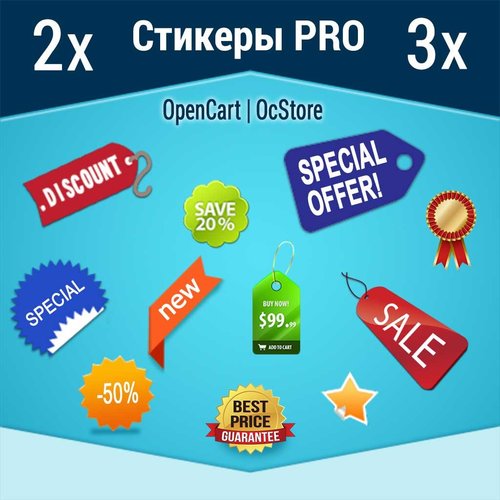
DEMO login: demo pass: demo http://stickerpro.waterfilter.in.ua/ps/PS2v.jpg Стикеры для товара на опенкарт 2х-3х. Для чего они нужны и как благодаря этому инструменту повышать продажи. Современный e-маркетинг сталкивается с 3мя основными проблемами ведения бизнеса. 1 – Презентация товара, 2- Оплата продукта, 3- Доставка продукта. Если все 3 этапа продаж решены на «Высоком уровне», то однозначно такой е-маркетинг будет успешным, и как следствие владелец бизнеса будет получать доход. В реалиях современных стартапов, наиболее остро встает вопрос привлечения трафика (покупателей) и грамотная презентация продукта для потенциального покупателя, с целью снять все существующие возражения (сомнения) перед совершением заказа. Еще в 20х годах прошлого столетия при зарождении эры рекламных агентств и собственно маркетинга, производители мануфактур испытывали затруднения с реализацией собственной продукции, дабы люди попросту не понимали какой толк в приобретении еще одного похожего продукта, в то время, как предыдущий служит верой и правдой. Именно в те времена были сделаны основные исследования психологов в области презентации товаров, были выявлены основные закономерности восприятия и разработана концепция: «Как заставить покупателя осознать, что ему данный продукт остро необходим». В рамках данных исследований было обнаружено, что любой визуальный образ доходит до человека в разы быстрее, чем смысловой, а также, он менее критикуется, т.к. попадает в сознания минуя логические фильтры критического мышления, вызывая гораздо больше ассоциаций, практически мгновенно активируя инстинкты и рефлексы. На сегодняшний день это аксиома маркетинга, споры ведутся только вокруг того, на какие инстинкты бить, и какой «Пакет рефлексов» активировать. Современная онлайн торговля имеет огромные преимущества перед офлайн продажами и небольшое количество недостатков. Из основных недостатков стоит отметить невозможность пощупать и понюхать предлагаемый продукт. В то время как преимуществ на несколько порядков больше, это и возможность в любое время ознакомиться с параметрами предлагаемого продукта, и более качественная презентация, и возможность заранее спланировать необходимость покупки, и т.д. Презентация – замечательно, когда на сайте присутствуют качественные фото товаров, полноценное описание и технические характеристики. Но в условиях урбанизации, где каждый человек ценит свое время, привлечь внимание юзера (интернет серфера) к описанию и перевести его в разряд потенциальных покупателей, может только короткая, емкая по своей сути и включающая ожидаемые образцы поведения пользователя информация – Стикеры. Модуль Стикеры pro позволяет наиболее эффективным способом донести основные преимущества товара до юзера и подходит для opencart и ocstore, а так же сборок на их основе версии 2х – 3х. Так же привлекая внимание стикеры влияют на поведение пользователя, заставляя его задержать свое внимание на презентации, что положительно влияет на поведенческие факторы, которые учитывают поисковые системы при ранжировании сайта. Преимущества модуля Стикеры pro для товара на опенкарт 2х-3х: 1. Неограниченное количество стикеров 2. 9 позиций отображения 3. Авто подстановка на системные события: акция, скидка, новинка, хит продаж, популярный товар 4. Авто подстановка стикеров производителя 5. Настраиваемый информер товарных запасов на складе 6. Возможность выборочного как отдельного, так и пакетного присвоения, заданного стикера к товарам 7. Удобный фильтр товаров по категориям, наименованиям, стикерам, дате начала и окончания показа. 8. Мультиязычность Данный инструмент значительно расширяет возможности презентации, делает сайт на основе opencart и его сборок более информативным и «Юзабильным». Модуль совместим с шаблоном. Продающий шаблон Moneymaker 2 ..
Updated
AJAX Стикеры PRO
499 грн
155 465

««Говорящие товары»» знято з продажу
Ми підібрали схожі модулі інших розробників — їх можна придбати вже зараз.
Інші варіанти
2.0.6
Ioncube Loader: Ні
Withdrawn from sale
The marketplace administration has withdrawn this file from sale
OpenCart3.0, 2.3, 2.2, 2.1, 2.0
ocStore3.0, 2.3, 2.2, 2.1
License type На один домен + его поддомены
Activation method Без активации
Ioncube LoaderНі
Get request to server of developerНі
Downloads60
Submitted09/05/2018
Updated03/27/2022
File Size286.44 kB
When buying from 2 to 4 discount -20%
$8
When buying more 4 discount -30%
$7


-
Recently Browsing 0 members
- No registered users viewing this page.