




Що можна обрати замість
Вирішують ту саму задачу, але іншим способом або частково.

A simple free module sends order notifications for specific statuses and custom messages
Updated
SP Telegram Notification FREE
Free
825

Module for automated SMS and Viber notifications to customers and managers on order status change. Integrated with TurboSMS.ua service.
Updated
TurboSMS Notify - SMS/Viber Notifications
Free
107
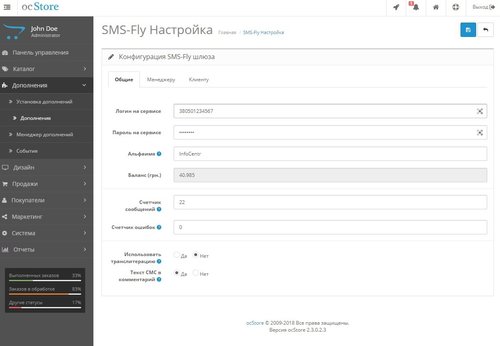
Дополнение позволяет отправлять смс с помощью сервиса SMS-Fly.
Установка:
1. Скачать прилагаемый к теме файл.
2. Зайти в админпанель вашего магазина.
3. Перейти в раздел Дополнения(Extensions)->Установка дополнений(Extension Installer).
4. Нажать кнопку Загрузить(Upload) и выбрать скаченный модуль и дождаться окончания установки.
5. Перейти в раздел Дополнения(Extensions) ->Менеджер дополнений (Modifications) и нажать кнопку Обновить (Refresh) 2 раза!!! в правой верхней части формы.
6. ОБЯЗАТЕЛЬНО! Указать права для администратора (при необходимости и другим пользователям) на доступ к странице настроек. Система(System)->Пользователи(Users)-Группы пользователей (User Groups), нажимаем карандаш у нужного пользователя, в окнах Разрешить просмотр(Access Permission) и Разрешить редактирование(Modify Permission) ищем контроллер setting/sfconfig , отмечаем галочкой и сохраняем настройки.
На этом установка модуля завершена, но для полноценной работы вам необходимо ввести ваши данные:
7. Перейти (в версии 2.1 переход в настройки только из меню быстрого доступа, иконка ракеты) в Система(System)->SMS-Fly включить уведомления, заполнить Ваше Альфаимя, если оставить пустым, то отправляться будет с Альфаименем InfoCentr, указать номера получателей, логин от сервиса в формате 380ХХYYYYYYY и Ваш пароль.
8. Нажимаете кнопку Сохранить. Проверьте работоспособность отправив произвольное смс из панели быстрого доступа (видно на скриншоте).
Вопросы, предложения и проблемы сообщайте по e-mail или в skype: [email protected]..
Updated
SmsFly order
Free
1442
Інші рішення в тій самій області магазину.
-20%
 Придбати

Google Review Request — automatic Google review requests after an order for OpenCart / ocStore 2.3 and 3.x. Once an order is complete, the customer gets a branded email with a button that opens your business review form on Google Maps. Set it up once — the module does the rest.
🔍 Live demo — Admin (login: demo, password: demo) — module: Extensions → Modules → Google Review Request
Most happy customers simply forget to leave a review unless they are reminded. Automate Google review requests and turn satisfied customers into the best advertising for your online store.
⭐ Works best together with the Google Reviews — reviews from Google Maps module: locations are imported in one click, and Google Reviews shows the collected reviews on your site.
1
Order complete
Sending by order status
Delay in hours or days
Sending time
Email to the customer
→
2
Branded email
Store logo and color
Photos of purchased products
Unsubscribe option
Flexible email text settings
→
3
Go to the Google review form
The review form of your business (the customer searches for nothing)
Statistics (email sent / click to the form)
→
4
You see results
30-day report
% who went to Google
Email log
A second reminder to those who did not open the form
More Google Maps reviews — keep the trust of future customers!
1st
day — requests to customers
of past orders
30
days report
with clicks
11
automatic
setup checks
0
Google API setup
or Cloud keys
How it differs from Google Customer Reviews
Google Customer Reviews is a Merchant Center survey whose ratings go to the seller rating in Google Shopping. This module, in contrast, collects reviews for your business profile on Google Maps (Google Business Profile) — the ones people see in Search and Maps.
Features
SENDING
Trigger statuses and delay
Depending on the order status, delay in hours or days
Sending window
For example, only 10:00–20:00 — no emails at night
No spam
One invitation per location, even for frequent customers
Second reminder
After a set number of days — only to those who did not go to Google from the first email
Consent only
«Only customers who agreed to newsletters» mode (optional) and an unsubscribe link in every email
EMAIL
Branded template
Store logo and your choice of color, photos of purchased products, responsive
Texts for each language
Editable. Variables {firstname}, {lastname}, {order_id}, {store_name}, {products}
Email language
Order language or always one — for example, Ukrainian only
Preview and test
Preview and a test email to any address
LOG AND CONTROL
Clicks to Google
The button counts clicks; mail scanner clicks right after delivery are filtered out
Past orders
Requests to customers from recent days (up to 90) with a daily email limit (sent in batches)
Setup check
Automatic setup check with hints
Email queue, cron
Run the queue manually from the log — no waiting for cron, or work without cron at all
Admin panel
30-day report
Invitations and reminders sent, how many went to Google and the percentage, skipped and why, errors, unsubscribes.
Log
What is queued, what is sent, who went to Google. Any email can be cancelled or sent right away.
Setup check
See at once what is wrong: mail, cron, links for every store, license — and how to fix it.
Results from day one
Invite customers of recent orders: the module first shows how many emails will go out, then spreads them over days.
Fair to Google rules
No review incentives and no rating filter. Google prohibits incentivized and selectively requested reviews and may remove them — so the module asks every customer for a review the same way.
Highlights
No Google API or Google Cloud — a short review link from Google Business Profile or a place_id is enough
Import from Google Reviews — locations from the Google Reviews module are added in one click
Multistore and several locations — a separate review link for every store
Works without cron too — the queue runs on site visits or with a button in the log
No core file changes — orders are tracked via OpenCart events, OCMOD is used only for the no-cron mode
Code is not encrypted — customize it for your project
Multilingual — admin in Ukrainian, Russian and English, email texts for any number of languages
PHP 5.6–8.4 — OpenCart / ocStore 2.3 and 3.x
Installation
1
Install the module — upload the archive for your version via Extensions → Installer and refresh modifications.
2
Activate with a license key — install Google Review Request in «Modules» and enter the key. The key is emailed to the buyer automatically after the order.
3
Add the review link — paste the link from Google Business Profile or import a location from Google Reviews (if that module is installed) and assign it to the store.
4
Start the queue — add the line from the «Running» tab to your hosting cron or enable the no-cron mode.
5
Check — look at the «Check» block and send yourself a test email. Optionally invite customers of recent orders.
Compatibility
Platform
Archive
✅ OpenCart / ocStore 3.x
ldev_review_request_v1.0.0_oc3.ocmod.zip
✅ OpenCart / ocStore 2.3
ldev_review_request_v1.0.0_oc2.ocmod.zip
Store mail must be configured (mail or SMTP; SMTP is more reliable).
License
▸ Issued for 1 domain for 1 year from activation.
▸ After the term ends the module keeps working without limits — access to updates requires a renewal.
▸ A test subdomain or local domain (test.site.com, site.loc).
▸ The key is emailed automatically. If it did not arrive, send a private message or write to [email protected].
Updates
▸ All updates within the license term are free.
▸ Follow the module page to get notified about new versions automatically.
▸ The latest file is always available in the downloads section of the module page.
Support
📧 [email protected]
💬 Telegram: @Seriusis
▶ YouTube channel
Collect reviews with this module — show them on your site with Google Reviews
⭐ Google Reviews — Google Maps reviews on your site..
Updated
Google Review Request - ask customers for a review after the order
990грн
790 грн
0 0

"SendPulse Address Book" module is designed to automatically transfer customer and order data from your OpenCart online store to the address books in the SendPulse service.
Key Features
Automatic submission of new customers to the selected SendPulse address book Adding customer's email, phone number, and name Sending order details (email, phone, first name, last name) Ability to segment customer groups and order statuses into different address books Benefits
Easy installation and configuration through the admin panel No system file modifications (OCMOD) Boosts marketing effectiveness and repeat sales Additional Integrations
Compatible with the subscription system from Octemplates Feel free to contact via PM for integration with other subscription modules Installation Instructions
Install the module through the OpenCart admin panel Refresh the modification cache Go to System → Users → User Groups in the admin panel and assign editing permissions to the appropriate administrator groups Navigate to Extensions → Extensions → Modules, activate the "SendPulse Address Book" module, and configure it DEMO
Admin Page login/password: demo/demodemo Requirements
OpenCart 3.x / OcStore 3.x SendPulse account SendPulse API keys License
Allowed for use in one online store only.
Updated
SendPulse Address Book
460 грн
4 8
«Telegram уведомления» знято з продажу
Ми підібрали схожі модулі інших розробників — їх можна придбати вже зараз.
Інші варіанти
3.2.1
Ioncube Loader: Ні
Withdrawn from sale
The marketplace administration has withdrawn this file from sale
OpenCart3.0, 2.3, 2.2, 2.1, 2.0, 1.5.6.4, 1.5.6.3, 1.5.6.2, 1.5.6.1, 1.5.6, 1.5.5.1, 1.5.5, 1.5.4.1, 1.5.3.1
ocStore3.0, 2.3.0.2.4, 2.3, 2.2, 2.1, 1.5.5.1.2, 1.5.5.1.1, 1.5.5.1, 1.5.4.1.2, 1.5.4.1.1, 1.5.4.1, 1.5.3.1, 1.5.2.1, 1.5.1.3
License type На один домен + его поддомены
Activation method Автоматическая активация
Ioncube LoaderНі
Get request to server of developerНі
Downloads1,421
Submitted02/19/2018
Updated12/29/2023
File Size122 B


-
Recently Browsing 0 members
- No registered users viewing this page.