


Що можна обрати замість
Роблять те саме — можна поставити замість.

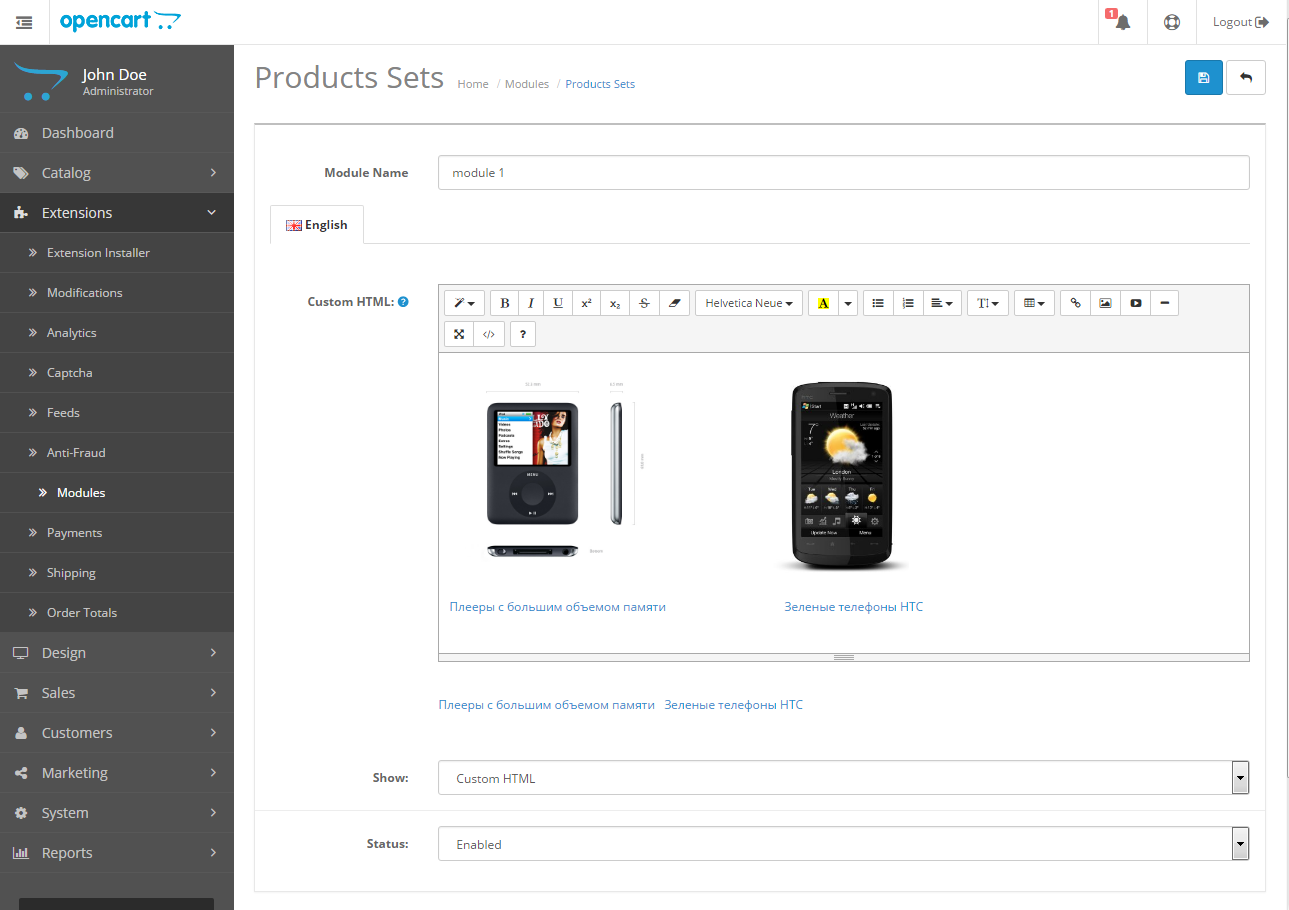
модуль дозволяє створити комплект товарів зі знижкою
Updated
КомплектыPro
1,400 грн
407 871

Bundles for OpenCart 3 and ocStore: a set block on the product page with an Add all to cart button and a discount, a kit product whose price comes from its parts, bundle landing pages, CSV import and AI suggestions of what sells together.
Updated
OcBox Product Bundles — product bundles and kits for OpenCart 3 and ocStore: set discount, kit price calculates itself (beta)
1,440 грн
7 6
Вирішують ту саму задачу, але іншим способом або частково.

Представляю вам модуль Хорошо подходят к этому товару. Идея для модуля была взята с интернет магазина Розетка.
ТЕПЕРЬ МОДУЛЬ ПОЛНОСТЬЮ БЕСПЛАТНЫЙ. Так как не хватает времени на его поддержку и развитие.
Установка полностью через ocmod, никакие файлы не перезаписываются и не перезатираются. После загрузки модификации зайти в Менеджер модификаций и нажать обновить. Потом зайти в модули и установить модуль Хорошо подходят. И в карточке товара появится дополнительная вкладка
Демо товара: http://demo.store-price.pro/index.php?route=product/product&product_id=40
Админка: http://demo.store-price.pro/admin пароль и логин demo
Модуль тестировался на дефолтной теме на Ocstore 2.1 и 2.3 всех версий и Opencart 2.0* - 2.3
Всем купившим помогу с установкой и адаптацией к вашей теме.
Для авторов других дополнений и шаблонов для тестирования даю модуль бесплатно. Писать в личку
Что в планах если пользователям будет интересно:
-добавить возможность привязки товаров категория -категория (сейчас просто товар - товар и товар - категория)
-добавить установку даты с по, что бы блоки могли автоматом отключаться (сейчас если товар привязан, то до тех пор пока не удалится вручную с карточки привязка)
-также добавить систему добавления скидок к привязанным товарам
- ну и конечно же все пожелания которые возникнут у пользователей
-добавить совместимость с opencartpro
Данный модуль позволяет добавлять к товару неограниченное число блоков с дополнительными товарами, которые можно все вместе купить нажатием одной кнопки:
Модуль добавляет в карточке товара дополнительную вкладку Хорошо подходят, в которой можно добавлять блоки с товарами. Товары можно добавлять в блок как и по одному так и сразу целую категорию:
Новые блоки добавляются кнопкой Добавить еще один блок:
Модуль выводится в карточке товара , расположением модуля в карточке товара управляйте с помощью настроек в модуле:
Если в блоке больше одного товара, навигация в нем происходит с помощью вертикальной карусели, если на странице больше 4 блоков навигация по блокам с помощью горизонтальной карусели. Для каждого блока есть чекбокс при снятии которого или установке обратно итоговая сумма и количество товаров меняется:
При нажатии кнопки Купить в Корзину добаляется главный товар и товары которые его дополняют.
..
Updated
Модуль комплектов товаров Хорошо подходят
Free
333
Інші рішення в тій самій області магазину.

Модуль HPMR позволяет объединять товары в виде опций на основе их характеристик
Updated
HPMR AJAX: options as individual products + auto-linking
1,300 грн
414 773

Automatic rule-based related products. Matching by category, manufacturer, attributes, name, price range. Cross-sell, upsell, SEO interlinking. AJAX loading, caching, CRON. OpenCart 2.3 / 3.x.
Updated
OcBox AI Smart Related — AI related products for OpenCart and ocStore + rule engine + Bought-Together AI + block analytics + 4-in-1
1,440 грн
20 23
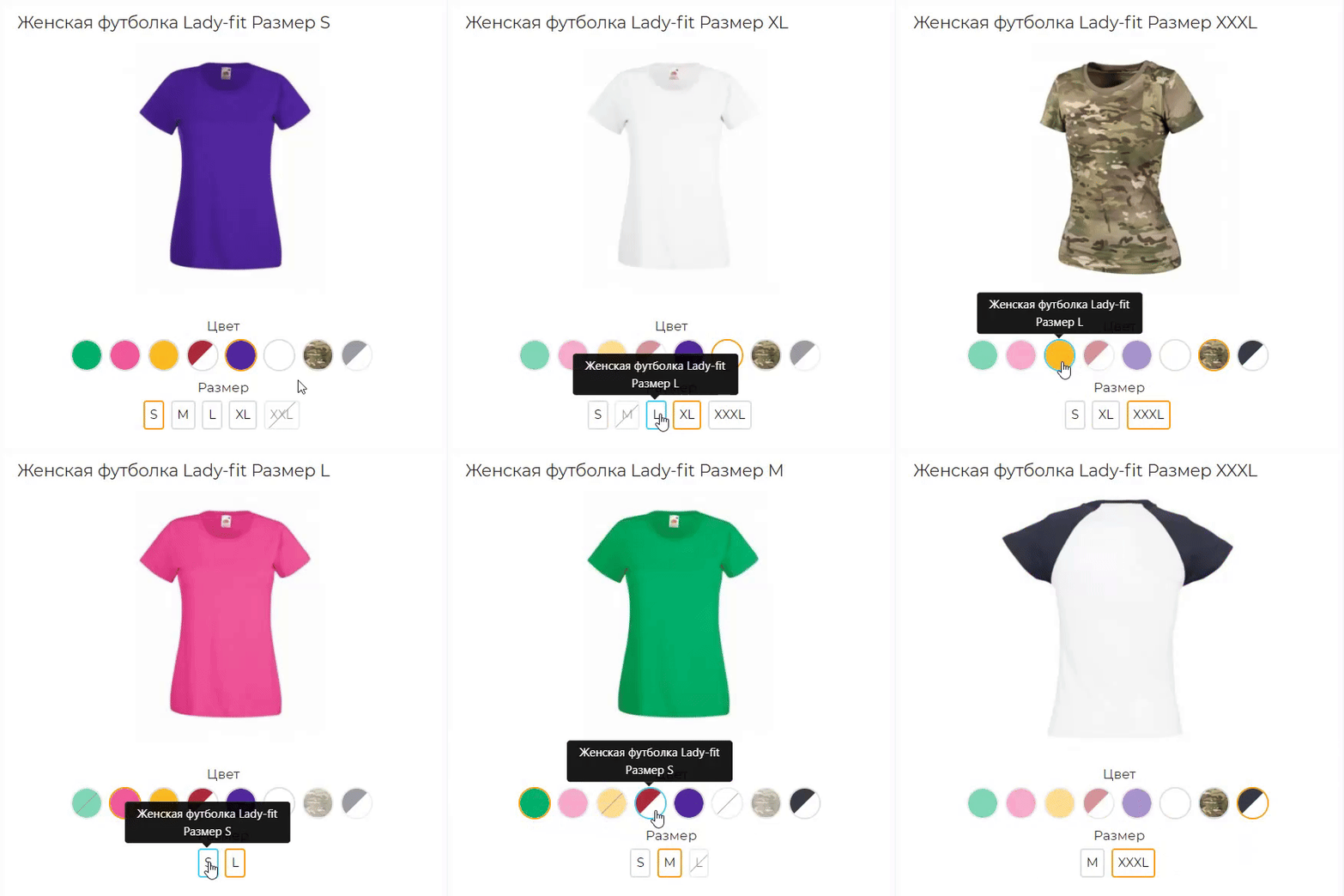
Розширена версія HPMrr AJAX в якій кілька важливих додаткових функцій
Кастомне групування у категорії Мікророзмітка під schema.org Розрізання значення атрибуту по роздільнику (напр. значення1, значення2, значення3) Генерування текстур за значенням атрибуту
Кастомне групування у категорії Мікророзмітка під schema.org Розрізання значення атрибуту по роздільнику (напр. значення1, значення2, значення3) Генерування текстур за значенням атрибуту
Updated
HPMR PRO
2,000 грн
75 67
-39%
 Придбати

With the help of this module, you will be able to maximize the potential of reviews on the site and, accordingly, increase your sales, since customers will be able not only to leave reviews, but also to add their photos and videos, and the motivation system in the form of bonus points for reviews will increase and facilitate the receipt of these very reviews.
Updated
Reviews PRO with Photos and Videos
1,800грн
1,100 грн
14 46

The module allows you to display a block with prices for different groups of customers.
The module works both with OpenCart special prices and with discounts set through the module " Different prices for groups of buyers
The module works both with OpenCart special prices and with discounts set through the module " Different prices for groups of buyers
Updated
Display different prices for different customer groups
450 грн
145 223
-40%
Придбати

Interactive polygon product areas on photos. ASSL Lookbook Single displays one composition, while ASSL LookBook SlideShow combines several lookbooks as a slider or tabs.
Updated
ASSL Lookbook — Products on Photos
1,000грн
600 грн
21 66
-50%
Придбати

When a shopper orders an XL you do not actually have, the shopper is not to blame, stock OpenCart is: options there are only a price surcharge and a shared stock figure. OcBox Product Variants turns every combination into a real product: its own price, SKU, stock, photo and shipping dimensions.
A colour-by-size matrix in the admin, one-click combination generation, cloning from another product and Excel import save weeks of manual work. On the storefront, the photo, price and SKU change the moment you click, unavailable combinations cannot be put in the cart, and the choice is kept in the link. The warehouse and the website finally speak the same language, and the shop sells exactly what it has. $30 instead of $60, licence for the shop domain and a test domain.
A colour-by-size matrix in the admin, one-click combination generation, cloning from another product and Excel import save weeks of manual work. On the storefront, the photo, price and SKU change the moment you click, unavailable combinations cannot be put in the cart, and the choice is kept in the link. The warehouse and the website finally speak the same language, and the shop sells exactly what it has. $30 instead of $60, licence for the shop domain and a test domain.
Updated
OcBox Product Variants for OpenCart 3 and ocStore: a colour by size matrix, per-variant stock, photo and SKU, dimensions for shipping
2,880грн
1,440 грн
0 1

The Linked Products as Options module combines separate product variant pages into logical groups and displays links between them as familiar options. Customers can select a color, size, storage capacity, material, or another attribute, while each variant remains a separate product with its own URL, price, special price, stock level, model, image, and SEO data.
This approach is suitable for stores where different colors, sizes, or configurations have already been created as separate products. The module does not replace or modify standard OpenCart options: it adds a separate mechanism for linking complete product pages.
Integration with the standard OpenCart theme is included, along with separate adaptations for OCTemplates Promo, OCTemplates Deals, Chameleon.
How the module works
The administrator selects one of the standard OpenCart fields as the product group identifier: UPC, EAN, JAN, ISBN, or MPN. Products with the same non-empty value in the selected field are automatically assigned to one group.
Option types are then created in the module, such as “Color,” “Size,” “Storage Capacity,” “Material,” or any other option required by the store. One or more product attributes can be selected for each type. If several attributes are selected, the module checks them in the specified order and uses the first non-empty value.
After synchronization, the available group variants appear on the product page. Clicking a value opens the corresponding product page, so every variant retains its own data, page address, and standard OpenCart product behavior.
Module features
Automatically group products by the UPC, EAN, JAN, ISBN, or MPN field Use only exact matches of non-empty group identifiers Create any required number of option types Obtain option values from product attributes Use several attributes for one option type with configurable priority Display values as text buttons, HEX colors, or product images Configure multiple colors for a single value Configure the value sort order Create fully manual product groups Include or exclude products in an automatic group Set a manual option value for a specific product Control the display of out-of-stock products Index large catalogs in batches via CRON Automatically add changed products to the indexing queue through OpenCart Events Generate Schema.org structured data for product variants Product group identifier
One of the standard product fields is used for automatic linking. The field is selected in the module settings and must contain the same value for every variant of the same model.
UPC — Universal Product Code EAN — European Article Number JAN — Japanese Article Number ISBN — International Standard Book Number MPN — model or group code assigned by the manufacturer or administrator For example, six separate Samsung Galaxy product pages may have different models, colors, storage capacities, prices, and stock levels, but the same group MPN. After indexing, the module links them and displays color and storage as navigation between variants.
Option types and attributes
Option type names are not predefined or restricted. The store creates the variants required for its catalog: color, size, storage, material, style, length, configuration, or any other attribute.
Several attributes can be assigned to one option type. This is useful when the same information is stored under different names in different categories, such as “Color,” “Body Color,” or “Primary Color.” The attribute order determines the priority in which they are checked.
Text — values are displayed as compact buttons Color — values are displayed as a HEX palette Image — the main image of the corresponding product is used The module does not create separate images for option values. Image mode uses the existing main product image and the thumbnail dimensions configured in the module.
HEX palette and value sorting
After indexing, the module collects the detected attribute values on a separate tab. A sort order can be set for every value, while one or more HEX codes can be assigned to colors.
If a value consists of several colors, the module creates a multicolor swatch. Configured HEX codes and sorting are retained independently of the current display type. Switching an option from color to image and back does not remove the previously configured palette.
Display on the product page
The current option value is highlighted and is not an active link Text values are displayed as buttons Colors are displayed as solid or multicolor swatches The main image of the corresponding product is used in image mode The product name is available on hover in image mode Out-of-stock products can be displayed, disabled, or completely hidden Unavailable values have a separate visual style When a value is selected, the customer is taken to the separate page of the corresponding product. The module does not replace the price, stock, or image through JavaScript, so the page always uses current standard OpenCart product data.
Manual groups
Automatic mode can be supplemented with manual management. A separate page provides a list of all created groups with filtering, sorting, and pagination.
Search by group name or identifier Search for a group by product, model, or SKU Filter automatic, manual, and mixed groups Create a new manual group Add products using autocomplete Manually sort products within a group Set manual option values separately for each language Disable an individual group Lock an automatic group A manual value takes priority over an automatically obtained attribute value. This makes it possible to add a product with incomplete data to a group without changing its standard attributes.
Clearing groups
The module provides three separate clearing modes:
Automatic groups — clears the automatic index and groups created by synchronization Manual groups — removes groups created manually by the administrator All groups — completely clears the module’s automatic and manual groups Indexing and CRON
For fast storefront performance, the module builds its own relationship index in advance. Data is processed in batches, allowing the module to be used with large catalogs without a long-running query when a product page is opened.
Configurable number of products per batch Manual full synchronization from the administration panel Secret-key-protected URL for CRON Ready-to-use crontab command Indexing status, progress, and statistics The current index remains operational during full synchronization. The new data generation becomes active only after the rebuild completes successfully. Customers do not see partially populated groups while the catalog is being updated.
Automatic updates after product changes
The module uses standard OpenCart Events. After a product is added, edited, or deleted, its identifier is placed in a queue. The next CRON run updates only the changed products and their related groups.
Direct SQL queries and some third-party imports may not trigger OpenCart Events. A full synchronization is recommended after a bulk direct import or changes to group identifiers.
SEO and structured data
A corresponding Schema.org property can be selected for each option type. If no property is selected, the module does not add structured data for that option.
ProductGroup — a logical group of product variants productGroupID — the product group identifier hasVariant and isVariantOf — the relationship between the group and its variants variesBy — the list of properties by which products differ color — color size — size material — material pattern — pattern suggestedAge — suggested age suggestedGender — suggested gender additionalProperty — another product attribute For the standard theme, the module generates its own structured data block. The OCTemplates Promo, Deals, Chameleon adaptations also integrate the variant relationship into the native product structured data of the corresponding theme.
Performance
Separate index tables with database indexes for primary queries Batch loading of product attributes Batch insertion of index records Active data is not cleared before full synchronization is complete Incremental updates for changed products Option type settings cached through the standard OpenCart cache No external API requests on the product page Multilingual and multistore support
Group names, option type names, and manual values can be specified separately for each language. When displaying variants, the module respects the current OpenCart language and store and does not show products that are not assigned to the current store.
The module administration interface is localized in Ukrainian, English, and Russian.
Theme integration
Default — support is included in the main package OCTemplates Promo — a separate adaptation package with its own Twig template and CSS OCTemplates Deals — a separate adaptation package with its own Twig template and CSS Chameleon — a separate adaptation package with its own Twig template and CSS For Promo, Deals, Chameleon install only the adaptation that matches the active theme. The main module must always be installed.
Open source code and independence
The module code is not encrypted or obfuscated. All PHP, Twig, JavaScript, CSS, and XML files are available for review and modification.
The module does not connect to third-party resources, external APIs, or remote servers and does not require third-party libraries or system services. Product processing, group building, caching, and variant block generation are performed directly on the website.
Thanks to a separate Twig template, CSS file, and targeted OCMOD integration, the module can be adapted to other OpenCart themes without changing its core logic. For a custom product page, it is usually sufficient to prepare a separate adaptation with the appropriate output position and styles for the active theme.
Installation
Perform a clean installation of the main package through Extensions / Installer If OCTemplates Promo, Deals, Chameleon is used, upload the corresponding adaptation package Go to Extensions / Modifications and click Refresh Go to Extensions / Extensions Select the Modules extension type Find Linked Products as Options and click Install Open the module settings Select the group identifier field and create the required option types Run a full synchronization Add the protected URL to your CRON scheduler The module does not modify OpenCart core files directly. Integration is performed through standard OpenCart Events and OCMOD.
Important notes
To create groups automatically, at least two enabled products must have the same non-empty value in the selected UPC, EAN, JAN, ISBN, or MPN field. A full synchronization must be performed after changing the group identifier field, the attribute configuration, or running a bulk direct import. Regular CRON runs process the changed-product queue and continue an unfinished full synchronization. For a small catalog, synchronization can also be started manually from the administration panel. Uninstalling the module with the Uninstall button removes the tables, index, automatic and manual groups, palettes, and other value settings created by the module. Products, attributes, and standard OpenCart data are not removed. DEMO
Admin Page login/password: demo/demodemo Store Page License
The license covers one domain and its subdomains.
This approach is suitable for stores where different colors, sizes, or configurations have already been created as separate products. The module does not replace or modify standard OpenCart options: it adds a separate mechanism for linking complete product pages.
Integration with the standard OpenCart theme is included, along with separate adaptations for OCTemplates Promo, OCTemplates Deals, Chameleon.
How the module works
The administrator selects one of the standard OpenCart fields as the product group identifier: UPC, EAN, JAN, ISBN, or MPN. Products with the same non-empty value in the selected field are automatically assigned to one group.
Option types are then created in the module, such as “Color,” “Size,” “Storage Capacity,” “Material,” or any other option required by the store. One or more product attributes can be selected for each type. If several attributes are selected, the module checks them in the specified order and uses the first non-empty value.
After synchronization, the available group variants appear on the product page. Clicking a value opens the corresponding product page, so every variant retains its own data, page address, and standard OpenCart product behavior.
Module features
Automatically group products by the UPC, EAN, JAN, ISBN, or MPN field Use only exact matches of non-empty group identifiers Create any required number of option types Obtain option values from product attributes Use several attributes for one option type with configurable priority Display values as text buttons, HEX colors, or product images Configure multiple colors for a single value Configure the value sort order Create fully manual product groups Include or exclude products in an automatic group Set a manual option value for a specific product Control the display of out-of-stock products Index large catalogs in batches via CRON Automatically add changed products to the indexing queue through OpenCart Events Generate Schema.org structured data for product variants Product group identifier
One of the standard product fields is used for automatic linking. The field is selected in the module settings and must contain the same value for every variant of the same model.
UPC — Universal Product Code EAN — European Article Number JAN — Japanese Article Number ISBN — International Standard Book Number MPN — model or group code assigned by the manufacturer or administrator For example, six separate Samsung Galaxy product pages may have different models, colors, storage capacities, prices, and stock levels, but the same group MPN. After indexing, the module links them and displays color and storage as navigation between variants.
Option types and attributes
Option type names are not predefined or restricted. The store creates the variants required for its catalog: color, size, storage, material, style, length, configuration, or any other attribute.
Several attributes can be assigned to one option type. This is useful when the same information is stored under different names in different categories, such as “Color,” “Body Color,” or “Primary Color.” The attribute order determines the priority in which they are checked.
Text — values are displayed as compact buttons Color — values are displayed as a HEX palette Image — the main image of the corresponding product is used The module does not create separate images for option values. Image mode uses the existing main product image and the thumbnail dimensions configured in the module.
HEX palette and value sorting
After indexing, the module collects the detected attribute values on a separate tab. A sort order can be set for every value, while one or more HEX codes can be assigned to colors.
If a value consists of several colors, the module creates a multicolor swatch. Configured HEX codes and sorting are retained independently of the current display type. Switching an option from color to image and back does not remove the previously configured palette.
Display on the product page
The current option value is highlighted and is not an active link Text values are displayed as buttons Colors are displayed as solid or multicolor swatches The main image of the corresponding product is used in image mode The product name is available on hover in image mode Out-of-stock products can be displayed, disabled, or completely hidden Unavailable values have a separate visual style When a value is selected, the customer is taken to the separate page of the corresponding product. The module does not replace the price, stock, or image through JavaScript, so the page always uses current standard OpenCart product data.
Manual groups
Automatic mode can be supplemented with manual management. A separate page provides a list of all created groups with filtering, sorting, and pagination.
Search by group name or identifier Search for a group by product, model, or SKU Filter automatic, manual, and mixed groups Create a new manual group Add products using autocomplete Manually sort products within a group Set manual option values separately for each language Disable an individual group Lock an automatic group A manual value takes priority over an automatically obtained attribute value. This makes it possible to add a product with incomplete data to a group without changing its standard attributes.
Clearing groups
The module provides three separate clearing modes:
Automatic groups — clears the automatic index and groups created by synchronization Manual groups — removes groups created manually by the administrator All groups — completely clears the module’s automatic and manual groups Indexing and CRON
For fast storefront performance, the module builds its own relationship index in advance. Data is processed in batches, allowing the module to be used with large catalogs without a long-running query when a product page is opened.
Configurable number of products per batch Manual full synchronization from the administration panel Secret-key-protected URL for CRON Ready-to-use crontab command Indexing status, progress, and statistics The current index remains operational during full synchronization. The new data generation becomes active only after the rebuild completes successfully. Customers do not see partially populated groups while the catalog is being updated.
Automatic updates after product changes
The module uses standard OpenCart Events. After a product is added, edited, or deleted, its identifier is placed in a queue. The next CRON run updates only the changed products and their related groups.
Direct SQL queries and some third-party imports may not trigger OpenCart Events. A full synchronization is recommended after a bulk direct import or changes to group identifiers.
SEO and structured data
A corresponding Schema.org property can be selected for each option type. If no property is selected, the module does not add structured data for that option.
ProductGroup — a logical group of product variants productGroupID — the product group identifier hasVariant and isVariantOf — the relationship between the group and its variants variesBy — the list of properties by which products differ color — color size — size material — material pattern — pattern suggestedAge — suggested age suggestedGender — suggested gender additionalProperty — another product attribute For the standard theme, the module generates its own structured data block. The OCTemplates Promo, Deals, Chameleon adaptations also integrate the variant relationship into the native product structured data of the corresponding theme.
Performance
Separate index tables with database indexes for primary queries Batch loading of product attributes Batch insertion of index records Active data is not cleared before full synchronization is complete Incremental updates for changed products Option type settings cached through the standard OpenCart cache No external API requests on the product page Multilingual and multistore support
Group names, option type names, and manual values can be specified separately for each language. When displaying variants, the module respects the current OpenCart language and store and does not show products that are not assigned to the current store.
The module administration interface is localized in Ukrainian, English, and Russian.
Theme integration
Default — support is included in the main package OCTemplates Promo — a separate adaptation package with its own Twig template and CSS OCTemplates Deals — a separate adaptation package with its own Twig template and CSS Chameleon — a separate adaptation package with its own Twig template and CSS For Promo, Deals, Chameleon install only the adaptation that matches the active theme. The main module must always be installed.
Open source code and independence
The module code is not encrypted or obfuscated. All PHP, Twig, JavaScript, CSS, and XML files are available for review and modification.
The module does not connect to third-party resources, external APIs, or remote servers and does not require third-party libraries or system services. Product processing, group building, caching, and variant block generation are performed directly on the website.
Thanks to a separate Twig template, CSS file, and targeted OCMOD integration, the module can be adapted to other OpenCart themes without changing its core logic. For a custom product page, it is usually sufficient to prepare a separate adaptation with the appropriate output position and styles for the active theme.
Installation
Perform a clean installation of the main package through Extensions / Installer If OCTemplates Promo, Deals, Chameleon is used, upload the corresponding adaptation package Go to Extensions / Modifications and click Refresh Go to Extensions / Extensions Select the Modules extension type Find Linked Products as Options and click Install Open the module settings Select the group identifier field and create the required option types Run a full synchronization Add the protected URL to your CRON scheduler The module does not modify OpenCart core files directly. Integration is performed through standard OpenCart Events and OCMOD.
Important notes
To create groups automatically, at least two enabled products must have the same non-empty value in the selected UPC, EAN, JAN, ISBN, or MPN field. A full synchronization must be performed after changing the group identifier field, the attribute configuration, or running a bulk direct import. Regular CRON runs process the changed-product queue and continue an unfinished full synchronization. For a small catalog, synchronization can also be started manually from the administration panel. Uninstalling the module with the Uninstall button removes the tables, index, automatic and manual groups, palettes, and other value settings created by the module. Products, attributes, and standard OpenCart data are not removed. DEMO
Admin Page login/password: demo/demodemo Store Page License
The license covers one domain and its subdomains.
Updated
Linked Products as Options
680 грн
3 11

Option Combo Price is a high-performance module designed to manage product pricing based on multiple dependent options. It allows you to set a unique, fixed price for any combination of options (e.g., a specific Color + specific Size) instead of just adding surcharges for each individual option
Updated
Option Combo Price
1,300 грн
4 4

DEMO login: demo pass: demo http://stickerpro.waterfilter.in.ua/ps/PS2v.jpg Стикеры для товара на опенкарт 2х-3х. Для чего они нужны и как благодаря этому инструменту повышать продажи. Современный e-маркетинг сталкивается с 3мя основными проблемами ведения бизнеса. 1 – Презентация товара, 2- Оплата продукта, 3- Доставка продукта. Если все 3 этапа продаж решены на «Высоком уровне», то однозначно такой е-маркетинг будет успешным, и как следствие владелец бизнеса будет получать доход. В реалиях современных стартапов, наиболее остро встает вопрос привлечения трафика (покупателей) и грамотная презентация продукта для потенциального покупателя, с целью снять все существующие возражения (сомнения) перед совершением заказа. Еще в 20х годах прошлого столетия при зарождении эры рекламных агентств и собственно маркетинга, производители мануфактур испытывали затруднения с реализацией собственной продукции, дабы люди попросту не понимали какой толк в приобретении еще одного похожего продукта, в то время, как предыдущий служит верой и правдой. Именно в те времена были сделаны основные исследования психологов в области презентации товаров, были выявлены основные закономерности восприятия и разработана концепция: «Как заставить покупателя осознать, что ему данный продукт остро необходим». В рамках данных исследований было обнаружено, что любой визуальный образ доходит до человека в разы быстрее, чем смысловой, а также, он менее критикуется, т.к. попадает в сознания минуя логические фильтры критического мышления, вызывая гораздо больше ассоциаций, практически мгновенно активируя инстинкты и рефлексы. На сегодняшний день это аксиома маркетинга, споры ведутся только вокруг того, на какие инстинкты бить, и какой «Пакет рефлексов» активировать. Современная онлайн торговля имеет огромные преимущества перед офлайн продажами и небольшое количество недостатков. Из основных недостатков стоит отметить невозможность пощупать и понюхать предлагаемый продукт. В то время как преимуществ на несколько порядков больше, это и возможность в любое время ознакомиться с параметрами предлагаемого продукта, и более качественная презентация, и возможность заранее спланировать необходимость покупки, и т.д. Презентация – замечательно, когда на сайте присутствуют качественные фото товаров, полноценное описание и технические характеристики. Но в условиях урбанизации, где каждый человек ценит свое время, привлечь внимание юзера (интернет серфера) к описанию и перевести его в разряд потенциальных покупателей, может только короткая, емкая по своей сути и включающая ожидаемые образцы поведения пользователя информация – Стикеры. Модуль Стикеры pro позволяет наиболее эффективным способом донести основные преимущества товара до юзера и подходит для opencart и ocstore, а так же сборок на их основе версии 2х – 3х. Так же привлекая внимание стикеры влияют на поведение пользователя, заставляя его задержать свое внимание на презентации, что положительно влияет на поведенческие факторы, которые учитывают поисковые системы при ранжировании сайта. Преимущества модуля Стикеры pro для товара на опенкарт 2х-3х: 1. Неограниченное количество стикеров 2. 9 позиций отображения 3. Авто подстановка на системные события: акция, скидка, новинка, хит продаж, популярный товар 4. Авто подстановка стикеров производителя 5. Настраиваемый информер товарных запасов на складе 6. Возможность выборочного как отдельного, так и пакетного присвоения, заданного стикера к товарам 7. Удобный фильтр товаров по категориям, наименованиям, стикерам, дате начала и окончания показа. 8. Мультиязычность Данный инструмент значительно расширяет возможности презентации, делает сайт на основе opencart и его сборок более информативным и «Юзабильным». Модуль совместим с шаблоном. Продающий шаблон Moneymaker 2 ..
Updated
AJAX Стикеры PRO
499 грн
155 465

Управление торговлей 3 Быстрый заказ купить в 1 клик, купить все что в корзине в 1 клик, заказ падает в заказ демо Opencart 2.x карточка товара демо Страница категорий login: demo pass: demo Демка OcStore Opencart login: demo pass: demo http://opencart20.waterfilter.in.ua/fastimage/quickorderv7.2_0.jpg http://opencart20.waterfilter.in.ua/fastimage/quickorderv7.2_1.jpg http://opencart20.waterfilter.in.ua/fastimage/quickorderv7.2_2.jpg Все версии поддерживают выбор опций Обновил версию для Opencart 2.0.0.0 - 2.1.0.1 1)Поля можно настраивать 2)Вывод в корзине кнопки купить в 1 клик 3)Добавил настройки модуля - можно задать шаблон письма для покупателя - можно задать шаблон письма для Админа - поддерживает переменные - можно подтягивать форму шаблона с товаром который заказали для отправки на почту как себе так и покупателю - почту задавать для получения теперь в самом модуле 4)изменил дизайн 5)заказ падает в заказ 6)всплывающие окно после покупки можно редактировать. посмотреть все настройки модуля можно в админке ПРОДАЖИ / БЫСТРЫЙ ЗАКАЗ или нажать на информер. Совместимость: OCSTORE 15 2x OPENCART 15 OPENCART 2.х - все версии Модуль использует ionCube с онлайн проверкой ключа после приобретения писать в личку заглавив письмо" КУпил, Скачал, Жду ключа на управление 3" Это третий модуль из серии "Управление торговлей" , в него так же включено дальнешее расширение и совместимость со всеми остальными модулями серии "Управление торговлей" Для тех "Кто в теме" полезные ссылки Управление торговлей 7 Управление торговлей 6 Управление торговлей 5 Управление торговлей 4 Управление торговлей 2 Управление торговлей 1 Модуль наличия товара на складе разный цвет..
Updated
Управление торговлей 3 Быстрый заказ
450 грн
470 2275
«Наборы товаров для OpenCart 2.x» знято з продажу
Ми підібрали схожі модулі інших розробників — їх можна придбати вже зараз.
Інші варіанти
1.0.1
Ioncube Loader: Ні
Withdrawn from sale
The marketplace administration has withdrawn this file from sale
OpenCart2.3, 2.2, 2.1, 2.0
ocStore2.3, 2.2, 2.1
License type На один домен + его поддомены
Activation method Без активации
Ioncube LoaderНі
Get request to server of developerНі
Downloads38
Submitted05/17/2016
Updated04/26/2022
File Size3.4 MB
When buying more 2 discount -50%
$10


-
Recently Browsing 0 members
- No registered users viewing this page.