


Що можна обрати замість
Роблять те саме — можна поставити замість.


Вирішують ту саму задачу, але іншим способом або частково.
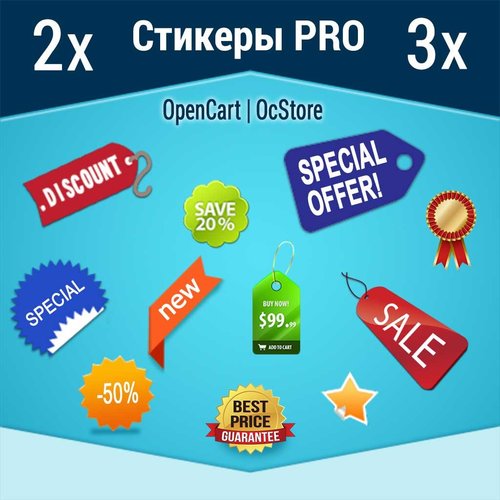
DEMO login: demo pass: demo http://stickerpro.waterfilter.in.ua/ps/PS2v.jpg Стикеры для товара на опенкарт 2х-3х. Для чего они нужны и как благодаря этому инструменту повышать продажи. Современный e-маркетинг сталкивается с 3мя основными проблемами ведения бизнеса. 1 – Презентация товара, 2- Оплата продукта, 3- Доставка продукта. Если все 3 этапа продаж решены на «Высоком уровне», то однозначно такой е-маркетинг будет успешным, и как следствие владелец бизнеса будет получать доход. В реалиях современных стартапов, наиболее остро встает вопрос привлечения трафика (покупателей) и грамотная презентация продукта для потенциального покупателя, с целью снять все существующие возражения (сомнения) перед совершением заказа. Еще в 20х годах прошлого столетия при зарождении эры рекламных агентств и собственно маркетинга, производители мануфактур испытывали затруднения с реализацией собственной продукции, дабы люди попросту не понимали какой толк в приобретении еще одного похожего продукта, в то время, как предыдущий служит верой и правдой. Именно в те времена были сделаны основные исследования психологов в области презентации товаров, были выявлены основные закономерности восприятия и разработана концепция: «Как заставить покупателя осознать, что ему данный продукт остро необходим». В рамках данных исследований было обнаружено, что любой визуальный образ доходит до человека в разы быстрее, чем смысловой, а также, он менее критикуется, т.к. попадает в сознания минуя логические фильтры критического мышления, вызывая гораздо больше ассоциаций, практически мгновенно активируя инстинкты и рефлексы. На сегодняшний день это аксиома маркетинга, споры ведутся только вокруг того, на какие инстинкты бить, и какой «Пакет рефлексов» активировать. Современная онлайн торговля имеет огромные преимущества перед офлайн продажами и небольшое количество недостатков. Из основных недостатков стоит отметить невозможность пощупать и понюхать предлагаемый продукт. В то время как преимуществ на несколько порядков больше, это и возможность в любое время ознакомиться с параметрами предлагаемого продукта, и более качественная презентация, и возможность заранее спланировать необходимость покупки, и т.д. Презентация – замечательно, когда на сайте присутствуют качественные фото товаров, полноценное описание и технические характеристики. Но в условиях урбанизации, где каждый человек ценит свое время, привлечь внимание юзера (интернет серфера) к описанию и перевести его в разряд потенциальных покупателей, может только короткая, емкая по своей сути и включающая ожидаемые образцы поведения пользователя информация – Стикеры. Модуль Стикеры pro позволяет наиболее эффективным способом донести основные преимущества товара до юзера и подходит для opencart и ocstore, а так же сборок на их основе версии 2х – 3х. Так же привлекая внимание стикеры влияют на поведение пользователя, заставляя его задержать свое внимание на презентации, что положительно влияет на поведенческие факторы, которые учитывают поисковые системы при ранжировании сайта. Преимущества модуля Стикеры pro для товара на опенкарт 2х-3х: 1. Неограниченное количество стикеров 2. 9 позиций отображения 3. Авто подстановка на системные события: акция, скидка, новинка, хит продаж, популярный товар 4. Авто подстановка стикеров производителя 5. Настраиваемый информер товарных запасов на складе 6. Возможность выборочного как отдельного, так и пакетного присвоения, заданного стикера к товарам 7. Удобный фильтр товаров по категориям, наименованиям, стикерам, дате начала и окончания показа. 8. Мультиязычность Данный инструмент значительно расширяет возможности презентации, делает сайт на основе opencart и его сборок более информативным и «Юзабильным». Модуль совместим с шаблоном. Продающий шаблон Moneymaker 2 ..
Updated
AJAX Стикеры PRO
499 грн
155 465
Інші рішення в тій самій області магазину.

Модуль позволяет скрыть категории товаров и товары которые в них находятся от некоторых групп покупателей путем установки галочки напротив группы покупателей в настройках категории (на скриншоте)
Примеры использования:
- Оптовые категории и и товары в них и розничные, которые не пересекаются
- "Временные категории" для обработки прайсов, недооформленных товаров и тп
- Переучет в какой-либо категории
- и многое другое
ОЧЕНЬ ВАЖНО!!!
Модуль использует стандартный функционал и изменяет стандартные модели категории и товара для определения доступа
Если у вас какой-то модуль супермегаменю или суперстена категорий, который использует свои модели, отличающиеся от "родных" - адаптация недорогая но платная
Под популярные шаблоны - >300 покупок на форуме - адаптация бесплатная, под остальные - недорого, пишите в лс
Уточняйте эти моменты ДО покупки!
Имеются патчи под шаблоны:
1. Newstore
2. Revolution
Лицензия - 1 домен
Какие-то вопросы - пишите в личку, разберемся..
Updated
Скрытие категорий от групп покупателей Hide Categories From Customer Groups 1.5.x-2.x-3.x
450 грн
63 134

Promo Banners in Categories and Manufacturers
Place promotional banners directly among products on category pages and manufacturer product pages. Inform customers about promotions, new arrivals, seasonal collections, and special offers while they browse your catalog.
Banners are added to the product listing without reducing the number of products displayed per page. Banner management is available directly when editing a category or manufacturer, without modifying the template code.
Two Banner Types
Product card banner — occupies a single product grid cell.
Full-width banner — spans the entire width of the product listing area.
For each banner, you can choose its position: at the beginning of the list, after a specific product, after a specific row, or at the end.
Positioning after a row automatically takes into account the number of columns displayed on the current screen.
Separate Display Settings for Desktop and Mobile Devices
Banners can be displayed on all devices, only on desktops and tablets, or only on mobile devices.
To use different images, aspect ratios, or positions, create separate banners and select the appropriate devices.
For example, you can display a wide horizontal banner on desktop screens and a compact vertical banner on smartphones. Each banner will have its own positioning and display settings.
Catalog Display Mode Support
Banners can be displayed in grid view, list view, or both modes.
This allows you to use different banners depending on the catalog layout.
Banners for Different Pagination Pages
Configure separate promotional offers for the first, second, and subsequent catalog pages.
For each banner, you can specify individual page numbers or ranges, such as 1,3-5.
Banner positions are calculated independently within each pagination page.
If a page does not contain enough products or rows to reach the specified position, the banner will not be displayed.
Multilingual Support
Add separate banners for each store language.
Images, titles / ALT text, and links are configured according to the language version currently viewed by the customer.
Additional Features
Multiple banners per category or manufacturer.
Enable or disable individual banners.
Set banner display start and end dates.
Configure sorting order for banners with the same position.
Use banners with or without links.
Optionally add the rel="nofollow" attribute to links.
Configure image dimensions.
Choose between scaling the entire image to fit the available area or filling the area by cropping the edges.
Compatibility
OpenCart 3.x
ocStore 3.x
Theme Compatibility
The base version is compatible with the standard default theme.
Other themes may require additional adaptation.
Themes that include a Price List display mode require adaptation.
Theme adaptation is a paid service.
Installation Instructions
For a new installation, execute the SQL script from promo_banners_in_categories_and_manufacturers_v_3_0_install.sql, making sure to use your store's database table prefix.
Upload promo_banners_in_categories_and_manufacturers_v_3_0_oc3.ocmod.zip via Extensions → Installer.
Refresh modifications and clear the theme cache.
Open the category or manufacturer editing page and navigate to the Promo Banners tab.
Add banners, configure their display conditions, and save your changes.
License
The license is valid for one domain and all its subdomains.
DEMO
Admin Page login/password: demo/demodemo Store Page Important!
Adaptations developed for version 2.0 are not compatible with this version!
Updated
Promo banners in categories and manufacturers
900 грн
25 97

Продаж «Статусы Товара» призупинено
Ми підібрали схожі модулі інших розробників — їх можна придбати вже зараз.
Інші варіанти
1.0
Ioncube Loader: Ні
Sales paused
Продаж призупинено адміністрацією форуму.
OpenCart1.5.6.4, 1.5.6.3, 1.5.6.2, 1.5.6.1, 1.5.6, 1.5.4.1, 1.5.3.1
ocStore1.5.5.1.2, 1.5.5.1.1, 1.5.5.1, 1.5.4.1.2, 1.5.4.1.1, 1.5.4.1, 1.5.3.1
License type На один домен
Activation method Без активации
Ioncube LoaderНі
Get request to server of developerНі
Downloads45
Submitted11/26/2014
Updated03/03/2021
File Size401.21 kB















-
Recently Browsing 0 members
- No registered users viewing this page.