


Що можна обрати замість

Партнерский товар | Ссылка в кнопке купить Opencart 3

Купить в 1 клик PRO - Быстрый заказ oc 3.x 7.3

Main Features:
Automatic display of product-related features. Image support for better visualization of features. Easy integration with any templates. Fully responsive design. Usage Examples:
Clothing:
How to wash (hand wash, machine wash, dry cleaning). How to iron (ironing allowed, ironing prohibited, steam iron). Material composition (100% cotton, polyester, wool). Electronics: Key technologies (AMOLED display, water resistance IP68). Compatibility (wireless charging support, works with iOS and Android). Important features (fast charging, NFC, 5G support). Benefits of Using the Module:
Improved visual perception of product features. Convenient and clear presentation of product details. Enhanced user experience and increased conversion rate. Easy setup. Installation:
Run the query from the product_features_query.sql file in the website database (don’t forget to change the table prefix).
Install the extension using the built-in OpenCart installer.
Refresh the modifications.
Grant access permissions to user groups.
Go to store settings: System → Settings → Edit Store → Options tab and configure the width and height of the feature images.
The feature management page is located at: Catalog → Attributes → Features.
Template Compatibility:
The extension is compatible with the default template. Adaptation is required for other templates (paid adaptation).
DEMO
Admin Page login/password: demo/demodemo Store Page License:
Allowed for use in one online store.
Product Features

Купить в 1 клик PRO - oc 2.x

It allows you to display additional information in a convenient and visual way — such as size charts, care instructions, delivery and payment terms, warranty details, promotions, and much more.
The module supports bulk assignment by selected categories and manufacturers.
Main Features:
Create popup windows with tabbed content. Unlimited number of content tabs. Bulk add content to product groups by selected categories and manufacturers. Multilingual support. Ability to insert images, tables, text, and HTML content into tabs. Display popup trigger button on the product page. Example Use Cases:
Size chart — add a tab with size tables for different brands or categories. Care instructions — provide helpful product care information. Delivery and payment info — show details without leaving the product page. Promotions, warranty, or certificate information. Benefits:
Improves user experience — customers get all the necessary info without reloading the page. Reduces customer inquiries (especially about sizes and shipping terms). Flexible content assignment — easily update information for many products at once. Theme Compatibility:
default Adaptation for other themes is paid. Please contact before purchase!
Installation:
Upload the module archive via Extensions → Installer. Upload the theme adaptation archive via Extensions → Installer. Refresh modification cache (Extensions → Modifications → Refresh). Go to Extensions → Modules → Content Popup and click Install. Configure the module. After saving settings, always click "Add content to products". Template Compatibility:
The extension is compatible with the default template. Adaptation is required for other templates (paid adaptation).
DEMO
Admin Page login/password: demo/demodemo Store Page License:
Use is allowed in one online store only.
Content Popup

Управление торговлей 3 Быстрый заказ

Быстрый просмотр товара PRO oc 15x / 2.x

User Feedback
/monthly_2024_04/msettings.png.c9787c18688b02994afbb7dd7844d514.png" rel="">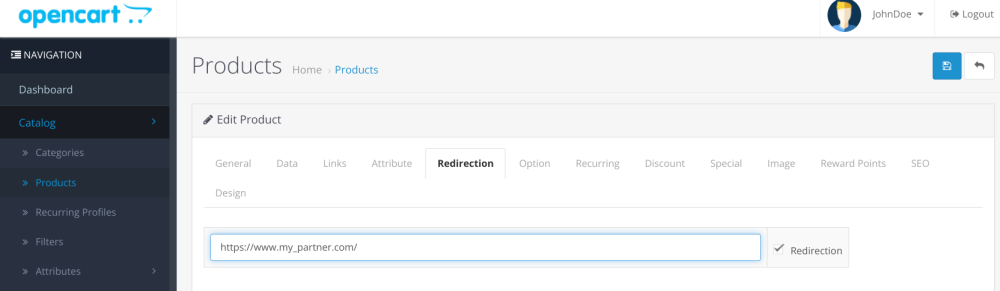
A very simple module that changes the behavior of the “Buy” or “Add to Cart” button of your store.
Using this "Redirections" module, when you click on the "Buy" or "Add to Cart" button, you can redirect
buyer to the product card on the Partner website. You can set up redirection for certain products.
For example, a Partner offers the same product but at a price 10% or even 20% lower. And at the same time, the Partner often offers rewards for referred buyers. In general, if for one reason or another you want to redirect a customer to another store website when trying to buy a certain product, then this module is for you.
The "Redirections" module replaces the functionality of the "Buy" or "Add to Cart" button in all places where it is present. That is, when searching, in special products, displaying categories, other modules, etc.
The "Redirections" module supports Ukrainian, Russian and English languages.
The "Redirections" module does not change the database structure and does not create new tables. Works on all versions OpenCart or OcStore starting from 2.0
The module has been tested with all listed versions of OpenCart/OcStore.
The module works with the default template. Adaptation to your template is paid by agreement.
Installation
To install the "Redirections" module, you need to download the redirections.ocmod.zip package in the administrative panel of your site in the Add-ons Section -> Install Add-ons! Attention! the package must match the version of your OpenCart/OcStore. This is clear from the name of the archive.
After the package is installed, go to the Add-ons -> Add-ons Manager subsection and update the cache (icon in the upper right corner)
Then go to the Modules/Add-ons section (depending on the CMS version) and click install next to the module name.
Then you need to go to the module settings and enter the license key. After entering the key, switch the module to enabled mode. The remaining settings are in the product card in the admin panel.
To receive a license key, write to me in a personal message on behalf of the person for whom the module was purchased:
Module name
Your store's domain name
Test site domain name (if available)
Your email address where to send the key
Характеристики
-
Recently Browsing 0 members
- No registered users viewing this page.