



Що можна обрати замість


SimplePars - Universal parser for IM

Updating prices and stock levels manually in OpenCart is time-consuming and inconvenient. The "Google Spreadsheets Data Exchange" module allows you to easily edit prices and stock levels directly in Google Sheets and then import them into OpenCart.
Why is this convenient?
Speed & flexibility – make changes in Google Sheets and update your store in one click. Bulk editing – update thousands of products without accessing the admin panel. Better data visualization – sort, filter, and analyze products in Google Sheets. Team collaboration – edit product data without giving access to the OpenCart admin panel. Export with category filtering – download selected product data, such as specific categories only. Import from multiple Google Sheets – update product data from supplier price lists. Scheduled import/export with CRON – automate data updates on a schedule. What data can be imported into OpenCart?
Price Stock quantity Product status Indexing/Noindex Promotional prices for customer groups (with start & end dates) Supported product identifiers: product_id, model, sku, upc, ean, jan, isbn, mpn What data can be exported from OpenCart to Google Sheets?
Price Stock quantity Product status Indexing/Noindex Promotional prices for customer groups Product identifiers: product_id, model, sku, upc, ean, jan, isbn, mpn What's included in the module?
After purchasing the module, you will receive:
composer_google_api.zip – Google API files (upload via FTP). google_spreadsheets_v_1_0_oc3.ocmod.zip – install via OpenCart. How to set up the module?
For importing into OpenCart: Get an API key with Google Sheets API enabled in Google Cloud. For exporting from OpenCart: Set up a Google Cloud service account and grant access to your spreadsheet. You can find more information about receiving and setting up in the video manual at the link below.
Installation Instructions
Unzip the composer_google_api.zip archive and transfer the contents to the root of the site using FTP. Install the module via OpenCart. Refresh modifications. Go to System → Users → User Groups and grant admin rights. Navigate to Extensions → Extensions → Modules, activate Google Spreadsheets, and configure it. DEMO
Admin Page login/password: demo/demodemo License:
Allowed for use in one online store.
Data Exchange with Google Spreadsheets

This module is specifically designed to be fully compatible with the structure and format of Horoshop export files. It allows you to automate updates to products, prices, inventory levels, and categories in your OpenCart store with minimal effort.
Automatic Import of XLSX Price Lists from Horoshop Module


User Feedback
РАБОТА С ПРАЙС-ЛИСТАМИ ПОСТАВЩИКОВ
в Excel`е
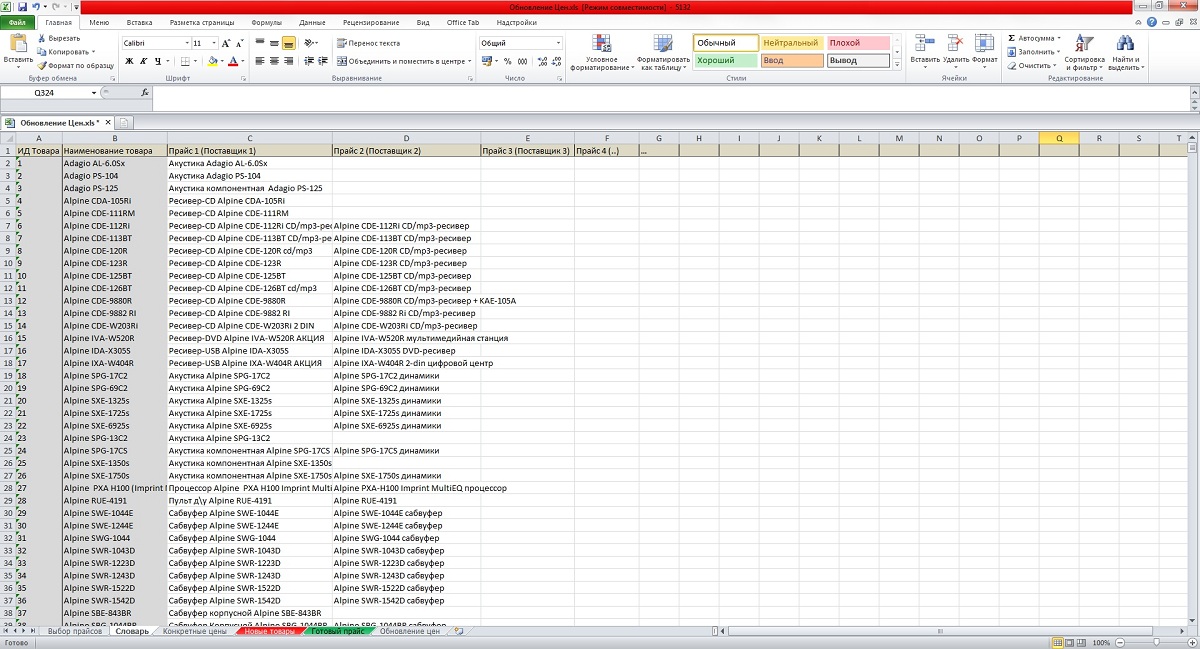
Необходимая для работы штука! Нажатием 1 кнопки "ПУСК" у вас происходит чудо:
- обработка сразу всех прайсов ваших поставщиков (много)
- обновление цен и остатков (*если цена = 0, значит нет в наличии )
- выбор минимальной цены из нескольких поставщиков + автоматическая настраиваемая наценка (для разных диапазонов цен - разная наценка)
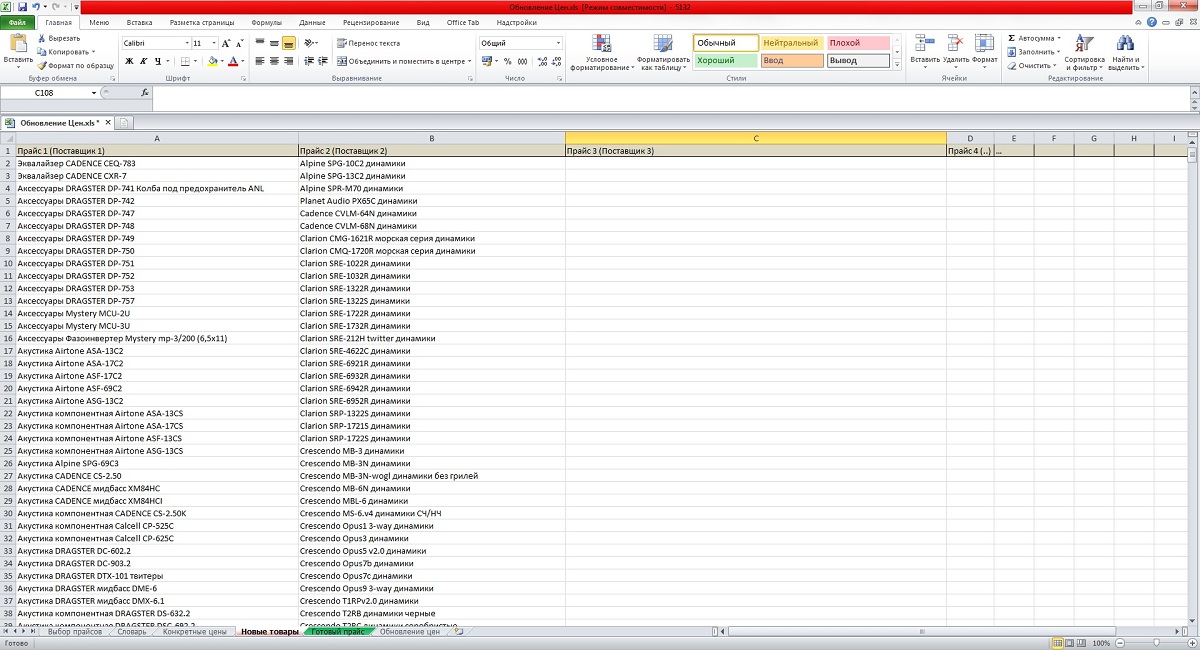
- вывод новых товаров поставщиков, которых нет еще в вашем магазине
- назначение конкретных цен на определенные товары (игнорирование функций наценки, т.е. какую поставили цену такая и будет в магазине). Если у всех поставщиков 0, то в итоге будет 0.
- отдельный лист для импорта в магазин (удобнее это делать с модулем CSV Price Pro import/export)
- отдельный лист "Готовый прайс" для удобной работы с товарами. Заказали товар - смотрим у какого поставщика забирать.
Видео работы:
PS: Данным макросом работаю с товарами в магазине Autoulet.ru (около 5000 товаров, 3 поставщика)
Мне его разработка обошлась в 6000 рублей. Вы его получите в 30 раз дешевле!
Характеристики
-
 2
-
Recently Browsing 0 members
- No registered users viewing this page.