


Що можна обрати замість
Вирішують ту саму задачу, але іншим способом або частково.

Promo Banners in Categories and Manufacturers
Place promotional banners directly among products on category pages and manufacturer product pages. Inform customers about promotions, new arrivals, seasonal collections, and special offers while they browse your catalog.
Banners are added to the product listing without reducing the number of products displayed per page. Banner management is available directly when editing a category or manufacturer, without modifying the template code.
Two Banner Types
Product card banner — occupies a single product grid cell.
Full-width banner — spans the entire width of the product listing area.
For each banner, you can choose its position: at the beginning of the list, after a specific product, after a specific row, or at the end.
Positioning after a row automatically takes into account the number of columns displayed on the current screen.
Separate Display Settings for Desktop and Mobile Devices
Banners can be displayed on all devices, only on desktops and tablets, or only on mobile devices.
To use different images, aspect ratios, or positions, create separate banners and select the appropriate devices.
For example, you can display a wide horizontal banner on desktop screens and a compact vertical banner on smartphones. Each banner will have its own positioning and display settings.
Catalog Display Mode Support
Banners can be displayed in grid view, list view, or both modes.
This allows you to use different banners depending on the catalog layout.
Banners for Different Pagination Pages
Configure separate promotional offers for the first, second, and subsequent catalog pages.
For each banner, you can specify individual page numbers or ranges, such as 1,3-5.
Banner positions are calculated independently within each pagination page.
If a page does not contain enough products or rows to reach the specified position, the banner will not be displayed.
Multilingual Support
Add separate banners for each store language.
Images, titles / ALT text, and links are configured according to the language version currently viewed by the customer.
Additional Features
Multiple banners per category or manufacturer.
Enable or disable individual banners.
Set banner display start and end dates.
Configure sorting order for banners with the same position.
Use banners with or without links.
Optionally add the rel="nofollow" attribute to links.
Configure image dimensions.
Choose between scaling the entire image to fit the available area or filling the area by cropping the edges.
Compatibility
OpenCart 3.x
ocStore 3.x
Theme Compatibility
The base version is compatible with the standard default theme.
Other themes may require additional adaptation.
Themes that include a Price List display mode require adaptation.
Theme adaptation is a paid service.
Installation Instructions
For a new installation, execute the SQL script from promo_banners_in_categories_and_manufacturers_v_3_0_install.sql, making sure to use your store's database table prefix.
Upload promo_banners_in_categories_and_manufacturers_v_3_0_oc3.ocmod.zip via Extensions → Installer.
Refresh modifications and clear the theme cache.
Open the category or manufacturer editing page and navigate to the Promo Banners tab.
Add banners, configure their display conditions, and save your changes.
License
The license is valid for one domain and all its subdomains.
DEMO
Admin Page login/password: demo/demodemo Store Page Important!
Adaptations developed for version 2.0 are not compatible with this version!
Updated
Promo banners in categories and manufacturers
900 грн
25 97
Інші рішення в тій самій області магазину.
The module adds the ability to add special image and text statuses and stickers to each product, which can be displayed in the product card, catalog and other site pages and modules.
Updated
Product statuses PRO Speed, auto statuses, stickers, text statuses
450 грн
556 1095

Модуль позволяет добавить неограниченное количество произвольных ссылок на страницы категории, производителя и товара для более классного продвижения вашего сайта!
Updated
SP SEO Custom Links 1.5.x-2x-3x Multilang - Произвольные ссылки в товаре, категории, производителе, страницах фильтров
400 грн
149 371

Модуль позволяет скрыть категории товаров и товары которые в них находятся от некоторых групп покупателей путем установки галочки напротив группы покупателей в настройках категории (на скриншоте)
Примеры использования:
- Оптовые категории и и товары в них и розничные, которые не пересекаются
- "Временные категории" для обработки прайсов, недооформленных товаров и тп
- Переучет в какой-либо категории
- и многое другое
ОЧЕНЬ ВАЖНО!!!
Модуль использует стандартный функционал и изменяет стандартные модели категории и товара для определения доступа
Если у вас какой-то модуль супермегаменю или суперстена категорий, который использует свои модели, отличающиеся от "родных" - адаптация недорогая но платная
Под популярные шаблоны - >300 покупок на форуме - адаптация бесплатная, под остальные - недорого, пишите в лс
Уточняйте эти моменты ДО покупки!
Имеются патчи под шаблоны:
1. Newstore
2. Revolution
Лицензия - 1 домен
Какие-то вопросы - пишите в личку, разберемся..
Updated
Скрытие категорий от групп покупателей Hide Categories From Customer Groups 1.5.x-2.x-3.x
450 грн
63 134
Модуль добавляет возможность добавить к каждому товару специальные статусы-картинки, которые могут отображаться в карточке товара, каталоге и на других страницах сайта и модулях.
Updated
Статусы Товара PRO, автостатусы, стикеры
450 грн
186 427

Дает возможность создавать и красиво показывать в карточке товара, каталоге и других страницах всевозможные акции. За основу в создании этого модуля был взят опыт больших интернет магазинов.
Updated
Акции, Подарки
450 грн
289 567

Демо Админка login: demo pass: demo http://nsdemo.waterfilter.in.ua/ns_banner/wallcatman_2.gif Вывод категорий на любой странице с возможностью задать изображение категории Отображение подкатегорий при наведении + скролл сортировка родительских категорий Лимит подкатегорий Бренды ( Производители ) Кэш категорий Кэш производителей Очистка кеша в модуле в админке Мультиязычное название модуля ..
Updated
Витрина категорий & Производители
450 грн
61 129
Продаж «Плитки категорий» призупинено
Ми підібрали схожі модулі інших розробників — їх можна придбати вже зараз.
Інші варіанти
1.0.0
Ioncube Loader: Ні
Sales paused
Продаж призупинено адміністрацією форуму.
OpenCart2.2, 2.1, 2.0
ocStore2.2, 2.1
License type На один домен + его поддомены
Activation method Без активации
Ioncube LoaderНі
Get request to server of developerНі
Downloads1
Submitted07/11/2021
Updated03/24/2022
File Size25.3 kB


User Feedback
Модуль Плитки категорий (category tiles) позволяет добавить в вверх любой категории плитку баннеров (фото, название , ссылка).
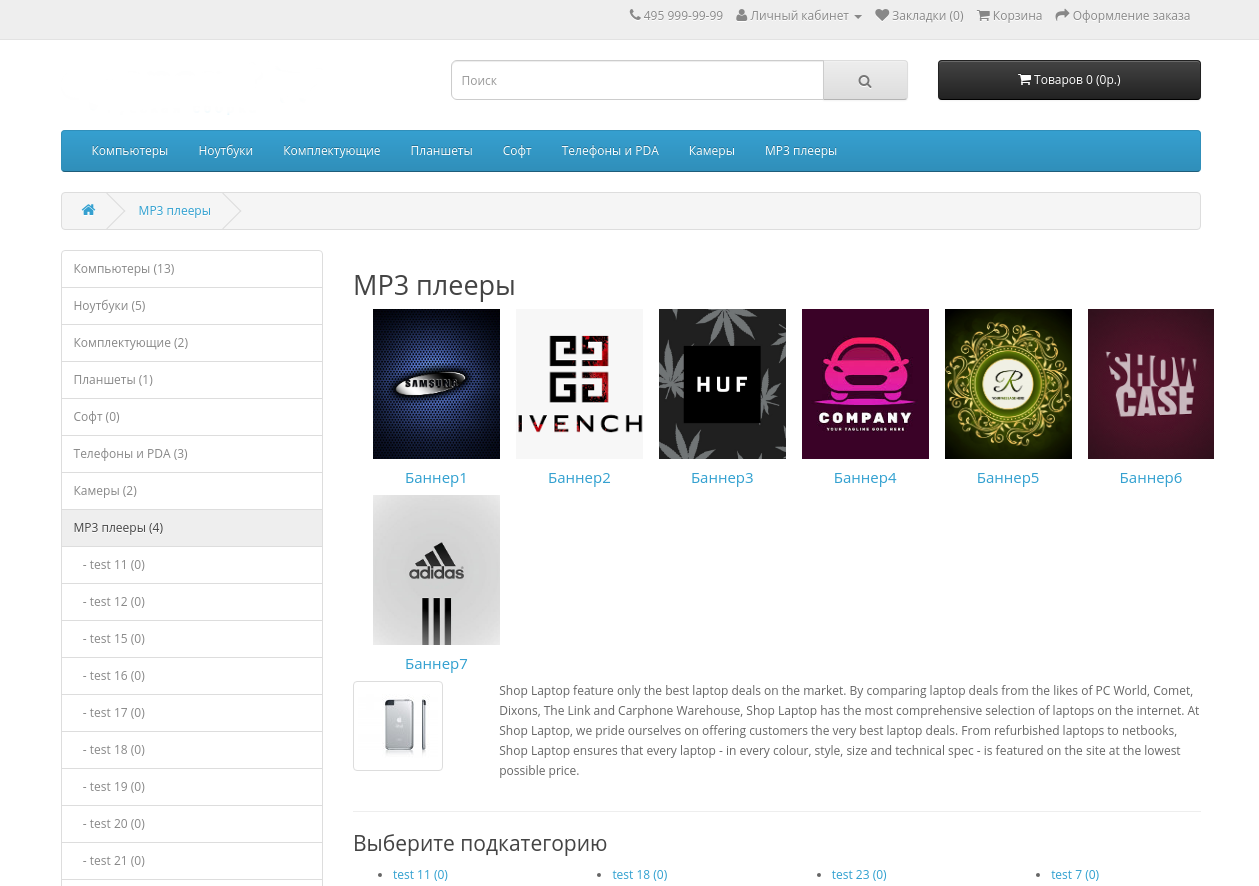
Плитка располагается перед описанием категории и товарами и можно поставить там любую ссылку (например на товар или отфильтрованную категорию по заданным параметрам)
Модуль работает со стандартной темой Opencart, а также coloring. Адаптация под любую Вашу тему со скидками. Адаптация под установленную у Вас версию OpenCart/OcStore бесплатна если Вы закажите адаптацию для своей темы.
Лицензия:
- Модуль продается с лицензией на один сайт, одна покупка = один домен
- Покупая копию модуля вы получаете право только на использование. Распространяя модуль платно или бесплатно вы нарушает лицензию - это грозит обнулением покупки, а так же уголовной ответственность предусмотренной статей 146 УК РФ (Нарушение авторских и смежных прав)
- Автор оставляет за собой право изменят условия предоставления лицензии, цену и строк продления дополнения.
- Все доработки и изменения функционала не входят в стоимость и оплачиваются отдельно.
- Модуль официально продается только через площадку opencartforum, другое получения дополнения считается не легальным.
Установка:
-
Для установки модуля cat_tiles Вам необходимо в административной панели Вашего сайта в Разделе Дополнения -> Установка дополнений
загрузить zip архив с модулем - После того как модуль установится можно перейти в подраздел Дополнения -> Менеджер дополнений и обновить кеш (иконка в правом верхнем углу)
- После этого включите модуль изменив его статус в разделе модули/расширения
/monthly_2021_06/sxreen1_bezr.png.7924c7e33b78682a4333e26f868a30fa.png" rel="">
Характеристики
License type На один домен + его поддомены
Activation method Без активации
Ioncube LoaderНі
В продажеДа
OpenCart2.2, 2.1, 2.0
ocStore2.2, 2.1
OpenCart.Pro, ocShopНе проверялось
Get request to server of developerНі
If the developer server is unavailableДополнение работает
СкидкаNo
Template compatiblecoloring, default
AdaptationПлатная
Версія1.0.0
File Size25.3 kB
Submitted07/11/2021
Updated03/24/2022
-
Recently Browsing 0 members
- No registered users viewing this page.