


Що можна обрати замість
Роблять те саме — можна поставити замість.

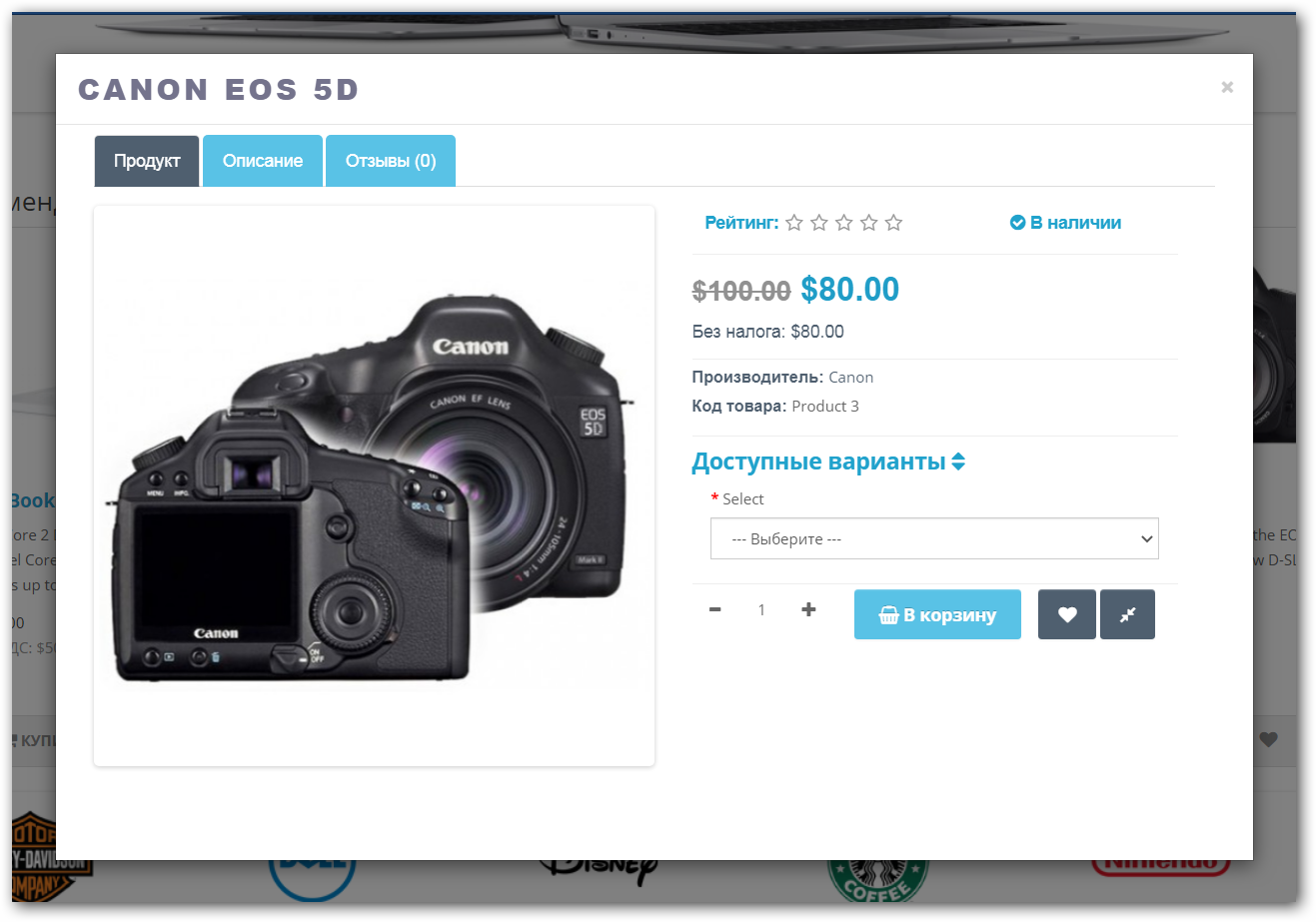
Быстрый просмотр товара DEMO 2х login: demo pass: demo DEMO 15 login: demo pass: demo Сделаю совместимость с любым шаблоном. Если у Вас установлен модуль быстрый заказ, то кнопку выведу и в быстром просмотре. http://opencart20.waterfilter.in.ua/quickview_image/quickview_2.png http://opencart20.waterfilter.in.ua/quickview_image/quickview_3.png http://opencart20.waterfilter.in.ua/quickview_image/quickview_4.png дублей страниц не будет !!!! 1) модуль быстрый просмотр товара можно включить в модуле рекомендуем, акции, хит продаж, последние поступления , страница поиска, страница категорий, страница акция и производителя 2) 4 вкладки в модуле (Оснавная вкладка / Описание товара / Характеристики / Отзывы) 3) отзыв можно оставлять с быстрого просмотра 4 вкладки можно отключать 5) отображаение опций товара с возможностью свернуть опции от определенного количества (настроить можно в админке) 6) Возможность купить товар (кнопку можно отключать в админке) 7) добавить в закладки и сравнение (кнопки можно отключать в админке) 8) настроить цвет кнопки можно в админке 9) просмотр дополнительных изображене Ниже, для того, что бы не искать приведены ссылки на полезные модули "Для тех, кто в теме" (будет пополняться) Управление торговлей 1 Управление торговлей 2 Управление торговлей 3 Управление торговлей 4 Управление торговлей 5 Управление торговлей 6 Управление торговлей 7 Добавил версию для Opencart v2.2.0.0 Добавил версию для Opencart v2.2.0.0 PRO Ru перед открытием поставил индикатор загрузки Quickview_Pro_v2101_2102.zip Quickview_Pro_2010-2031.zip QuickviewPro_v2200.zip..
Updated
Быстрый просмотр товара PRO oc 15x / 2.x
450 грн
135 396
Не замінюють, але додають можливостей до цієї задачі або працюють у парі.

Этот модификатор позволяет вывести все дополнительные изображения для каждого товара и пролистывать их при наведении на карточку товара. Это позволяет покупателю без перехода в карточку товара посмотреть все фото товара, увеличивает конверсию и время проведенное на сайте. Отлично подходит для магазинов одежды, обуви, аксессуаров, когда нужно показать товар со всех сторон.Работает в категориях, поиске, акциях, производителях, стандартных модулях - "избранное", "последние", "лидер продаж" и тд.Добавлена поддержка Opencart и Ocstore от 2.1 до 3.0 включительно.Демо здесьВидео работы здесь
Установка:
Установка выполняется полностью автоматически через стандартный установщик. После установки необходимо обязательно обновить кеш модификаторов!Дополнение распространяется бесплатно и как есть, без претензий и доработок...
Updated
Слайдер дополнительных изображений товара по наведению
Free
415
Інші рішення в тій самій області магазину.
The module adds the ability to add special image and text statuses and stickers to each product, which can be displayed in the product card, catalog and other site pages and modules.
Updated
Product statuses PRO Speed, auto statuses, stickers, text statuses
450 грн
556 1096

Promo Banners in Categories and Manufacturers
Place promotional banners directly among products on category pages and manufacturer product pages. Inform customers about promotions, new arrivals, seasonal collections, and special offers while they browse your catalog.
Banners are added to the product listing without reducing the number of products displayed per page. Banner management is available directly when editing a category or manufacturer, without modifying the template code.
Two Banner Types
Product card banner — occupies a single product grid cell.
Full-width banner — spans the entire width of the product listing area.
For each banner, you can choose its position: at the beginning of the list, after a specific product, after a specific row, or at the end.
Positioning after a row automatically takes into account the number of columns displayed on the current screen.
Separate Display Settings for Desktop and Mobile Devices
Banners can be displayed on all devices, only on desktops and tablets, or only on mobile devices.
To use different images, aspect ratios, or positions, create separate banners and select the appropriate devices.
For example, you can display a wide horizontal banner on desktop screens and a compact vertical banner on smartphones. Each banner will have its own positioning and display settings.
Catalog Display Mode Support
Banners can be displayed in grid view, list view, or both modes.
This allows you to use different banners depending on the catalog layout.
Banners for Different Pagination Pages
Configure separate promotional offers for the first, second, and subsequent catalog pages.
For each banner, you can specify individual page numbers or ranges, such as 1,3-5.
Banner positions are calculated independently within each pagination page.
If a page does not contain enough products or rows to reach the specified position, the banner will not be displayed.
Multilingual Support
Add separate banners for each store language.
Images, titles / ALT text, and links are configured according to the language version currently viewed by the customer.
Additional Features
Multiple banners per category or manufacturer.
Enable or disable individual banners.
Set banner display start and end dates.
Configure sorting order for banners with the same position.
Use banners with or without links.
Optionally add the rel="nofollow" attribute to links.
Configure image dimensions.
Choose between scaling the entire image to fit the available area or filling the area by cropping the edges.
Compatibility
OpenCart 3.x
ocStore 3.x
Theme Compatibility
The base version is compatible with the standard default theme.
Other themes may require additional adaptation.
Themes that include a Price List display mode require adaptation.
Theme adaptation is a paid service.
Installation Instructions
For a new installation, execute the SQL script from promo_banners_in_categories_and_manufacturers_v_3_0_install.sql, making sure to use your store's database table prefix.
Upload promo_banners_in_categories_and_manufacturers_v_3_0_oc3.ocmod.zip via Extensions → Installer.
Refresh modifications and clear the theme cache.
Open the category or manufacturer editing page and navigate to the Promo Banners tab.
Add banners, configure their display conditions, and save your changes.
License
The license is valid for one domain and all its subdomains.
DEMO
Admin Page login/password: demo/demodemo Store Page Important!
Adaptations developed for version 2.0 are not compatible with this version!
Updated
Promo banners in categories and manufacturers
900 грн
25 99

Демо Админка login: demo pass: demo http://nsdemo.waterfilter.in.ua/ns_banner/wallcatman_2.gif Вывод категорий на любой странице с возможностью задать изображение категории Отображение подкатегорий при наведении + скролл сортировка родительских категорий Лимит подкатегорий Бренды ( Производители ) Кэш категорий Кэш производителей Очистка кеша в модуле в админке Мультиязычное название модуля ..
Updated
Витрина категорий & Производители
450 грн
61 129
«Quick view goods - быстрый просмотр товаров» знято з продажу
Ми підібрали схожі модулі інших розробників — їх можна придбати вже зараз.
Інші варіанти
1.0.0
Ioncube Loader: Ні
Withdrawn from sale
The marketplace administration has withdrawn this file from sale
OpenCart3.0
ocStore3.0
License type На один домен + его поддомены
Activation method Автоматическая активация
Ioncube LoaderНі
Get request to server of developerНі
Downloads10
Submitted02/09/2021
Updated09/01/2021
File Size42.04 kB


User Feedback
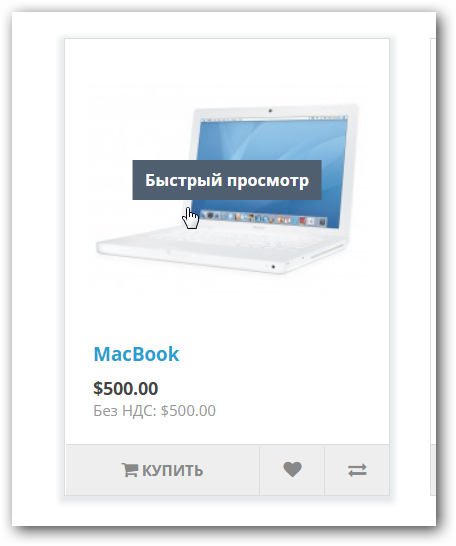
Quick View Goods - модуль ускорит просмотр, отображая информацию о товаре во всплывающем окне предварительного просмотра на странице категории, производителя, поиска, главная страница.
Тестировалось: Opencart 3.0.2 ocStore 3.0.2
Отлично работает на дефолтной теме
Возможности модуля:
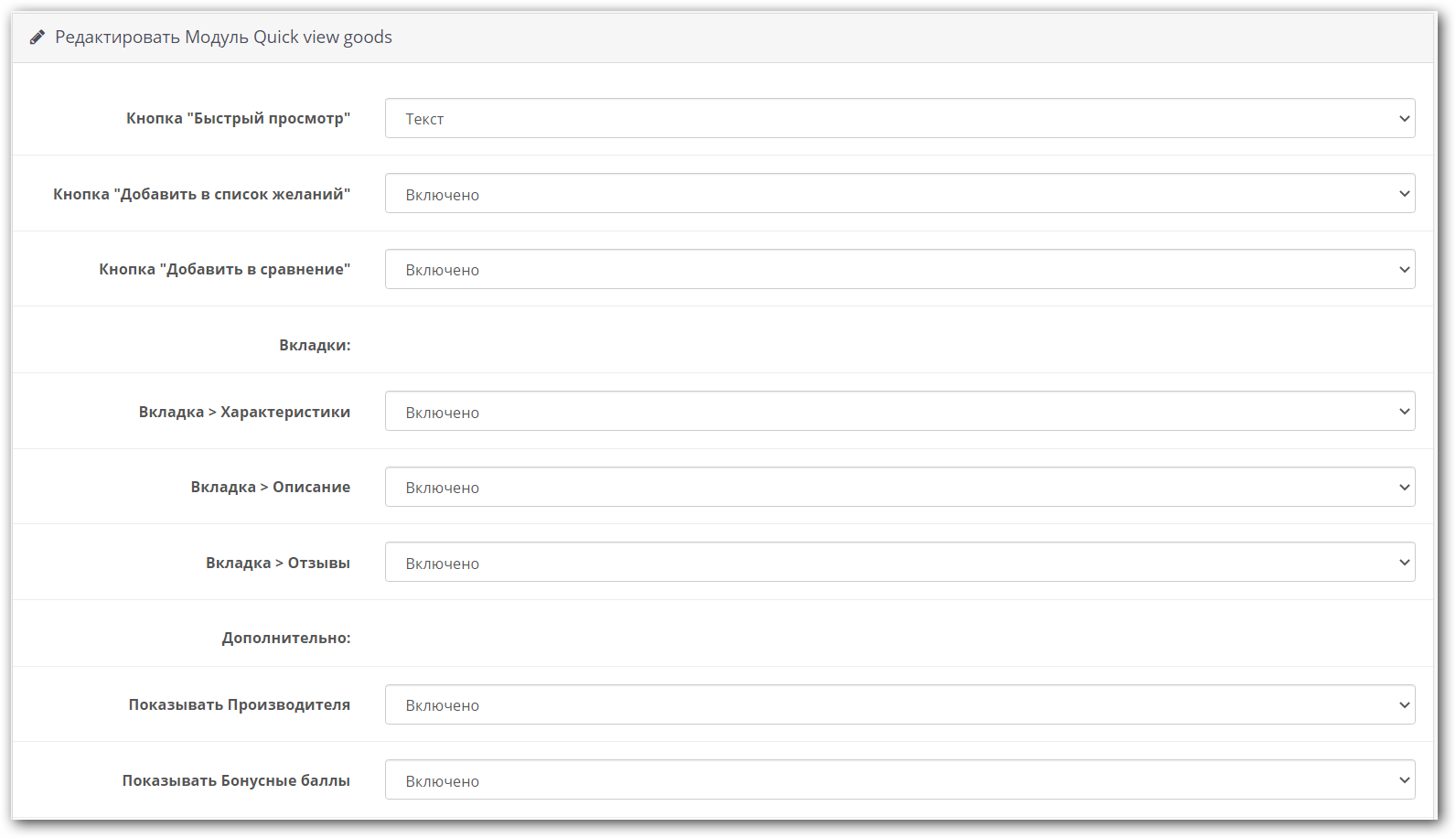
- Выводит вкладки: Продукт, Характеристики, Описание, Отзывы
- Возможность отключать вкладки: Характеристики, Описание, Отзывы
- Вывод кнопки Быстрый просмотр текстом или иконкой
- ВКЛ/ОТК кнопок: Добавить в список желаний, Добавить в сравнение
- Показывать/скрыть производителя
- Показывать/скрыть бонусные баллы
- Обновление стоимости продукта на лету при выборе кол-ва или при выборе опций
Установка:
- Качаем файл и грузим в Установка расширений
- Идем в Настройки->Пользователи->Группы пользователей и ставим галочку Разрешён просмотр и Разрешено внесение изменений
- Обновляем модификаторы
- Идем в Расширения->Модули включаем модуль
Перед покупкой:
- Внимательно читаем описание
- Адаптация модуля не входит в техподдержку
- Если есть вопросы пишем в личку или в тему техподдержки
- Установка и обновление модуля техподдержкой - платная!
- Не работаем с шаблоном Journal!!!
Характеристики
License type На один домен + его поддомены
Activation method Автоматическая активация
Ioncube LoaderНі
В продажеДа
OpenCart3.0
ocStore3.0
Get request to server of developerНі
If the developer server is unavailableДополнение работает
СкидкаNo
Template compatibleДефолтный шаблон точно
AdaptationПлатная
Версія1.0.0
File Size42.04 kB
Submitted02/09/2021
Updated09/01/2021
Venter's Other Downloads

-
Recently Browsing 0 members
- No registered users viewing this page.