


Що можна обрати замість

OcBox Product Bundles. Product bundles and kits for OpenCart 3 and ocStore: set discount, kit price calculates itself (beta)

HPMR AJAX: options as individual products + auto-linking

OcBox AI Smart Related. AI related products for OpenCart and ocStore + rule engine + Bought-Together AI + block analytics + 4-in-1
Кастомне групування у категорії Мікророзмітка під schema.org Розрізання значення атрибуту по роздільнику (напр. значення1, значення2, значення3) Генерування текстур за значенням атрибуту
HPMR PRO

Reviews PRO with Photos and Videos

Discount Pro — Universal Discount Module for OpenCart / OcStore

The module works both with OpenCart special prices and with discounts set through the module " Different prices for groups of buyers
Display different prices for different customer groups

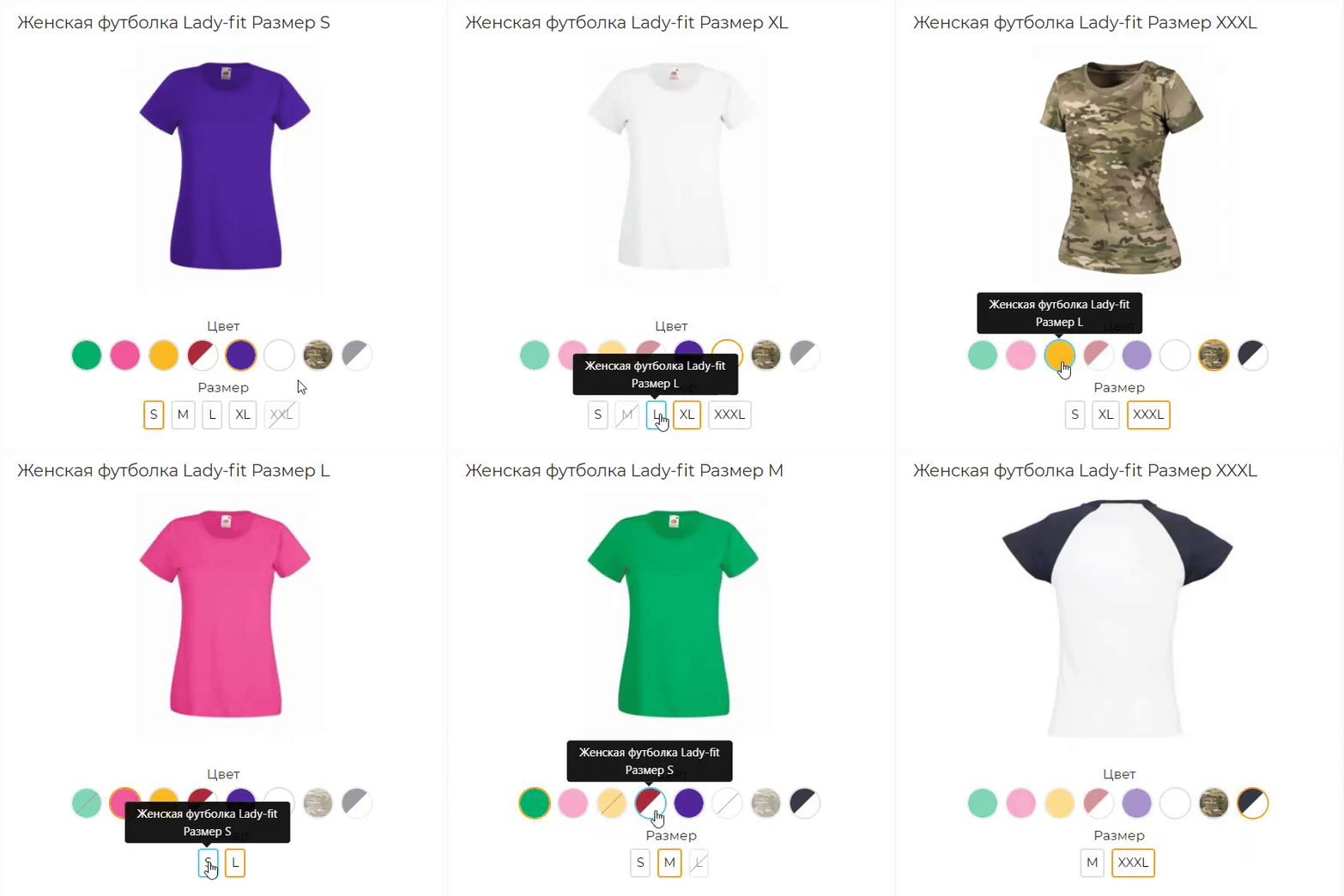
This approach is suitable for stores where different colors, sizes, or configurations have already been created as separate products. The module does not replace or modify standard OpenCart options: it adds a separate mechanism for linking complete product pages.
Integration with the standard OpenCart theme is included, along with separate adaptations for OCTemplates Promo, OCTemplates Deals, Chameleon.
How the module works
The administrator selects one of the standard OpenCart fields as the product group identifier: UPC, EAN, JAN, ISBN, or MPN. Products with the same non-empty value in the selected field are automatically assigned to one group.
Option types are then created in the module, such as “Color,” “Size,” “Storage Capacity,” “Material,” or any other option required by the store. One or more product attributes can be selected for each type. If several attributes are selected, the module checks them in the specified order and uses the first non-empty value.
After synchronization, the available group variants appear on the product page. Clicking a value opens the corresponding product page, so every variant retains its own data, page address, and standard OpenCart product behavior.
Module features
Automatically group products by the UPC, EAN, JAN, ISBN, or MPN field Use only exact matches of non-empty group identifiers Create any required number of option types Obtain option values from product attributes Use several attributes for one option type with configurable priority Display values as text buttons, HEX colors, or product images Configure multiple colors for a single value Configure the value sort order Create fully manual product groups Include or exclude products in an automatic group Set a manual option value for a specific product Control the display of out-of-stock products Index large catalogs in batches via CRON Automatically add changed products to the indexing queue through OpenCart Events Generate Schema.org structured data for product variants Product group identifier
One of the standard product fields is used for automatic linking. The field is selected in the module settings and must contain the same value for every variant of the same model.
UPC — Universal Product Code EAN — European Article Number JAN — Japanese Article Number ISBN — International Standard Book Number MPN — model or group code assigned by the manufacturer or administrator For example, six separate Samsung Galaxy product pages may have different models, colors, storage capacities, prices, and stock levels, but the same group MPN. After indexing, the module links them and displays color and storage as navigation between variants.
Option types and attributes
Option type names are not predefined or restricted. The store creates the variants required for its catalog: color, size, storage, material, style, length, configuration, or any other attribute.
Several attributes can be assigned to one option type. This is useful when the same information is stored under different names in different categories, such as “Color,” “Body Color,” or “Primary Color.” The attribute order determines the priority in which they are checked.
Text — values are displayed as compact buttons Color — values are displayed as a HEX palette Image — the main image of the corresponding product is used The module does not create separate images for option values. Image mode uses the existing main product image and the thumbnail dimensions configured in the module.
HEX palette and value sorting
After indexing, the module collects the detected attribute values on a separate tab. A sort order can be set for every value, while one or more HEX codes can be assigned to colors.
If a value consists of several colors, the module creates a multicolor swatch. Configured HEX codes and sorting are retained independently of the current display type. Switching an option from color to image and back does not remove the previously configured palette.
Display on the product page
The current option value is highlighted and is not an active link Text values are displayed as buttons Colors are displayed as solid or multicolor swatches The main image of the corresponding product is used in image mode The product name is available on hover in image mode Out-of-stock products can be displayed, disabled, or completely hidden Unavailable values have a separate visual style When a value is selected, the customer is taken to the separate page of the corresponding product. The module does not replace the price, stock, or image through JavaScript, so the page always uses current standard OpenCart product data.
Manual groups
Automatic mode can be supplemented with manual management. A separate page provides a list of all created groups with filtering, sorting, and pagination.
Search by group name or identifier Search for a group by product, model, or SKU Filter automatic, manual, and mixed groups Create a new manual group Add products using autocomplete Manually sort products within a group Set manual option values separately for each language Disable an individual group Lock an automatic group A manual value takes priority over an automatically obtained attribute value. This makes it possible to add a product with incomplete data to a group without changing its standard attributes.
Clearing groups
The module provides three separate clearing modes:
Automatic groups — clears the automatic index and groups created by synchronization Manual groups — removes groups created manually by the administrator All groups — completely clears the module’s automatic and manual groups Indexing and CRON
For fast storefront performance, the module builds its own relationship index in advance. Data is processed in batches, allowing the module to be used with large catalogs without a long-running query when a product page is opened.
Configurable number of products per batch Manual full synchronization from the administration panel Secret-key-protected URL for CRON Ready-to-use crontab command Indexing status, progress, and statistics The current index remains operational during full synchronization. The new data generation becomes active only after the rebuild completes successfully. Customers do not see partially populated groups while the catalog is being updated.
Automatic updates after product changes
The module uses standard OpenCart Events. After a product is added, edited, or deleted, its identifier is placed in a queue. The next CRON run updates only the changed products and their related groups.
Direct SQL queries and some third-party imports may not trigger OpenCart Events. A full synchronization is recommended after a bulk direct import or changes to group identifiers.
SEO and structured data
A corresponding Schema.org property can be selected for each option type. If no property is selected, the module does not add structured data for that option.
ProductGroup — a logical group of product variants productGroupID — the product group identifier hasVariant and isVariantOf — the relationship between the group and its variants variesBy — the list of properties by which products differ color — color size — size material — material pattern — pattern suggestedAge — suggested age suggestedGender — suggested gender additionalProperty — another product attribute For the standard theme, the module generates its own structured data block. The OCTemplates Promo, Deals, Chameleon adaptations also integrate the variant relationship into the native product structured data of the corresponding theme.
Performance
Separate index tables with database indexes for primary queries Batch loading of product attributes Batch insertion of index records Active data is not cleared before full synchronization is complete Incremental updates for changed products Option type settings cached through the standard OpenCart cache No external API requests on the product page Multilingual and multistore support
Group names, option type names, and manual values can be specified separately for each language. When displaying variants, the module respects the current OpenCart language and store and does not show products that are not assigned to the current store.
The module administration interface is localized in Ukrainian, English, and Russian.
Theme integration
Default — support is included in the main package OCTemplates Promo — a separate adaptation package with its own Twig template and CSS OCTemplates Deals — a separate adaptation package with its own Twig template and CSS Chameleon — a separate adaptation package with its own Twig template and CSS For Promo, Deals, Chameleon install only the adaptation that matches the active theme. The main module must always be installed.
Open source code and independence
The module code is not encrypted or obfuscated. All PHP, Twig, JavaScript, CSS, and XML files are available for review and modification.
The module does not connect to third-party resources, external APIs, or remote servers and does not require third-party libraries or system services. Product processing, group building, caching, and variant block generation are performed directly on the website.
Thanks to a separate Twig template, CSS file, and targeted OCMOD integration, the module can be adapted to other OpenCart themes without changing its core logic. For a custom product page, it is usually sufficient to prepare a separate adaptation with the appropriate output position and styles for the active theme.
Installation
Perform a clean installation of the main package through Extensions / Installer If OCTemplates Promo, Deals, Chameleon is used, upload the corresponding adaptation package Go to Extensions / Modifications and click Refresh Go to Extensions / Extensions Select the Modules extension type Find Linked Products as Options and click Install Open the module settings Select the group identifier field and create the required option types Run a full synchronization Add the protected URL to your CRON scheduler The module does not modify OpenCart core files directly. Integration is performed through standard OpenCart Events and OCMOD.
Important notes
To create groups automatically, at least two enabled products must have the same non-empty value in the selected UPC, EAN, JAN, ISBN, or MPN field. A full synchronization must be performed after changing the group identifier field, the attribute configuration, or running a bulk direct import. Regular CRON runs process the changed-product queue and continue an unfinished full synchronization. For a small catalog, synchronization can also be started manually from the administration panel. Uninstalling the module with the Uninstall button removes the tables, index, automatic and manual groups, palettes, and other value settings created by the module. Products, attributes, and standard OpenCart data are not removed. DEMO
Admin Page login/password: demo/demodemo Store Page License
The license covers one domain and its subdomains.
Linked Products as Options

ASSL Lookbook — Products on Photos

A colour-by-size matrix in the admin, one-click combination generation, cloning from another product and Excel import save weeks of manual work. On the storefront, the photo, price and SKU change the moment you click, unavailable combinations cannot be put in the cart, and the choice is kept in the link. The warehouse and the website finally speak the same language, and the shop sells exactly what it has. $30 instead of $60, licence for the shop domain and a test domain.
OcBox Product Variants for OpenCart 3 and ocStore: a colour by size matrix, per-variant stock, photo and SKU, dimensions for shipping

OcBox Reviews Pro for OpenCart 3 and ocStore: reviews with photos and video, product questions, post-order reminders, reward points and Schema.org

It allows you to display additional information in a convenient and visual way — such as size charts, care instructions, delivery and payment terms, warranty details, promotions, and much more.
The module supports bulk assignment by selected categories and manufacturers.
Main Features:
Create popup windows with tabbed content. Unlimited number of content tabs. Bulk add content to product groups by selected categories and manufacturers. Multilingual support. Ability to insert images, tables, text, and HTML content into tabs. Display popup trigger button on the product page. Example Use Cases:
Size chart — add a tab with size tables for different brands or categories. Care instructions — provide helpful product care information. Delivery and payment info — show details without leaving the product page. Promotions, warranty, or certificate information. Benefits:
Improves user experience — customers get all the necessary info without reloading the page. Reduces customer inquiries (especially about sizes and shipping terms). Flexible content assignment — easily update information for many products at once. Theme Compatibility:
default Adaptation for other themes is paid. Please contact before purchase!
Installation:
Upload the module archive via Extensions → Installer. Upload the theme adaptation archive via Extensions → Installer. Refresh modification cache (Extensions → Modifications → Refresh). Go to Extensions → Modules → Content Popup and click Install. Configure the module. After saving settings, always click "Add content to products". Template Compatibility:
The extension is compatible with the default template. Adaptation is required for other templates (paid adaptation).
DEMO
Admin Page login/password: demo/demodemo Store Page License:
Use is allowed in one online store only.
Content Popup


User Feedback
КомплектExpert - модуль для создания комплекта товаров, серий, коллекций.
NEW ! "Комплекты как товар" - Демо
Варианты настройки комплектов:
Фиксированный список товаров: ссылка
Список товаров разбит на группы, со свободным удалением и добавлением товаров: ссылка
Добавление товаров в фиксированные позиции комплекта: ссылка
Комбинирование предыдущих вариантов: ссылка
5 видов комплектов
- простой комплект
- комплект как товар
- комплект как товар в упрощенном режиме
- серия
- коллекция
Подробнее про виды комплектов и их различия можно прочитать здесь: Виды комплектов
Несколько форматов отображения комплекта:
- таблица Демо
- таблица с чекбоксами Демо
- карусель Демо
- баннер Демо
- серия Демо
- коллекция Демо
- ссылка на серию\коллекцию\комплект в которых есть данный товар Демо
- возможность добавления своих шаблонов
Гибкая система расположения комплектов:
- на странице товара Демо
- в категории рядом с соответствующими товарами Демо
- стандартным модулем Opencart Демо
- в статьях, блогах, новостях (внутри текста) Демо
- на любой странице в любом месте с помощью селекторов
Широкие возможности работы с комплектом для покупателя:
Товар на выбор в любой позиций комплекта (подробнее...)
Добавление товара в изначально пустые позиции комплекта (демо)
Форма настройки и редактирования комплекта (подробнее...)
Настройка всех возможных видов опций (пример, подробнее...)
Редактирование комплекта добавленного в корзину (подробнее...)
Контроль наличия в магазине товаров при настройке и добавлении комплекта в корзину и оформлении заказа
Широкие возможности по настройке комплектов\серий администратором магазина (ссылка):
Привязка и формирование комплектов\серий с помощью групп товаров, формируемых из:
- товаров
- по категориям
- по производителям
- по значению фильтра
- по значению полей model, sku, upc, ean, jan, isbn, mpn
- любой комбинацией перечисленных способов
Модуль поддерживает операции "пересечения", "объединения" и "вычитания" элементов внутри группы товаров.
Неограниченное количество позиций в комплекте
Товар на выбор в любой позиций комплекта
Опции:
- фиксированные опции
- отключаемые опции
- стандартные опций
Гибкая система настройки цен товаров в комплекте :
- цена товара
- цена товара минус процент
- цена товара минус значение
- фиксированная цена
- возможность учета текущих акций
Гибкая система настройки стоимости комплекта :
- сумма товаров
- сумма товаров минус процент
- сумма товаров минус значение
- фиксированная стоимость
Количественный учет:
- ограничение количества комплектов
- ограничение количества комплекта в корзине
- вывод комплектов с учетом наличия товаров в магазине
Полноценное редактирование заказа с комплектами (ссылка):
- редактирование комплекта в заказе
- добавление комплектов в заказ
- учет всех скидок в разделе Totals
- редактирование комплектов в старых заказах когда комплекты уже удалёны из магазина
Дополнительно
Поддержка мультиязычности сайта
Адаптация под шаблон
Адаптация под шаблон выполняется бесплатно. Под адаптацией подразумевается добавление двух файлов для корректной работы модуля с шаблоном.
Основные файлы шаблона и модуля при этом не изменяются, модуль и шаблон можно будет обновлять.
Визуально модуль будет отображаться примерно так же как на демо-сайте.
Если нужна более полная интеграция в шаблон с возможностью настройки комплектов например в "Быстром просмотре", "Быстром заказе", "Заказе в 1 клик" и тд. то эта адаптация делается отдельно.
Изменение визуального вида модуля под стиль шаблона выполняется за дополнительную плату, в зависимости от объёма работы.
Повторная адаптация под другой шаблон (при смене шаблона) - платная.
Импорт комплектов
Отдельное платное дополнение к модулю позволяет импортировать комплекты из файлов в формате csv.
Подробнее про импорт комплектов можно прочитать здесь: Импорт комплектов
Демо-сайт: ссылка
Админка: ссылка
Логин\пароль: demo\demo
Страница помощи по работе с модулем: ссылка
Выражаю особую благодарность @Aleksandr1110 и @PaulKravchenko за отличный перевод модуля на украинский язык!
Лицензия
- Условия использования лицензии: одна лицензия на один домен.
- Если необходимо установить модуль на два сайта (два домена) - необходимо приобрести
модуль в количестве двух экземпляров.
- Для тестового домена выдаётся дополнительный лицензионный ключ, при этом название тестового домена должно носить явно выраженную тестовую суть
- Вы не можете передавать, продавать, распространять, сублицензировать, сдавать в аренду какую-либо
часть программного обеспечения. Вы не можете разместить программное обеспечение на сервере, чтобы оно
было доступно через сеть общего пользования с целью распространения (п. 6 Лицензионного Соглашения).
- Любое распространение программного обеспечения без нашего согласия, в том числе некоммерческого
рассматривается как нарушения данного Соглашения и влечет за собой ответственность согласно действующему
законодательству. (п. 4 Лицензионного Соглашения).
- Все права на модуль принадлежат разработчику opencart-expert.com
- Полный текст Лицензионного соглашения в файле
Характеристики
-
 13
-
Recently Browsing 0 members
- No registered users viewing this page.