


Що можна обрати замість
Роблять те саме — можна поставити замість.

Вирішують ту саму задачу, але іншим способом або частково.
Данный модуль больше не поддерживается автором (с 14/12/2020), любые вопросы/ошибки будут проигнорированы.
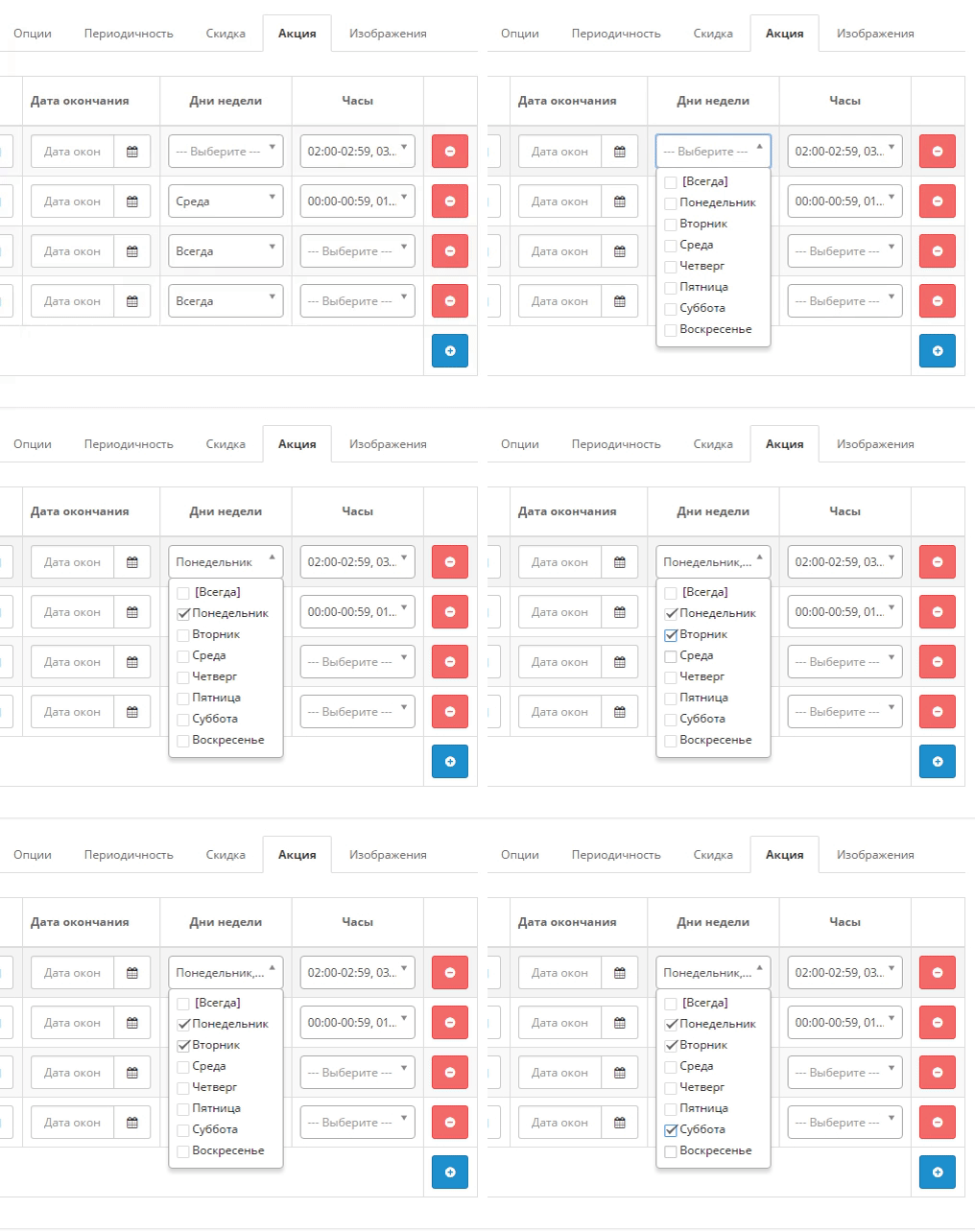
Модуль добавляет 2 новых параметра для акций (дни недели и часы активности).
Акционные цены будут отображаться только в заданые дни и часы.
Добавлена возможность выбрать перевод дней недели и включить/отключить работу модуля.
Модуль отображает акционные цены с учетем выбранных дней и часов как в админ-панеле при просмотре товаров, так и на сайте.
Данный модуль совместим с модулем "Массовое управление акциями + Таймер обратного отсчета" и расширяет его функционал (добавляет генерацию/изменение/просмотр акций с учетом акционных дней и акционного времени).
Для работы этих двух модулей их необходимо установить и в модуле "Акции в определенное время и дни" включить статус модуля "Включено".
Пример расширенного функционала можно увидеть ниже:
Демо Opencart 1.5.x
Визуальное отображение: Ссылка на отображение модуля на сайте
Админ-панель: Ссылка на модуль, Ссылка на акционный товар
Логин/Пароль: demo/demo
Демо Opencart 2.x
Визуальное отображение: Ссылка на отображение модуля на сайте
Админ-панель: Ссылка на модуль, Ссылка на акционный товар
Логин/Пароль: demo/demo
Инструкция по установке находиться в файле readme.txt (в архиве)..
Updated
Акции в определенное время и дни для OC 1.5x/2.x/3.x., счастливые часы, ночные распродажи
Free
1116
Інші рішення в тій самій області магазину.

The module allows you to display a block with prices for different groups of customers.
The module works both with OpenCart special prices and with discounts set through the module " Different prices for groups of buyers
The module works both with OpenCart special prices and with discounts set through the module " Different prices for groups of buyers
Updated
Display different prices for different customer groups
450 грн
145 223

Bundles for OpenCart 3 and ocStore: a set block on the product page with an Add all to cart button and a discount, a kit product whose price comes from its parts, bundle landing pages, CSV import and AI suggestions of what sells together.
Updated
OcBox Product Bundles — product bundles and kits for OpenCart 3 and ocStore: set discount, kit price calculates itself (beta)
1,440 грн
7 6

The module is designed to automatically display a modal window with similar products if the selected product is out of stock.
When a customer opens a product page with the status “Out of stock”, the system displays a modal window after a specified delay, showing products that are in stock and selected according to the configured filters.
This allows you to
avoid losing customers; quickly offer alternative products; increase conversion rate and number of orders. Module features
The module settings include the following parameters:
number of products – defines the maximum number of products displayed in the modal window; modal display delay – allows you to set the time (in seconds) before the modal window opens automatically after the product page is loaded; category filter – allows displaying only products from the same category as the current product; manufacturer filter – allows displaying products from the same manufacturer as the viewed product. How it works
The customer opens a product page. If the product is out of stock, the module is activated. After the specified delay, a modal window opens. The window displays in-stock products selected according to the chosen filters. The customer can immediately switch to an alternative product. Compatibility
OpenCart 3.x Theme compatibility
The extension is compatible with the standard default theme. For other themes, adaptation may be required (adaptation is paid).
Installation
Install the module via the OpenCart administration panel Refresh the modifications Enable and configure the module. DEMO
Admin Page login/password: demo/demodemo Store Page License
The license is valid for one domain and its subdomain.
Updated
Similar Products in modal popup
320 грн
1 3

Product Features – Module for OpenCart, allows you to conveniently and beautifully display product features. Each feature is presented as a separate block with an image, title, and description.
Main Features:
Automatic display of product-related features. Image support for better visualization of features. Easy integration with any templates. Fully responsive design. Usage Examples:
Clothing:
How to wash (hand wash, machine wash, dry cleaning). How to iron (ironing allowed, ironing prohibited, steam iron). Material composition (100% cotton, polyester, wool). Electronics: Key technologies (AMOLED display, water resistance IP68). Compatibility (wireless charging support, works with iOS and Android). Important features (fast charging, NFC, 5G support). Benefits of Using the Module:
Improved visual perception of product features. Convenient and clear presentation of product details. Enhanced user experience and increased conversion rate. Easy setup. Installation:
Run the query from the product_features_query.sql file in the website database (don’t forget to change the table prefix).
Install the extension using the built-in OpenCart installer.
Refresh the modifications.
Grant access permissions to user groups.
Go to store settings: System → Settings → Edit Store → Options tab and configure the width and height of the feature images.
The feature management page is located at: Catalog → Attributes → Features.
Template Compatibility:
The extension is compatible with the default template. Adaptation is required for other templates (paid adaptation).
DEMO
Admin Page login/password: demo/demodemo Store Page License:
Allowed for use in one online store.
Updated
Product Features
320 грн
4 25
-18%
 Придбати

ShipTime - a module for OpenCart that displays the current shipping time to the customer directly on the product page.
Updated
ShipTime - shipping date in the product card OpenCart,ocStore
496грн
406 грн
0 0

This modification is designed to enhance the product page interface in OpenCart by allowing you to add tooltips to product options. It helps improve how customers perceive product information and makes the selection process more convenient and informative. The modification includes settings for text tooltips displayed as pop-up hints, helping users better understand what each option means.
Benefits of the Modification
Simplified understanding of product options: Pop-up tooltips allow you to provide more detailed information without cluttering the page. Improved user experience: Customers can get all the necessary information directly on the product page without switching tabs or dealing with technical details. Tooltips make the interface more interactive and visually appealing. Flexibility and customization: The store administrator can configure tooltips for each product option individually. Multilingual Support
The modification supports multilingual stores, allowing tooltips to be configured separately for each language version of the store. Conversion Boost
Tooltips help customers navigate product options faster and make purchase decisions more confidently, which can increase conversion rates and reduce cart abandonment. Compatibility
OpenCart 3.x Template Compatibility
The extension is compatible with the standard default template. For other templates, adaptation may be required (paid adaptation).
Installation
Run the SQL query from the file tips_for_product_options_query.sql in the database (taking into account the table prefix). Install the module via the OpenCart admin panel. Refresh the modifications. DEMO
Admin Page login/password: demo/demodemo Store Page License
The license applies to one domain and its subdomain.
Updated
Product Option Tooltips
250 грн
0 0
«Обратный отсчет до конца акции» знято з продажу
Ми підібрали схожі модулі інших розробників — їх можна придбати вже зараз.
Інші варіанти

User Feedback
Орбатный отсчет до конца действия акционной цены на странице продукта.
Языки: ru, en
демо
Характеристики
License type На один домен
Activation method Без активации
Ioncube LoaderНі
В продажеДа
OpenCart2.3, 2.2, 2.1, 2.0
ocStore2.3, 2.2, 2.1
OpenCart.Pro, ocShopНе проверялось
СкидкаNo
Версія1.0
File Size6.91 kB
Submitted12/05/2017
Updated04/17/2018
-
 1
-
Recently Browsing 0 members
- No registered users viewing this page.