Модуль "Аналоги товара" и другие custom блоки


Що можна обрати замість

When a customer opens a product page with the status “Out of stock”, the system displays a modal window after a specified delay, showing products that are in stock and selected according to the configured filters.
This allows you to
avoid losing customers; quickly offer alternative products; increase conversion rate and number of orders. Module features
The module settings include the following parameters:
number of products – defines the maximum number of products displayed in the modal window; modal display delay – allows you to set the time (in seconds) before the modal window opens automatically after the product page is loaded; category filter – allows displaying only products from the same category as the current product; manufacturer filter – allows displaying products from the same manufacturer as the viewed product. How it works
The customer opens a product page. If the product is out of stock, the module is activated. After the specified delay, a modal window opens. The window displays in-stock products selected according to the chosen filters. The customer can immediately switch to an alternative product. Compatibility
OpenCart 3.x Theme compatibility
The extension is compatible with the standard default theme. For other themes, adaptation may be required (adaptation is paid).
Installation
Install the module via the OpenCart administration panel Refresh the modifications Enable and configure the module. DEMO
Admin Page login/password: demo/demodemo Store Page License
The license is valid for one domain and its subdomain.
Similar Products in modal popup


OcBox AI Smart Related. AI related products for OpenCart and ocStore + rule engine + Bought-Together AI + block analytics + 4-in-1

This approach is suitable for stores where different colors, sizes, or configurations have already been created as separate products. The module does not replace or modify standard OpenCart options: it adds a separate mechanism for linking complete product pages.
Integration with the standard OpenCart theme is included, along with separate adaptations for OCTemplates Promo, OCTemplates Deals, Chameleon.
How the module works
The administrator selects one of the standard OpenCart fields as the product group identifier: UPC, EAN, JAN, ISBN, or MPN. Products with the same non-empty value in the selected field are automatically assigned to one group.
Option types are then created in the module, such as “Color,” “Size,” “Storage Capacity,” “Material,” or any other option required by the store. One or more product attributes can be selected for each type. If several attributes are selected, the module checks them in the specified order and uses the first non-empty value.
After synchronization, the available group variants appear on the product page. Clicking a value opens the corresponding product page, so every variant retains its own data, page address, and standard OpenCart product behavior.
Module features
Automatically group products by the UPC, EAN, JAN, ISBN, or MPN field Use only exact matches of non-empty group identifiers Create any required number of option types Obtain option values from product attributes Use several attributes for one option type with configurable priority Display values as text buttons, HEX colors, or product images Configure multiple colors for a single value Configure the value sort order Create fully manual product groups Include or exclude products in an automatic group Set a manual option value for a specific product Control the display of out-of-stock products Index large catalogs in batches via CRON Automatically add changed products to the indexing queue through OpenCart Events Generate Schema.org structured data for product variants Product group identifier
One of the standard product fields is used for automatic linking. The field is selected in the module settings and must contain the same value for every variant of the same model.
UPC — Universal Product Code EAN — European Article Number JAN — Japanese Article Number ISBN — International Standard Book Number MPN — model or group code assigned by the manufacturer or administrator For example, six separate Samsung Galaxy product pages may have different models, colors, storage capacities, prices, and stock levels, but the same group MPN. After indexing, the module links them and displays color and storage as navigation between variants.
Option types and attributes
Option type names are not predefined or restricted. The store creates the variants required for its catalog: color, size, storage, material, style, length, configuration, or any other attribute.
Several attributes can be assigned to one option type. This is useful when the same information is stored under different names in different categories, such as “Color,” “Body Color,” or “Primary Color.” The attribute order determines the priority in which they are checked.
Text — values are displayed as compact buttons Color — values are displayed as a HEX palette Image — the main image of the corresponding product is used The module does not create separate images for option values. Image mode uses the existing main product image and the thumbnail dimensions configured in the module.
HEX palette and value sorting
After indexing, the module collects the detected attribute values on a separate tab. A sort order can be set for every value, while one or more HEX codes can be assigned to colors.
If a value consists of several colors, the module creates a multicolor swatch. Configured HEX codes and sorting are retained independently of the current display type. Switching an option from color to image and back does not remove the previously configured palette.
Display on the product page
The current option value is highlighted and is not an active link Text values are displayed as buttons Colors are displayed as solid or multicolor swatches The main image of the corresponding product is used in image mode The product name is available on hover in image mode Out-of-stock products can be displayed, disabled, or completely hidden Unavailable values have a separate visual style When a value is selected, the customer is taken to the separate page of the corresponding product. The module does not replace the price, stock, or image through JavaScript, so the page always uses current standard OpenCart product data.
Manual groups
Automatic mode can be supplemented with manual management. A separate page provides a list of all created groups with filtering, sorting, and pagination.
Search by group name or identifier Search for a group by product, model, or SKU Filter automatic, manual, and mixed groups Create a new manual group Add products using autocomplete Manually sort products within a group Set manual option values separately for each language Disable an individual group Lock an automatic group A manual value takes priority over an automatically obtained attribute value. This makes it possible to add a product with incomplete data to a group without changing its standard attributes.
Clearing groups
The module provides three separate clearing modes:
Automatic groups — clears the automatic index and groups created by synchronization Manual groups — removes groups created manually by the administrator All groups — completely clears the module’s automatic and manual groups Indexing and CRON
For fast storefront performance, the module builds its own relationship index in advance. Data is processed in batches, allowing the module to be used with large catalogs without a long-running query when a product page is opened.
Configurable number of products per batch Manual full synchronization from the administration panel Secret-key-protected URL for CRON Ready-to-use crontab command Indexing status, progress, and statistics The current index remains operational during full synchronization. The new data generation becomes active only after the rebuild completes successfully. Customers do not see partially populated groups while the catalog is being updated.
Automatic updates after product changes
The module uses standard OpenCart Events. After a product is added, edited, or deleted, its identifier is placed in a queue. The next CRON run updates only the changed products and their related groups.
Direct SQL queries and some third-party imports may not trigger OpenCart Events. A full synchronization is recommended after a bulk direct import or changes to group identifiers.
SEO and structured data
A corresponding Schema.org property can be selected for each option type. If no property is selected, the module does not add structured data for that option.
ProductGroup — a logical group of product variants productGroupID — the product group identifier hasVariant and isVariantOf — the relationship between the group and its variants variesBy — the list of properties by which products differ color — color size — size material — material pattern — pattern suggestedAge — suggested age suggestedGender — suggested gender additionalProperty — another product attribute For the standard theme, the module generates its own structured data block. The OCTemplates Promo, Deals, Chameleon adaptations also integrate the variant relationship into the native product structured data of the corresponding theme.
Performance
Separate index tables with database indexes for primary queries Batch loading of product attributes Batch insertion of index records Active data is not cleared before full synchronization is complete Incremental updates for changed products Option type settings cached through the standard OpenCart cache No external API requests on the product page Multilingual and multistore support
Group names, option type names, and manual values can be specified separately for each language. When displaying variants, the module respects the current OpenCart language and store and does not show products that are not assigned to the current store.
The module administration interface is localized in Ukrainian, English, and Russian.
Theme integration
Default — support is included in the main package OCTemplates Promo — a separate adaptation package with its own Twig template and CSS OCTemplates Deals — a separate adaptation package with its own Twig template and CSS Chameleon — a separate adaptation package with its own Twig template and CSS For Promo, Deals, Chameleon install only the adaptation that matches the active theme. The main module must always be installed.
Open source code and independence
The module code is not encrypted or obfuscated. All PHP, Twig, JavaScript, CSS, and XML files are available for review and modification.
The module does not connect to third-party resources, external APIs, or remote servers and does not require third-party libraries or system services. Product processing, group building, caching, and variant block generation are performed directly on the website.
Thanks to a separate Twig template, CSS file, and targeted OCMOD integration, the module can be adapted to other OpenCart themes without changing its core logic. For a custom product page, it is usually sufficient to prepare a separate adaptation with the appropriate output position and styles for the active theme.
Installation
Perform a clean installation of the main package through Extensions / Installer If OCTemplates Promo, Deals, Chameleon is used, upload the corresponding adaptation package Go to Extensions / Modifications and click Refresh Go to Extensions / Extensions Select the Modules extension type Find Linked Products as Options and click Install Open the module settings Select the group identifier field and create the required option types Run a full synchronization Add the protected URL to your CRON scheduler The module does not modify OpenCart core files directly. Integration is performed through standard OpenCart Events and OCMOD.
Important notes
To create groups automatically, at least two enabled products must have the same non-empty value in the selected UPC, EAN, JAN, ISBN, or MPN field. A full synchronization must be performed after changing the group identifier field, the attribute configuration, or running a bulk direct import. Regular CRON runs process the changed-product queue and continue an unfinished full synchronization. For a small catalog, synchronization can also be started manually from the administration panel. Uninstalling the module with the Uninstall button removes the tables, index, automatic and manual groups, palettes, and other value settings created by the module. Products, attributes, and standard OpenCart data are not removed. DEMO
Admin Page login/password: demo/demodemo Store Page License
The license covers one domain and its subdomains.
Linked Products as Options

Option Combo Price

A colour-by-size matrix in the admin, one-click combination generation, cloning from another product and Excel import save weeks of manual work. On the storefront, the photo, price and SKU change the moment you click, unavailable combinations cannot be put in the cart, and the choice is kept in the link. The warehouse and the website finally speak the same language, and the shop sells exactly what it has. $30 instead of $60, licence for the shop domain and a test domain.
OcBox Product Variants for OpenCart 3 and ocStore: a colour by size matrix, per-variant stock, photo and SKU, dimensions for shipping
User Feedback
Проблематика:
Очень часто у нас отсутствует товар на складе, а удаление страницы ведет к тому, что мы имеем 404 ошибку
- Большое количество 404 отрицательно сказывается на поиске
- Клиенты помнят старое название товара
- Переход клиентов по старым ссылкам на товар приводит к их уходу с сайта
- Менеджеру приходиться отвлекаться на поиск аналогичного товара
Решение!
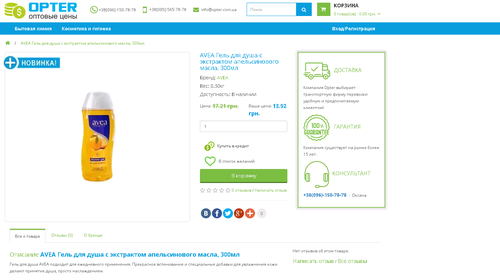
Настройка «Аналоги товаров" снятых с производства или отсутствующих на складе товаров
- возможность назначать товару (который отсутствует) аналоги
- возможность настроить отображение аналогов, если на складе 0 товаров
- расширенные настройки внешнего вида
demo
Данная возможность является активной настройкой модуля Super Custom Html. Также в модуле содержится библиотека с другими многообразными настройками.
Настройку можно просто применить к сайту, достаточно выбрать нужную и нажать кнопку "Добавить себе" также выбрать страницы, где будет выводится настройка.
Модуль позволяет очень просто, быстро настроить отдельные схемы кода и просто любой информации для схем, групп продуктов, категорий и производителей...
Есть возможность вывода ДО. ПОСЛЕ или с ЗАМЕНОЙ.
- Модуль способен заменить более 100 других модулей. Совместим с более 95% шаблонов.
- Рекомендован для каждого интернет-магазина.
- Модуль позволяет расположить любую информацию на любой странице сайта.
- Данные возможно выводить, как для отдельных товаров и категорий, так и для отдельных производителей, а также схем магазина.
- Любой html, js, jquery, ajax–код и в любой части странице Выберите селектор блока и положение данных, относительно блока (перед, после, вместо).
- Модуль мультиязычный, прост в настройке и использовании.
- Селекторы можно использовать абсолютно любые, от класса, заканчивая набором элементов, любые схемы селекторов, для jquery
- Любой код
Возможности модуля:
1. Гибкие настройки и фильтры, вывод любой информации на всех страницах сайта, вывод по отдельным категориям, товарам, производителям, добавление настроек ко всем товаров категории (Продукты категорий) и ко всем товарам производителя (Продукты производителей), макетам.
2.Фильтр "URL содержит". Можно добавить настройку для отдельных страниц сайта, если в url страницы содержится введенное значение. В карточке товар поиск из полного урла, в категории - ключевое слово из таблицы seo_url.
3. Возможность вывода любой информации в любой части страницы: Любой html, js, jquery, ajax–код и в любой части странице Выберите селектор блока и положение данных, относительно блока (перед, после, вместо).
4. Возможность замены блока полностью или только его содержимого.
5. Селекторы можно использовать абсолютно любые, от класса, заканчивая набором элементов, любые схемы селекторов, для jquery.
6. Копировать настройки из ранее созданных схем.
7. Настройка гибких условий отображения настроек в товарах. Условия И, ИЛИ, НЕ. Например, выбираем для вывода Продукты категорий КРОМЕ определенных товаров; выбираем продукты категорий И товары производителей. ИЛИ используется по-умолчанию. Название блоков являются кнопками, которые можно использовать для составления условий.
8. Использовать в настройках переменные товара. Введены переменные $product и $products, которое можно использовать в настройке в блок Код блока.
$products - массив со всеми выбранными товарами.
$product - данные текущего товара ( работает только в карточке товара).
Данные продукта, которые могут использоваться в настройках:
date_added: Дата создания
date_available: Дата поступления
date_modified: Дата изменения
description: Описание
ean: EAN
height: Высота
image: Изображение товара
isbn: ISBN
jan: JAN
location: Расположение
manufacturer: Наименование производителя
manufacturer_id: Id производителя
meta_description: Мета-тег Description
meta_keyword: Мета-тег Keyword
meta_title: Мета-тег Title
minimum: Минимальное кол-во заказа
model: Модель
mpn: MPN
name: Название товара
price: Цена товара
product_id: Id товара
quantity: Кол-во товара
sku: SKU
sort_order: Сортировка
status: Статус
stock_status: Статус на складе
stock_status_id: Id статуса на складе
tag: Теги
tax_class_id: Id налога
upc: UPC
weight: Ширина
width: Длина
Пример: вывод название текущего товара будет иметь вид $product.name;
вывод цена 3-го товара из массива $products[2].price;.
Можно задать лимит вывода товара из переменной $products.
9. Библиотека Настроек. Можно выбрать настройку из библиотеки кода.
10. Фильтр настроек. Позволит быстро найти и применить настройку из библиотеки.
11. Добавление своих настроек в библиотеку готовых решений.
12. Добавление неограниченного количества настроек к одной схеме товаров.
13. Автоматическое добавление нового товара к схеме.
Примеры использования:
- Возможность создания блога на сайте, отредактировав карточку товара как статью
- Возможность создания портфолио, отредактировав карточку товара, под объект портфолио
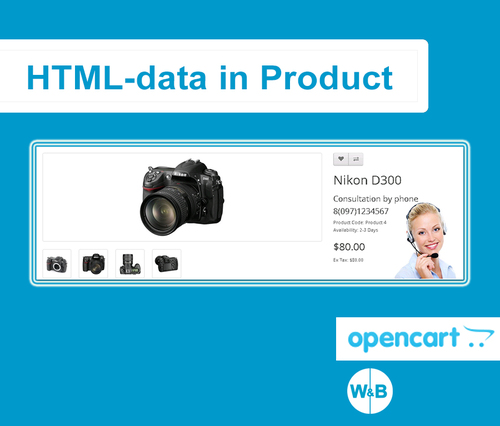
- Замена общего номера телефона в определенных продуктах или категориях на номер менеджера направления
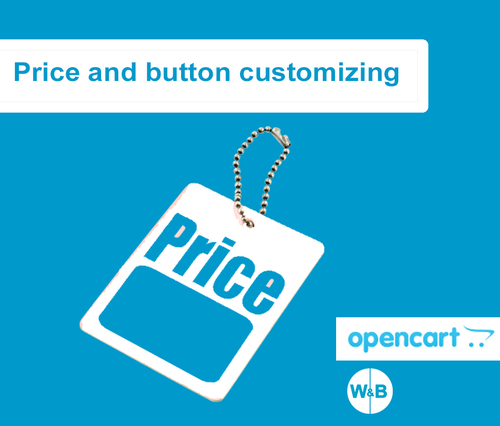
- Скрыть или заменить некоторые элементы в продуктах или категориях , например цену, кнопку, (цено от и прочее)
- Добавить любой кастомный HTML код в любое место или убрать..
- добавить для категории блок с доставкой и гарантиями
- добавить в моб версии кнопку позвонить и заказать у определенных продуктов
- у определенных продуктов скрыть корзину и добавит цена от с вызовом формы обратной связи
- добавить свои стили для определенного вида страниц
- Замена имейла и номера у определенной группы продуктов
- Мультимагазин
Инструкция по установке и настройке версия 2.0
Инструкция по установке и настройке версия 2.6
Установка модуля:
- Сделать резервную копию сайта и БД.
- Скачать архив.
- Не распаковывая его загрузить в админ-панель. Модули - Установка расширения - Загрузить.
- Обновить модификаторы.
- Дополнительно активировать модуль. Модули - Модули - Активировать.
Характеристики


-
Recently Browsing 0 members
- No registered users viewing this page.