


Що можна обрати замість

OcBox Reviews Pro for OpenCart 3 and ocStore: reviews with photos and video, product questions, post-order reminders, reward points and Schema.org

AI Chat - a smart chat consultant for your store

OcBox SEO FAQ AI — AI FAQ generator for OpenCart and ocStore with Schema.org markup, GPT-5 / Claude 4 / Gemini, batch CRON

Reviews PRO with Photos and Videos
Similar products with morphology and relevance

Advantages of the modifier:
Simplified perception of product attributes:
Using icons allows quick and clear representation of attribute information such as color, size, material, and more. Tooltips provide the ability to reveal more detailed information without overloading the page. Improved user experience:
Shoppers can get all the necessary information about a product directly on the page without navigating to other tabs or ignoring technical details. Tooltips and icons make the interface more interactive and visually appealing. Flexibility and customization:
Store administrators can set icons and tooltips for each product attribute or attribute group separately. Support for attribute groups allows applying icons and tooltips to all products within a single attribute group. Multi-language support:
The modifier supports multilingual stores, allowing you to customize tooltips for each language version of the store. Increased conversion:
Tooltips and icons help customers quickly navigate product details and make purchasing decisions, which in turn can increase conversion rates and reduce cart abandonment. Compatibility:
OpenCart 3.x Installation:
Run the query from the attribute_info_query.sql file in the website database (don’t forget to change the table prefix).
Install the extension using the built-in OpenCart installer.
Refresh the modifications.
Template Compatibility:
The extension is compatible with the default template. Adaptation is required for other templates (paid adaptation).
DEMO
Admin Page login/password: demo/demodemo Store Page License:
Allowed for use in one online store.
Icons and tips for product attributes

Benefits of the Modification
Simplified understanding of product options: Pop-up tooltips allow you to provide more detailed information without cluttering the page. Improved user experience: Customers can get all the necessary information directly on the product page without switching tabs or dealing with technical details. Tooltips make the interface more interactive and visually appealing. Flexibility and customization: The store administrator can configure tooltips for each product option individually. Multilingual Support
The modification supports multilingual stores, allowing tooltips to be configured separately for each language version of the store. Conversion Boost
Tooltips help customers navigate product options faster and make purchase decisions more confidently, which can increase conversion rates and reduce cart abandonment. Compatibility
OpenCart 3.x Template Compatibility
The extension is compatible with the standard default template. For other templates, adaptation may be required (paid adaptation).
Installation
Run the SQL query from the file tips_for_product_options_query.sql in the database (taking into account the table prefix). Install the module via the OpenCart admin panel. Refresh the modifications. DEMO
Admin Page login/password: demo/demodemo Store Page License
The license applies to one domain and its subdomain.
Product Option Tooltips
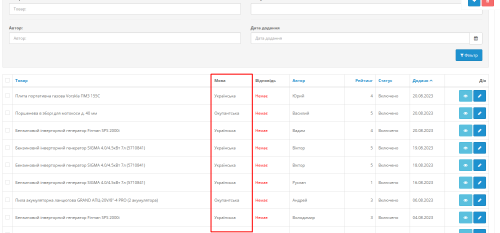 multilang
Multi language Reviews for goods


User Feedback
Данный модуль добавляет новую закладку «Вопросы и ответы» на страницу товара, где покупатели и менеджеры магазина могут общаться посредством комментариев в стиле вопрос – ответ.
Модуль сделан на виджете ВК «Комментарии в ВКонтакте».
Обладает следующими ключевыми особенностями:
1. Гибкая настройка блока «на лету»
2. Настройка уведомлений на адреса электронной почты администраторов (менеджеров) о новом (новых) комментариях, с указанием ссылки на страницу, где они появились.
3. Панель администрирования комментариев – просмотр и модерирование всех сообщений в одном месте, в админке, без необходимости искать их по страницам магазина.
Никакие файлы не затираются.
Установка:
Для установки версии без VQMOD - скачайте архив FAQ_VK_NO_VQMOD.zip
Внутри находятся два каталога:
1.5.x - если ваш магазин работает на версии OC 1.5.x
2.x - если ваш магазин работает на версии OC 2.0.x
0. Удалите из панели управления старую версию модуля.
1. Скопируйте содержимое каталога, соответствующего вашей версии магазина на сервер.
2. Если у вас установлен не дефолтный/стандартный шаблон, скопируйте содержимое подкаталога catalog\view\theme\default в папку, соответствующую вашему текущему установленному шаблону.
Также Вам, перед началом работы с модулем будет необходимо самостоятельно зарегистрировать приложение в ВК. Подробная инструкция как это сделать находится в архиве с модулем.
Работоспособность модуля проверена на версии ocStore 1.5.5.1.2 и OpenCart 2.0.1 при использовании стандартного (дефолтного) шаблона. Есть все основания полагать, что на других версиях также будет работать.
Для других шаблонов или сильно модифицированного стандартного, возможно, потребуется небольшая подгонка. Подпиливание под Ваш магазин - за дополнительную плату.
ВНИМАНИЕ: В архив уже включены файлы для шаблона Money Maker. Для стиля отображения "в закладках" замените после установки содержимым файла faq_vk_mm_tabs.zip, если вы используете стиль "список" - файлом faq_vk_mm_list.zip
Характеристики
-
Recently Browsing 0 members
- No registered users viewing this page.