


Що можна обрати замість

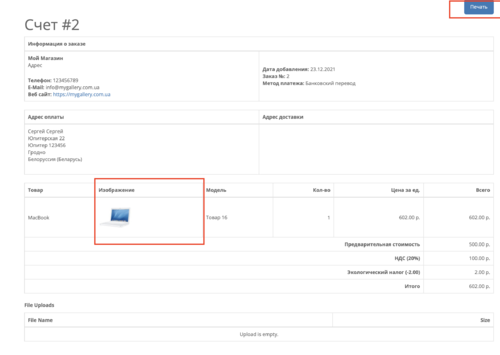
Пакет документов по заказу в PDF

The module was tested on OcStore 3.0.2.0, 3.0.3.7.
You can add the above values in the order view mode in the Admin. panels.
Displaying the above fields:
1. On the page for viewing an order in the Admin. panels.
2. On the order list page in the Admin. Panels.
3. On the status bar in the Admin. panel, provided that the module "Last orders" is displayed.
Installation:
1. It is necessary to make a query in the database (do not forget to change the table prefix if necessary):
ALTER TABLE `oc_order` ADD COLUMN IF NOT EXISTS `supplier_order` VARCHAR(255) NOT NULL AFTER `order_id`, ADD COLUMN IF NOT EXISTS `track_number` VARCHAR(255) NOT NULL AFTER `supplier_order`; 2. Installation is performed in the standard way through Add-ons-> Add-ons installation.
3. After installation, go to the add-ons manager and update the cache.
4. Go to Sales->Orders->View Order and you can enter values in the appeared fields "Supplier invoice" and "Carrier TTN".
Tracking numbers on the order page

ТТН Новой Почты

Order Manager (Order Editor)

Order List PRO
Управление торговлей 5 - быстрая обработка заказ

Smart Order Manager — Розумний менеджер і редактор замовлень для OpenCart / ocStore 3.x

Другие заказы покупателя 1.5.x-2.x-3.x

Now you do not have to constantly look for the desired status from a large list of statuses in the drop-down list, but if necessary, you can use it if you have given permission for this in the settings for a particular user.
Main + Allowed user order statuses


User Feedback
--------------- Описание -------------------------
Этот модуль предназначен для печати заказов для менеджеров (собственный шаблон) на вкладке Заказы.
Стандартные системные файлы не заменяются и не удаляется.Модуль работает с VQmod.
Модуль в настоящее время содержит следующие языки:
-Украинский;
-Русский;
-Английский.
Если вы не можете найти свой язык, пожалуйста, обращайтесь к автору модуля и
мы сделаем перевод для вас.
Могут быть проблемы в работе с некоторыми модулями печати чеков. Если у вас есть проблемы с модулем, пожалуйста
обращайтесь и мы это исправим.
--------------- Как это работает -------------------------
Вы просто входите в вкладку Заказы, выбераете какие товары вы хотите напечатать и нажимаете кнопку Печать чеков для менеджера.
После этого Вам открывается новая страница с чеками для менеджера.
--------------- Проверено на версиях: -----------------
1.5.5.1
1.5.6
Характеристики
ESlabs's Other Downloads

-
Recently Browsing 0 members
- No registered users viewing this page.