




Що можна обрати замість
Роблять те саме — можна поставити замість.

Downloadable Files - это бесплатное OCMOD-расширение, которое создаёт на странице товара вкладку "Документация" со списком прикреплённых к товару файлов для загрузки. Кроме того, позволяет работать с внешними ссылками. После установки расширения в поле "Имя файла" формы загрузки файла можно вставлять обычную ссылку, после чего прикрепить её к товару.
Возможности:
поддержка Opencart 3.x (начиная с 1.3)
поддержка Journal2 (возможно, работает и на других шаблонах)
поддержка seopro
поддержка Английского, Русского и Украинского языков Начиная с 1.2.4 - только английский (Если Вы хотите добавить поддержку своего языка, читайте readme)
поддержка работы с внешними ссылками
лимит в 128 символов для поля имени файла увеличен до 255 (если вы используете префикс таблиц, отличный от 'oc_', отредактируйте файл install.sql)
по-возможности, файлы будут открыты в браузере
Файлы и ссылки открываются в новом окне
Работает на OpenCart 2.x - 3.0.2.x..
Updated
Downloadable Files - Файлы для скачивания -
Free
2462
Вирішують ту саму задачу, але іншим способом або частково.

The “Free Product Downloads” module extends the standard OpenCart functionality and allows downloadable files to be displayed directly on the product page without placing an order, provided the product is marked as free.
After adding files in the standard Downloads section of the OpenCart admin panel, the administrator can mark the product as free. In this case, an additional tab with downloadable files will automatically appear on the product page.
Key Features
automatic display of the “Downloads” tab for free products; display of the file list in a convenient table format; file downloads without registration and without placing an order; verification of file-to-product assignment; protection against unauthorized access to files. Important
The module does not interfere with OpenCart’s standard download logic:
standard download and product_to_download tables are used; files are stored in the default downloads directory; the module does not affect paid downloads or order processing; the default post-purchase download logic remains unchanged. The Module Is Ideal For
free digital products; manuals, price lists, and catalogs; demo files and additional materials. Compatibility
OpenCart 3.x Theme Compatibility
The extension is compatible with the standard default theme. For other themes, adaptation may be required (paid adaptation).
Installation
Run the SQL query from the file free_product_downloads_query.sql in the database (taking table prefixes into account) Install the module via the OpenCart admin panel Refresh the modifications DEMO
Admin Page login/password: demo/demodemo Store Page License
The license applies to one domain and its subdomain.
After adding files in the standard Downloads section of the OpenCart admin panel, the administrator can mark the product as free. In this case, an additional tab with downloadable files will automatically appear on the product page.
Key Features
automatic display of the “Downloads” tab for free products; display of the file list in a convenient table format; file downloads without registration and without placing an order; verification of file-to-product assignment; protection against unauthorized access to files. Important
The module does not interfere with OpenCart’s standard download logic:
standard download and product_to_download tables are used; files are stored in the default downloads directory; the module does not affect paid downloads or order processing; the default post-purchase download logic remains unchanged. The Module Is Ideal For
free digital products; manuals, price lists, and catalogs; demo files and additional materials. Compatibility
OpenCart 3.x Theme Compatibility
The extension is compatible with the standard default theme. For other themes, adaptation may be required (paid adaptation).
Installation
Run the SQL query from the file free_product_downloads_query.sql in the database (taking table prefixes into account) Install the module via the OpenCart admin panel Refresh the modifications DEMO
Admin Page login/password: demo/demodemo Store Page License
The license applies to one domain and its subdomain.
Updated
Free Product Downloads
320 грн
5 9
Інші рішення в тій самій області магазину.

Модуль HPMR позволяет объединять товары в виде опций на основе их характеристик
Updated
HPMR AJAX: options as individual products + auto-linking
1,300 грн
415 775

модуль дозволяє створити комплект товарів зі знижкою
Updated
КомплектыPro
1,400 грн
407 871

Bundles for OpenCart 3 and ocStore: a set block on the product page with an Add all to cart button and a discount, a kit product whose price comes from its parts, bundle landing pages, CSV import and AI suggestions of what sells together.
Updated
OcBox Product Bundles. Product bundles and kits for OpenCart 3 and ocStore: set discount, kit price calculates itself (beta)
1,440 грн
7 6

Option Combo Price is a high-performance module designed to manage product pricing based on multiple dependent options. It allows you to set a unique, fixed price for any combination of options (e.g., a specific Color + specific Size) instead of just adding surcharges for each individual option
Updated
Option Combo Price
1,300 грн
4 4

Купить в 1 клик PRO - Быстрый заказ Demo Opencart 3x Главная Demo Opencart 3x Категории Demo Opencart 3x Товар Админка login: demo pass: demo 1) Пользователь видит дополнительные кнопки "Быстрого заказа" - кнопки имеют гибкие настройки как по цвету, так и по иконкам(более 400) 2) Быстрый заказ не только с карточки товара но и с категории и модулей 3) Регистрация всех заказов в админке + информер + ссылка на страницу товара, заказ на который был сделан 4) Гибкие настройки цветов, названий ,отправки СМС и отправки на почту 5) Заказ падает в заказ 6) В модуль добавлен выбор опций. 7) При выборе количества и опции автоматический пересчет цены. 8) В админке в графе регистрации быстрых заказов отображается присвоеный порядковый номер заказа + название и картинка заказанного товара ( очень удобно для визуального контроля) 9) Быстрая обработка с переходом в сам заказ 10) купить все что в корзине в 1 клик (Корзина покупок) ..
Updated
Купить в 1 клик PRO - Быстрый заказ oc 3.x 7.3
450 грн
278 481

Product Features – Module for OpenCart, allows you to conveniently and beautifully display product features. Each feature is presented as a separate block with an image, title, and description.
Main Features:
Automatic display of product-related features. Image support for better visualization of features. Easy integration with any templates. Fully responsive design. Usage Examples:
Clothing:
How to wash (hand wash, machine wash, dry cleaning). How to iron (ironing allowed, ironing prohibited, steam iron). Material composition (100% cotton, polyester, wool). Electronics: Key technologies (AMOLED display, water resistance IP68). Compatibility (wireless charging support, works with iOS and Android). Important features (fast charging, NFC, 5G support). Benefits of Using the Module:
Improved visual perception of product features. Convenient and clear presentation of product details. Enhanced user experience and increased conversion rate. Easy setup. Installation:
Run the query from the product_features_query.sql file in the website database (don’t forget to change the table prefix).
Install the extension using the built-in OpenCart installer.
Refresh the modifications.
Grant access permissions to user groups.
Go to store settings: System → Settings → Edit Store → Options tab and configure the width and height of the feature images.
The feature management page is located at: Catalog → Attributes → Features.
Template Compatibility:
The extension is compatible with the default template. Adaptation is required for other templates (paid adaptation).
DEMO
Admin Page login/password: demo/demodemo Store Page License:
Allowed for use in one online store.
Main Features:
Automatic display of product-related features. Image support for better visualization of features. Easy integration with any templates. Fully responsive design. Usage Examples:
Clothing:
How to wash (hand wash, machine wash, dry cleaning). How to iron (ironing allowed, ironing prohibited, steam iron). Material composition (100% cotton, polyester, wool). Electronics: Key technologies (AMOLED display, water resistance IP68). Compatibility (wireless charging support, works with iOS and Android). Important features (fast charging, NFC, 5G support). Benefits of Using the Module:
Improved visual perception of product features. Convenient and clear presentation of product details. Enhanced user experience and increased conversion rate. Easy setup. Installation:
Run the query from the product_features_query.sql file in the website database (don’t forget to change the table prefix).
Install the extension using the built-in OpenCart installer.
Refresh the modifications.
Grant access permissions to user groups.
Go to store settings: System → Settings → Edit Store → Options tab and configure the width and height of the feature images.
The feature management page is located at: Catalog → Attributes → Features.
Template Compatibility:
The extension is compatible with the default template. Adaptation is required for other templates (paid adaptation).
DEMO
Admin Page login/password: demo/demodemo Store Page License:
Allowed for use in one online store.
Updated
Product Features
320 грн
4 25
-50%
 Придбати

When a shopper orders an XL you do not actually have, the shopper is not to blame, stock OpenCart is: options there are only a price surcharge and a shared stock figure. OcBox Product Variants turns every combination into a real product: its own price, SKU, stock, photo and shipping dimensions.
A colour-by-size matrix in the admin, one-click combination generation, cloning from another product and Excel import save weeks of manual work. On the storefront, the photo, price and SKU change the moment you click, unavailable combinations cannot be put in the cart, and the choice is kept in the link. The warehouse and the website finally speak the same language, and the shop sells exactly what it has. $30 instead of $60, licence for the shop domain and a test domain.
A colour-by-size matrix in the admin, one-click combination generation, cloning from another product and Excel import save weeks of manual work. On the storefront, the photo, price and SKU change the moment you click, unavailable combinations cannot be put in the cart, and the choice is kept in the link. The warehouse and the website finally speak the same language, and the shop sells exactly what it has. $30 instead of $60, licence for the shop domain and a test domain.
Updated
OcBox Product Variants for OpenCart 3 and ocStore: a colour by size matrix, per-variant stock, photo and SKU, dimensions for shipping
2,880грн
1,440 грн
0 1
-29%
Придбати

This module will help solve the problem of clarifying the purpose of options, attributes and their values for a better understanding of the characteristics of the product item by the client.
Updated
Information (hint) of Options and Attributes
700грн
500 грн
14 29

Купить в 1 клик PRO - oc 2.x Быстрый заказ Версия для 15 купить все что в корзине в 1 клик заказ падает в заказ демо Opencart 2.x карточка товара демо Страница категорий login: demo pass: demo http://opencart20.waterfilter.in.ua/fastimage/quickorderv7.2_0.jpg http://opencart20.waterfilter.in.ua/fastimage/quickorderv7.2_1.jpg http://opencart20.waterfilter.in.ua/fastimage/quickorderv7.2_2.jpg 1) Пользователь видит дополнительные кнопки "Быстрого заказа" - кнопки имеют гибкие настройки как по цвету, так и по иконкам(более 400) 2) Быстрый заказ не только с карточки товара но и с категории 3) Регистрация всех заказов в админке + информер + ссылка на страницу товара, заказ на который был сделан. 4) Гибкие настройки цветов, названий ,отправки СМС. 5) Заказ падает в заказ 6) В модуль добавлен выбор опций. 7) При выборе количества и опции автоматический пересчет цены. 8) В админке в графе регистрации быстрых заказов отображается присвоеный порядковый номер заказа + название и картинка заказанного товара ( очень удобно для визуального контроля) 9) Быстрая обработка с переходом в сам заказ , присвоение статуса. Модуль использует ionCube с онлайн проверкой ключа после приобретения писать в личку заглавив письмо" КУпил, Скачал, Жду ключа на Купить в 1 клик"..
Updated
Купить в 1 клик PRO - oc 2.x
450 грн
414 1491

Управление торговлей 3 Быстрый заказ купить в 1 клик, купить все что в корзине в 1 клик, заказ падает в заказ демо Opencart 2.x карточка товара демо Страница категорий login: demo pass: demo Демка OcStore Opencart login: demo pass: demo http://opencart20.waterfilter.in.ua/fastimage/quickorderv7.2_0.jpg http://opencart20.waterfilter.in.ua/fastimage/quickorderv7.2_1.jpg http://opencart20.waterfilter.in.ua/fastimage/quickorderv7.2_2.jpg Все версии поддерживают выбор опций Обновил версию для Opencart 2.0.0.0 - 2.1.0.1 1)Поля можно настраивать 2)Вывод в корзине кнопки купить в 1 клик 3)Добавил настройки модуля - можно задать шаблон письма для покупателя - можно задать шаблон письма для Админа - поддерживает переменные - можно подтягивать форму шаблона с товаром который заказали для отправки на почту как себе так и покупателю - почту задавать для получения теперь в самом модуле 4)изменил дизайн 5)заказ падает в заказ 6)всплывающие окно после покупки можно редактировать. посмотреть все настройки модуля можно в админке ПРОДАЖИ / БЫСТРЫЙ ЗАКАЗ или нажать на информер. Совместимость: OCSTORE 15 2x OPENCART 15 OPENCART 2.х - все версии Модуль использует ionCube с онлайн проверкой ключа после приобретения писать в личку заглавив письмо" КУпил, Скачал, Жду ключа на управление 3" Это третий модуль из серии "Управление торговлей" , в него так же включено дальнешее расширение и совместимость со всеми остальными модулями серии "Управление торговлей" Для тех "Кто в теме" полезные ссылки Управление торговлей 7 Управление торговлей 6 Управление торговлей 5 Управление торговлей 4 Управление торговлей 2 Управление торговлей 1 Модуль наличия товара на складе разный цвет..
Updated
Управление торговлей 3 Быстрый заказ
450 грн
470 2275
«SL-Files v1.0 (Файлы для скачки) VQMOD» знято з продажу
Ми підібрали схожі модулі інших розробників — їх можна придбати вже зараз.
Інші варіанти
FREE
Ioncube Loader: Ні
Withdrawn from sale
The marketplace administration has withdrawn this file from sale
OpenCart1.5.6.4, 1.5.6.3, 1.5.6.2, 1.5.6.1, 1.5.6, 1.5.4.1, 1.5.3.1
ocStore1.5.5.1.2, 1.5.5.1.1, 1.5.5.1, 1.5.4.1.2, 1.5.4.1.1, 1.5.4.1, 1.5.3.1, 1.5.2.1, 1.5.1.3
License type
Activation method Без активации
Ioncube LoaderНі
Downloads89
Submitted08/05/2014
Updated08/22/2017
File Size5.97 kB

User Feedback
SL-Files (Файлы, инструкции, доки для скачки на странице товара) VQMOD
Версия 1.0
- MUST HAVE!
Демо сайт:
Предистория:
- Задумывался уже давно почему в оригинале нет модуля через который можно было бы прикрепить файлы к товарам для скачки клиентами.
- Например, вы продаете технику, и вы хотите чтоб клиент мог зайти в карточку товара и скачать инструкцию на этот товар или.
- Искал на форуме ничего подобного готового решения не нашел. Поковыряв немного в интернете, собрал модуль в готовую коробку.
Описание:
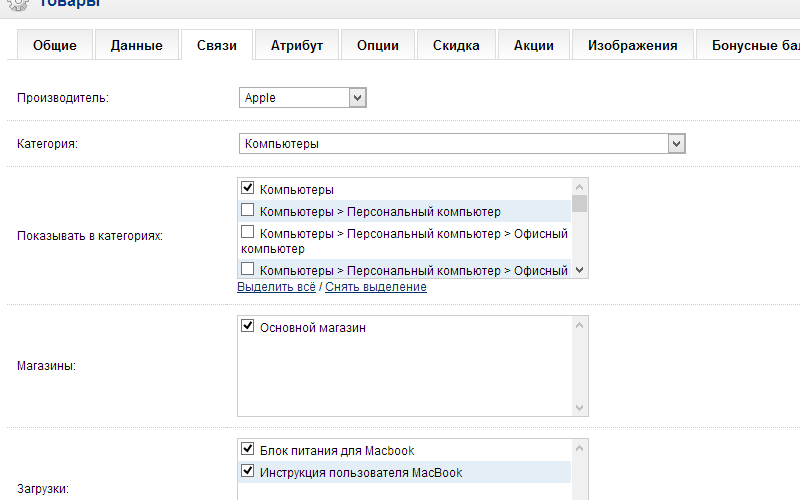
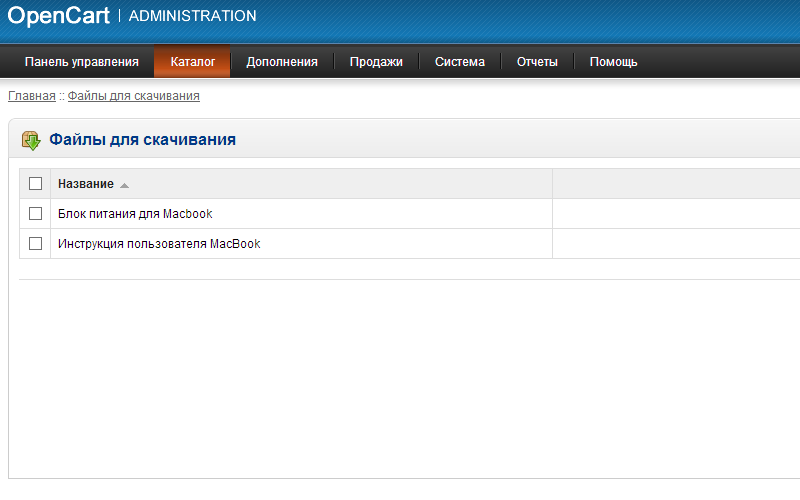
- Модуль расширяет-переделывает стандартный функционал загрузок файлов.
- Теперь можно к любому товару прикрепить файл, инструкция или картинку для скачки в карточке товара.
- Список файлов выводит на странице товара в табе перед отзывами.
- Ссылки файлов зашифрованы.
Особенности:
- МОДУЛЬ НЕ ЗАМЕНЯЕТ НИКАКИХ ФАЙЛОВ(vqmod);
- Загрузка файлов через админку =>Каталлог =>Загрузки, прикрепление файлов в карточке товара.
- Полная поддержка СЕО.
Совместимость:
- Модуль для версий 1.5.3.x, 1.5.4.x, 1.5.5.x, 1.5.6.x (Гарантия работы на стандартном шаблоне)(должен работать и на других схожиш по структуре темах).
- Браузеры: протестированно на всех популярных браузерах.
Установка (должен быть установлен VQMOD):
1. Скопировать файлы на сервер.
2. Готово, можно использовать.
Демо:
Лицензия
Запрещена передача данного ПО третьим лицам, распространение от своего имени без получения разрешения автора модуля.
Запрещается публикация, распространение модуля без согласия автора в любых целях, будь то ознакомительных или любых других.
Характеристики
Activation method Без активации
Ioncube LoaderНі
В продажеНе продается
OpenCart1.5.6.4, 1.5.6.3, 1.5.6.2, 1.5.6.1, 1.5.6, 1.5.4.1, 1.5.3.1
ocStore1.5.5.1.2, 1.5.5.1.1, 1.5.5.1, 1.5.4.1.2, 1.5.4.1.1, 1.5.4.1, 1.5.3.1, 1.5.2.1, 1.5.1.3
OpenCart.Pro, ocShopНесовместим
СкидкаNo
ВерсіяFREE
File Size5.97 kB
Submitted08/05/2014
Updated08/22/2017
-
Recently Browsing 0 members
- No registered users viewing this page.